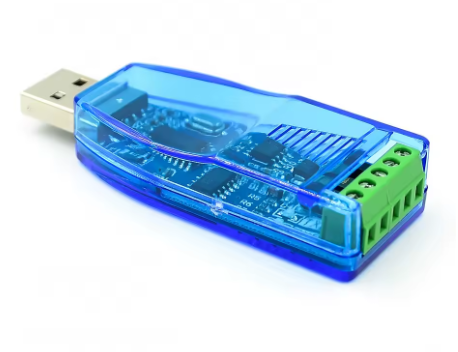
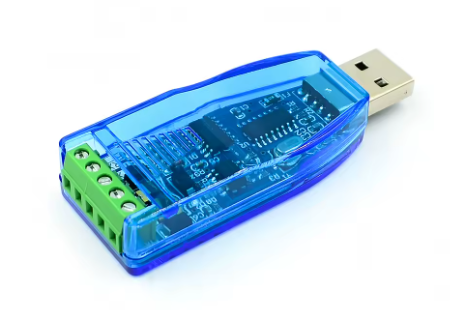
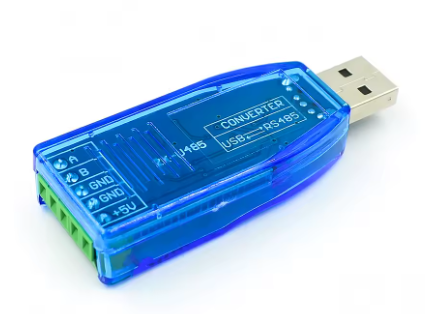
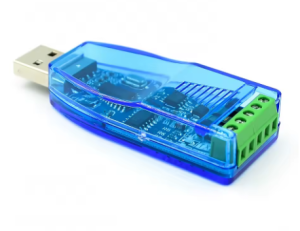
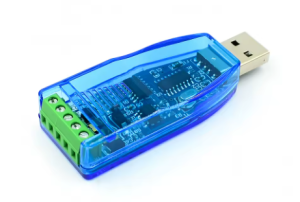
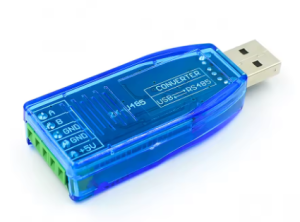
Industrial-grade USB to RS485+RS232 communication module two-way half-duplex serial cable converter TVS protection U485

SKU: FA2141-2
Chipset

CH340 / FTDI (varies by manufacturer)

Host Interface

USB 2.0 (compatible with USB 1.1/3.0)

Device Interface 1

RS485 (Half-Duplex, 2-wire)

Device Interface 2

RS232 (Full-Duplex)

Baud Rate (RS485)

300 bps – 921600 bps (up to 1.5-3Mbps on some models)

Maximum Transmission Distance (RS485)

1200 meters @ 9600 bps

Maximum Nodes (RS485)

Up to 32 devices per segment (16+ nodes recommended with repeater)

Termination Resistance

120Ω (optional, jumper or solder-pad selectable)

Protection Features

TVS, ESD protection, Surge protection (600W lightning), Self-recovery fuse, Protection diodes

Power Supply

5V DC (USB bus-powered)

Power Protection

200mA Self-recovery fuse

Operating Temperature

-15°C to +70°C (Industrial grade)

Storage Temperature

-40°C to +85°C

Humidity Range

5%RH – 95%RH (non-condensing)

Dimensions (Approx.)

70mm × 27mm × 13mm

Weight

Approx. 16g

Product Overview

The Industrial-grade USB to RS485+RS232 Communication Module is a versatile, high-reliability serial converter designed to bridge modern computers with legacy industrial equipment. Built with professional-grade protection circuits and supporting both RS485 and RS232 standards in a single device, this U485 module is the essential tool for engineers, technicians, and industrial automation professionals who require stable, long-distance data transmission in challenging environments .

By converting USB signals to both RS485 and RS232 protocols, this module eliminates the need for multiple adapters. Whether you’re programming PLCs, configuring Modbus networks, debugging embedded systems, or connecting to legacy serial equipment, this industrial-grade converter delivers the performance and durability required for demanding applications .

Unlike consumer-grade adapters that can fail in factory environments, this module features comprehensive industrial protection: TVS (瞬态电压抑制), ESD protection, surge suppression, and self-recovery fuses. These safeguards protect both the converter and your connected equipment against lightning-induced surges, electrostatic discharge, power fluctuations, and accidental short circuits .

Key Features

  • Dual Protocol Support: Integrates both RS485 and RS232 interfaces in a single module, offering maximum compatibility with PLCs, Modbus meters, sensors, VFDs, and legacy serial equipment

  • Industrial-Grade TVS (瞬态电压抑制) Protection: Built-in Transient Voltage Suppression circuits effectively absorb surge voltages and transient spikes, providing lightning and ESD protection that prevents equipment damage in harsh industrial environments

  • Hardware Auto Direction Control: Built-in automatic data flow direction control for RS485 eliminates the need for RTS/DTR handshake signals, ensuring seamless compatibility with existing communication software without driver modifications

  • Long-Distance RS485 Communication: Supports data transmission up to 1200 meters (at 9600 baud) using twisted-pair cable, ideal for factory floor and field wiring applications

  • High-Speed Data Transfer: Supports baud rates up to 921600 bps, enabling high-speed data logging, firmware updates, and real-time industrial control applications

  • Multiple Protection Circuits: Features TVS瞬态抑制, ESD protection, surge protection, self-recovery fuse, and protection diodes, ensuring stable operation and preventing damage from overcurrent, overvoltage, and electrostatic discharge

  • Multi-Device Networking Support: RS485 interface supports up to 32 nodes in a daisy-chain configuration (expandable with repeaters), enabling reliable point-to-multipoint industrial networks

  • Universal System Compatibility: Supports Windows (XP/7/8/10/11), Linux, macOS, and Android; plug-and-play with hot-swap support for all major operating systems

  • Visual Status Indicators: LED indicators for Power (PWR), Transmit (TXD), and Receive (RXD) provide real-time visual feedback of communication activity

  • Compact & Durable Design: Small form factor (approx. 70×27×13mm) with screw terminal connections, suitable for portable use or permanent installation in control cabinets

Technical Specifications

Parameter Operating Value
Chipset CH340 / FTDI (varies by manufacturer)
Host Interface USB 2.0 (compatible with USB 1.1/3.0)
Device Interface 1 RS485 (Half-Duplex, 2-wire)
Device Interface 2 RS232 (Full-Duplex)
Baud Rate (RS485) 300 bps – 921600 bps (up to 1.5-3Mbps on some models)
Maximum Transmission Distance (RS485) 1200 meters @ 9600 bps
Maximum Nodes (RS485) Up to 32 devices per segment (16+ nodes recommended with repeater)
Termination Resistance 120Ω (optional, jumper or solder-pad selectable)
Protection Features TVS瞬态抑制, ESD protection, Surge protection (600W lightning), Self-recovery fuse, Protection diodes
Power Supply 5V DC (USB bus-powered)
Power Protection 200mA Self-recovery fuse
Operating Temperature -15°C to +70°C (Industrial grade)
Storage Temperature -40°C to +85°C
Humidity Range 5%RH – 95%RH (non-condensing)
Dimensions (Approx.) 70mm × 27mm × 13mm
Weight Approx. 16g
Supported OS Windows (XP/7/8/10/11), Linux, macOS, Android, WinCE

Pinout & Connection Guide

RS485 Terminal Block (3-Pin)

Pin Label Function Direction
A / D+ / 485+ A Non-inverting data line (Positive) Bi-directional
B / D- / 485- B Inverting data line (Negative) Bi-directional
GND GND / SG Signal ground (optional but recommended for noise reduction) Reference

RS232 Terminal Block (or DB9 Connector)

Pin Signal Function Direction
2 RXD Receive Data Input
3 TXD Transmit Data Output
5 GND Ground Reference

Important: Pin numbering for DB9 connectors follows standard RS232 convention. Some modules may use terminal blocks with labeled pins (TXD, RXD, GND) instead of DB9 connectors.

LED Indicators

LED Color Function
PWR Red Power indicator; illuminates when USB power is detected
TXD Green/Red (varies) Transmit indicator; flashes when data is sent from USB to device
RXD Blue/Red (varies) Receive indicator; flashes when data is received from device to USB

Usage Guide

Driver Installation

Windows 10/11: Most modern Windows versions will automatically detect and install drivers for CH340/FTDI chips when the device is connected.

Windows 7/8/XP: Manual driver installation is required :

  1. Download the appropriate driver for your chip (CH340SER.exe for CH340, VCP drivers for FTDI)

  2. Disconnect the converter from USB

  3. Run the installer as Administrator

  4. Click “Install” and wait for completion

  5. Connect the converter – drivers will install automatically

Verification: Open Device Manager → Ports (COM & LPT). You should see a new “USB Serial Port” with a COM port number assigned .

RS485 Connection Rules

  • Connection: Connect A to A and B to B across all devices on the bus (straight-through connection)

  • Ground: For distances over 100m or in electrically noisy environments, connect the GND terminals to establish a common reference voltage

  • Termination: For long cables (>100m), place a 120Ω resistor between A and B at the two farthest ends of the cable

  • Cable Type: Use twisted-pair shielded cable (CAT5e or dedicated RS485 cable) for best noise immunity

Half-Duplex Operation Note

RS485 is a half-duplex protocol – the module can transmit and receive, but not simultaneously on the same pair of wires . The hardware auto-direction control handles this switching automatically, so no special code is required .

Testing the Converter

Perform a simple loopback test to verify the converter is working:

  1. Connect the A terminal to the B terminal using a short jumper wire

  2. Open a serial terminal program (e.g., Putty, Arduino Serial Monitor)

  3. Select the converter’s COM port, set baud rate to 9600, 8 data bits, 1 stop bit, no parity

  4. Type characters – they should be echoed back to the screen

Q: What is the difference between RS485 and RS232? Which one should I use?

RS485 uses differential signaling (A/B lines) and supports long-distance communication up to 1200 meters and multi-drop networks (up to 32 devices). RS232 is limited to ~15 meters and point-to-point connections only .

Q: Why does RS485 use "half-duplex" and what does that mean for me?

Half-duplex means the module can either transmit or receive at any given moment, but not both simultaneously . The hardware auto-direction control handles this switching automatically, so your software doesn’t need special handling—it works like a standard serial port .

Q: What protection features does this module offer?

The module includes comprehensive protection: TVS瞬态抑制 (suppresses voltage spikes), ESD protection (guards against electrostatic discharge), 600W surge/lightning protection, self-recovery fuse, and protection diodes . These prevent damage from power fluctuations, short circuits, and industrial electrical noise.

Q: How many RS485 devices can I connect to this converter?

RS485 supports up to 32 devices per segment in a daisy-chain configuration. For more than 16 devices, a repeater is recommended to maintain signal quality .

Q: What is the maximum transmission distance for RS485?

Up to 1200 meters (approximately 4000 feet) at 9600 baud rate . Higher baud rates support shorter distances; lower rates can achieve longer distances.

Q: Does this converter support Windows 11?

Yes. The module supports Windows 11, 10, 8.1, 8, 7, and XP, as well as Linux, macOS, and Android .

Q: Do I need termination resistors for my RS485 network?

Only if the converter is placed at the physical end of the RS485 cable . For long cables (>100 meters), place a 120Ω resistor between A and B at the two farthest ends of the cable.

Q: Why can't I see the device in Device Manager after connecting?

Common causes: Missing drivers, using a charge-only USB cable, or faulty USB port. Install the drivers first, then connect the converter using a known-good data cable .

Q: What is the baud rate range of this converter?

Supports baud rates from 300 bps up to 921600 bps. Some modules support up to 3Mbps .

Q: Can I use this converter for Modbus RTU communication?

Yes. This converter is ideal for Modbus RTU networks. It handles the physical layer (RS485), while Modbus protocol is handled by your software. The auto-direction control ensures seamless communication.