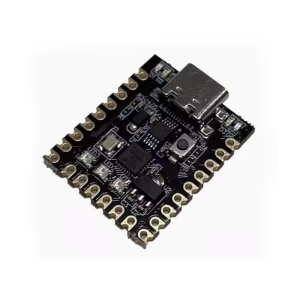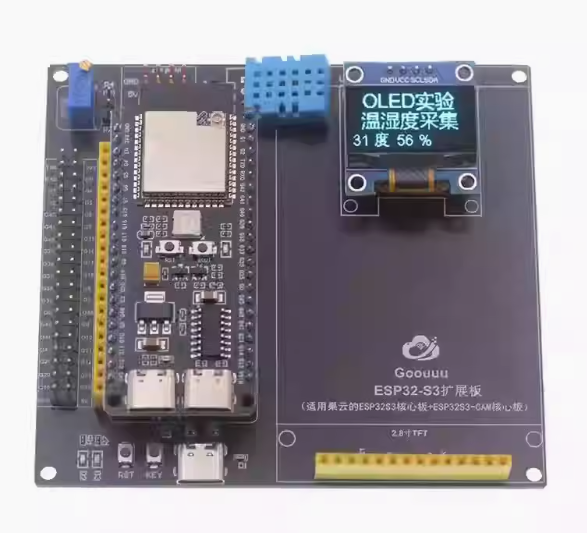
Goouuu ESP32-S3 development Board with Expansion Board and 0.96″ OLED Screen

SKU: FA1053-0-1-19
Core Module

ESP32-S3-WROOM-1 (N16R8)

Memory

16MB Flash / 8MB Octal PSRAM

Display

0.96-inch OLED (SSD1306, I2C Interface)

Expansion Board

42-pin breakout with DC Jack and mounting holes

Connectivity

2.4GHz Wi-Fi + Bluetooth 5.0 (LE/Mesh)

USB Ports

2× Type-C on S3 Module + 1× Type-C on Expansion

Logic Voltage

3.3V

Input Voltage

5V (USB) or 6.5V–12V (DC Jack)

This Goouuu ESP32-S3 Ultimate Development Kit is a professional-grade, all-in-one IoT prototyping station. It combines the raw power of the ESP32-S3-WROOM-1 (N16R8) with a dedicated Expansion Shield and a high-contrast 0.96″ OLED Display. Designed for 2025’s complex AIoT requirements, this kit provides a plug-and-play environment for both industrial engineers and advanced makers.

Product Description
The Goouuu ESP32-S3 Kit is engineered to eliminate the “rat’s nest” of jumper wires. At its heart is the ESP32-S3, featuring 16MB Flash and 8MB PSRAM, which provides the memory overhead needed for Edge AI, voice processing, and complex UI rendering.
The included Expansion Board acts as a power and I/O hub, breaking out the 42-pin module into accessible headers while providing stable power rails for peripherals. To complete the interface, the 0.96″ OLED screen (I2C) allows for real-time data visualization, debugging, and user interaction without needing a connection to a PC serial monitor. This kit is ideal for professional evaluation and rapid deployment of smart-home hubs or industrial sensor nodes.
Key Features
  • Integrated Visual Interface: The 0.96″ OLED (SSD1306) offers 128×64 resolution for displaying sensor data, Wi-Fi status, or QR codes.
  • Massive Memory (N16R8): 16MB Flash and 8MB Octal PSRAM handle high-end applications like MicroPython, CircuitPython, and AI models.
  • Industrial Power Hub: The expansion board supports multiple power inputs (Type-C, DC Jack) and provides high-current 3.3V/5V outputs for motors or bright displays.
  • Dual Type-C on S3: Separate ports for UART Debugging and Native USB OTG, allowing the device to act as a USB peripheral.
  • AI Acceleration: The Xtensa® LX7 dual-core processor includes vector instructions to speed up neural network inference.
  • No Soldering Required: Usually shipped with pre-soldered headers, allowing immediate connection between the S3 module, expansion board, and OLED.
Usage Scenarios
  • Business / B2B: Rapid prototyping of smart thermostats, industrial control panels with local displays, and secure IoT gateways.
  • Single User / Maker: Creating a “Desktop Dashboard” for cryptocurrency prices, smart home weather stations, or retro-style mini-games.
  • Education: A perfect kit for teaching “Full-Stack” IoT: from hardware wiring to cloud connectivity and UI/UX design on the OLED.
Q: Do I need to wire the OLED manually?

The OLED uses the I2C protocol (typically GND, VCC, SCL, SDA). If using the expansion board, you can use jumper wires to connect the OLED to the labeled I2C pins. Always check the pinout diagram included in your package.

Q: How do I display text on the OLED in Arduino?

You will need the Adafruit SSD1306 and Adafruit GFX libraries. In your code, initialize the display using the I2C address (usually 0x3C).

Q: Why does the expansion board have its own USB/DC port?

The ESP32-S3 module’s USB port is for data and low-power use. If you are connecting power-hungry sensors or many LEDs, the DC Jack on the expansion board provides a more stable, high-current power source to prevent the S3 from rebooting.

Q: Can I use this kit for voice recognition?

Yes. The S3 chip has built-in AI acceleration, and the 8MB PSRAM in this N16R8 version provides enough memory to run the Espressif ESP-Skainet offline voice assistant.

Q: Is the 0.96" OLED screen replaceable?

Yes, it is a standard 4-pin I2C OLED module. You can easily upgrade to a larger 1.3″ OLED or even a TFT color screen using the expansion board’s headers.

Q: Does it support 5V input from the DC Jack?

Most expansion boards require at least 6.5V to 7V at the DC Jack to allow the onboard regulator to provide a stable 5V and 3.3V output. For 5V, it is better to use the Type-C port.