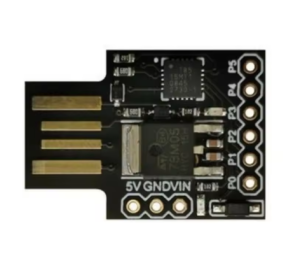
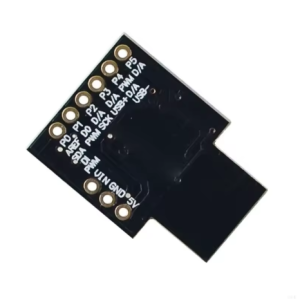
ATTINY85 Digispark Pro Board – QFN Chip Mini USB Development Tool for DIY Electronics

SKU: FA2010-2
Microcontroller

ATtiny167 (8-bit AVR RISC)

Operating Voltage

5V (regulated on board)

Input Voltage (VIN Pin)

5V – 16V DC

Input Voltage (External Regulator)

3.7V – 5V (e.g., single-cell LiPo)

Clock Speed

16 MHz (internal)

Flash Memory

16 KB (approx. 14 KB usable after bootloader)

SRAM

512 bytes

EEPROM

512 bytes

Digital I/O Pins

14 (shared functionality)

Analog Input Pins (ADC)

8 channels (10-bit)

PWM Pins

4 pins

Communication

Native USB, I2C, SPI, UART

USB Interface

Micro-USB port

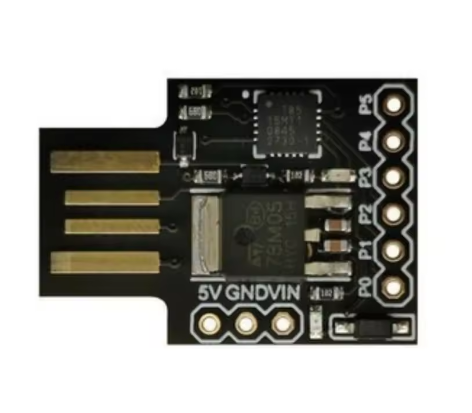
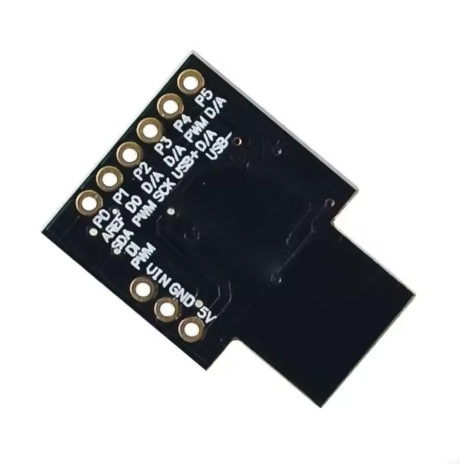
The ATTINY85 Digispark Pro Board is an advanced iteration of the popular ATtiny85 development platform, featuring an upgraded ATtiny167 microcontroller and a more versatile design. This compact QFN chip-based mini USB development tool offers enhanced capabilities, more memory, and improved connectivity options for both hobbyists and professional engineers developing sophisticated DIY electronics and prototypes.
Product Description
The ATTINY85 Digispark Pro Board elevates the capabilities of miniature microcontroller development. Moving beyond the original design, the “Pro” version often utilizes the more powerful ATtiny167 microcontroller, providing double the flash memory (16KB) and additional I/O pins within an incredibly small form factor, often integrating a convenient micro-USB connection instead of the direct plug-in style.
This board maintains the signature ease of use: it is fully programmable using the familiar Arduino IDE, leveraging a robust micronucleus bootloader that allows for simple drag-and-drop code uploads without requiring dedicated external hardware. Its primary appeal lies in its efficiency—offering powerful processing capabilities and ample memory for complex code while minimizing the board’s footprint. The onboard 5V boost regulator allows the board to be powered by a low 3.7V LiPo battery source, making it ideal for portable, wearable, and wireless applications where power management is crucial. With native USB communication capabilities, I2C, SPI, UART, and numerous general-purpose I/O pins, the Digispark Pro is a versatile tool for rapid prototyping of custom USB devices, smart sensors, and embedded systems.
Features
  • Upgraded Microcontroller: Utilizes the ATtiny167 (or similar variant) for enhanced performance and memory compared to the standard ATtiny85.
  • Arduino IDE Compatibility: Seamlessly integrates with the Arduino IDE (1.0+) for easy programming and driver installation.
  • Micro-USB Connectivity: Features a micro-USB port for convenient programming and power supply using standard cables.
  • Enhanced Memory: Offers 16KB of Flash Memory, 512 bytes of EEPROM, and 512 bytes of SRAM, providing more space for larger programs.
  • Flexible Power Input: Supports a wide voltage range (Input voltage on VIN pin: 5-16V; Onboard 5V boost regulator allows input from 3.7V, e.g., LiPo batteries).
  • Increased I/O: Provides 14 available I/O pins (some shared with USB and other functions), including analog inputs and PWM outputs.
  • Multiple Communication Protocols: Supports Native USB, I2C, SPI, and UART interfaces for diverse project requirements.
  • Compact QFN Form Factor: Ultra-small physical size suitable for highly integrated or space-constrained projects.
Usage
The ATTINY85 Digispark Pro Board is a versatile tool designed for advanced prototyping, educational purposes, and the development of specific commercial products where size and functionality are critical.
  • Custom USB Human Interface Devices (HIDs): Easily create custom keyboards, mouse jiggler tools, or specialty interface devices due to native USB support.
  • Wearable Technology & Portable Projects: The ability to run efficiently from a single LiPo battery makes it ideal for battery-powered, wearable, or remote sensor applications.
  • Complex Sensor Networks: With 8 ADC channels and various communication interfaces (UART, I2C, SPI), it can manage complex sensor arrays and network communications effectively.
  • Embedded Automation: Its small size allows it to be embedded discreetly into existing systems for automation, logging, or control tasks.
  • Rapid Prototyping: A cost-effective platform for quickly testing concepts before committing to custom PCB designs in a business environment
Q: What is the main difference between the standard Digispark and the Digispark Pro?

The Pro version typically uses the ATtiny167 chip which offers more flash memory (16KB vs 8KB), more I/O pins (14 vs 6), and usually a more reliable micro-USB port compared to the original board’s direct plug-in design.

Q: Is it difficult to set up in the Arduino IDE?

Setup is straightforward. You need to add a specific board manager URL to your Arduino IDE preferences, select the “Digispark Pro” board from the tools menu, and install the necessary drivers for your operating system

Q: Can I power this board with a 9V battery?

Yes, you can connect a 9V battery to the VIN pin. The onboard voltage regulator will safely step the voltage down to 5V for the microcontroller.

Q: How do I upload code to the board?

After installing the drivers and board support in the Arduino IDE, you simply click upload, wait for the IDE prompt, and then plug the board into your computer’s micro-USB port within 60 seconds. The bootloader handles the rest automatically

Q: Can I use standard Arduino shields with this board?

No, due to its miniature size and different pin configurations/voltage requirements, standard Arduino shields are not directly compatible. You will need to wire individual components on a breadboard or custom PCB