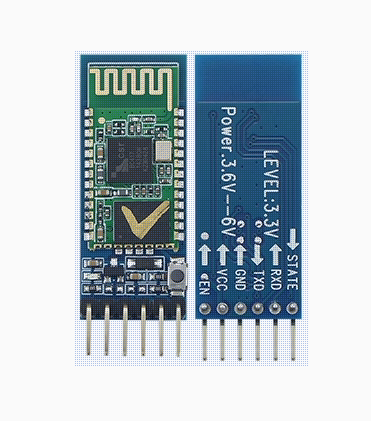
HC-05 6pin BT Bluetooth Module with Button (Compatible versions Type-B )

SKU: FA2039-1-0
Bluetooth Protocol

Bluetooth V2.0 + EDR

Operating Voltage

3.6V – 6.0V DC

Operating Current

30mA (Pairing); 8mA (Communication)

Logic Level

3.3V (VCC is 5V compatible; RX requires 3.3V logic)

Frequency Band

2.4GHz ISM Band

Modulation

GFSK (Gaussian Frequency Shift Keying)

Default Baud Rate

9600 (Data) / 38400 (AT Command Mode)

Default Pairing PIN

1234 or 0000

Transmission Range

Approx. 10 Meters (Class 2)

Sensitivity

≤-84dBm at 0.1% BER

Product Description
The HC-05 (Compatible Type-B) is a highly versatile Bluetooth 2.0+EDR (Enhanced Data Rate) module designed for seamless wireless serial communication. While many entry-level modules are limited to “Slave” mode, the HC-05 is a Master/Slave dual-role module. This allows it to either wait for a connection (Slave) or actively search for and connect to other Bluetooth devices (Master), such as another HC-05 module or a Bluetooth-enabled sensor.
The Type-B Compatible version is specifically designed for high stability across various third-party microcontrollers. It features an integrated onboard button that simplifies the process of entering AT Command Mode. By holding the button during power-up, users can easily modify internal settings like the device name, pairing PIN, and baud rate. Mounted on a professional 6-pin breakout board with an onboard 3.3V regulator, it is “plug-and-play” ready for 5V systems like Arduino, providing a robust wireless bridge for any serial data.
Key Features
  • Master/Slave Switchable: Configurable via software commands to act as a central controller or a peripheral device.
  • Onboard Configuration Button: A physical tactile switch allows for quick entry into “Command Mode” for easy setup without complex wiring.
  • Transparent Serial Bridge: Functions as a “wireless cable”; once a connection is established, data sent to the RX pin is instantly transmitted to the paired device.
  • Broad Compatibility: Designed to work reliably with Arduino, Raspberry Pi, PIC, STM32, and PC-based serial terminals.
  • Integrated Level Shifting Support: The baseboard includes a power regulator supporting 3.6V to 6V input for flexible powering options.
  • Status LED Indicator: Built-in LED provides instant feedback: fast flashing (searching), slow flashing (AT mode), and double-flashing (paired).
Usage Scenarios
  • Individual & Hobbyist: Wireless smartphone control for DIY robotics, remote weather station monitoring, and cable-free Arduino programming.
  • Business & Commercial: Wireless debugging for industrial machinery, point-of-sale (POS) terminal connectivity, wireless PLC-to-PLC communication, and inventory tracking systems.
Q: How do I know if my module is in AT Command Mode?
When you hold the button and power the module, the onboard LED will flash slowly (roughly once every 2 seconds). This indicates it is ready for configuration. In normal data mode, the LED flashes much faster.
Q: Can I use this module with an iPhone?

No. The HC-05 uses Bluetooth Classic (2.0), which is not supported by iOS for serial data. For Apple products, please look for BLE 4.0 modules (like the HM-10). It is fully compatible with Android, Windows, and Linux.

Q: Does this module remember my settings after power-off?
Yes. Any changes made via AT commands (Name, PIN, Baud Rate, Role) are saved in the onboard non-volatile Flash memory and will remain even after the power is disconnected.
Q: Can I connect two HC-05 modules together without a phone?

Yes. Set one module as “Master” and the other as “Slave” using AT commands. If they share the same pairing PIN, they will automatically find and lock onto each other when powered up.

Q: Why does the module connect to my PC but won't send data?

Ensure your Serial Monitor is set to the correct Baud Rate (default is 9600). Also, check your wiring: the TX of the module must go to the RX of your controller, and RX to TX.

Q: Is it safe to connect the RX pin directly to a 5V Arduino?
While the module is powered by 5V, the data pins are 3.3V. For the best long-term reliability, use a simple voltage divider (a 1kΩ and 2kΩ resistor) on the RX line of the HC-05 to step down the 5V signal from the Arduino.