Product Overview
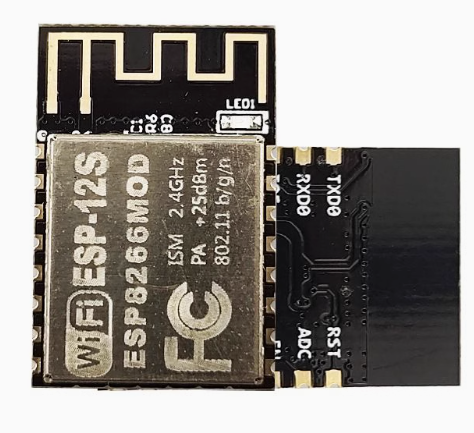
The ESP-12S WiFi Module is a high-performance, compact wireless communication module designed for modern IoT and embedded systems. Manufactured by Ai-Thinker, a trusted leader in IoT modules, the ESP-12S is built around the revolutionary ESP8266EX chip from Espressif Systems —a complete Wi-Fi SoC (System on Chip) that integrates a 32-bit microcontroller, Wi-Fi radio, and TCP/IP protocol stack into a compact 24mm × 16mm SMD package .
As an enhanced version within the ESP-12 series, the ESP-12S features improved PCB layout and optimized antenna design, delivering superior wireless stability, extended range, and better signal-to-noise ratio compared to earlier models . It offers up to 13 usable GPIO pins (including 5 dual-function pins) and a 10-bit ADC input, providing the I/O flexibility needed for complex projects without requiring external I/O expanders . With 4MB (32Mbit) of flash memory, it provides ample storage for firmware, web interfaces, and OTA (Over-The-Air) updates.
The module supports 802.11 b/g/n Wi-Fi protocols and can operate in Station (STA), Access Point (AP), or Station+AP modes, giving you the flexibility to connect to existing networks or create your own. Whether you’re building smart home devices, industrial sensors, wearable electronics, or commercial IoT products, the ESP-12S delivers the processing power, I/O flexibility, and wireless reliability your project demands.
Key Features
-
Enhanced RF Performance: Features improved PCB layout and optimized antenna design compared to earlier ESP-12 models, delivering superior wireless stability, extended range, and better signal-to-noise ratio .
-
Powerful 32-bit Processor: Built around the Tensilica L106 32-bit RISC processor running at up to 160 MHz, providing ample processing power for complex IoT applications without requiring an external microcontroller .
-
Rich I/O Capabilities: Provides up to 13 usable GPIO pins (including 5 dual-function pins) with support for UART, SPI, I2C, I2S, PWM, and 10-bit ADC interfaces, allowing connection to a wide variety of sensors, actuators, and display devices .
-
4MB Flash Memory: Equipped with 4MB (32Mbit) of flash memory , providing abundant storage for firmware, web interfaces, and OTA (Over-The-Air) firmware updates.
-
Complete Wi-Fi Solution: Supports 802.11 b/g/n protocols with integrated TR switch, balun, LNA, power amplifier, and matching network . Delivers up to +20dBm output power with excellent receiver sensitivity .
-
Multiple Operating Modes: Supports Station (STA), Access Point (AP), and Station+AP modes, enabling devices to connect to existing networks or create their own.
-
Integrated TCP/IP Stack: Features an embedded LWIP protocol stack with support for TCP, UDP, HTTP, FTP protocols, enabling seamless internet connectivity .
-
Ultra-Low Power Consumption: Features multiple sleep modes with deep sleep current as low as 10µA and standby power consumption less than 1.0mW (DTIM3) . Wake up and transmit packets in less than 2ms, making it ideal for battery-powered applications .
-
Smart Configuration Support: Compatible with Smart Config and AirKiss one-click network configuration technologies, simplifying device onboarding for Android and iOS devices .
-
Industrial Temperature Range: Rated for operation from -40°C to +125°C, making it suitable for demanding industrial environments and outdoor installations .
-
SMD Package for Automated Assembly: The SMD-16 package (half-hole pads) is designed for automated surface-mount assembly, making it suitable for large-scale production while remaining accessible for hand soldering .
-
Comprehensive Security: Supports WPA/WPA2 security protocols, ensuring secure wireless communication .
Technical Specifications
Pinout & Interface Guide
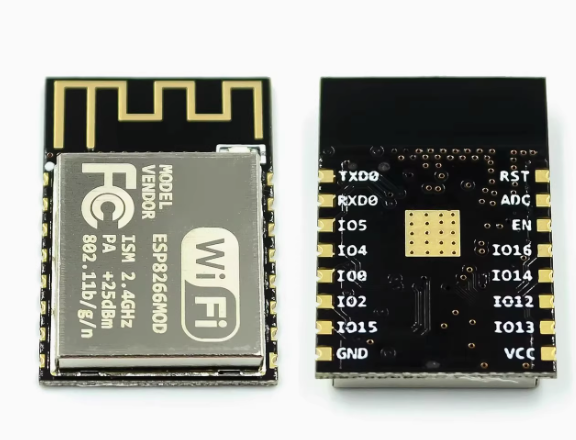
The ESP-12S features a 16-pin SMD package with half-hole pads for easy soldering. Pin configuration is similar to other ESP-12 series modules with improved layout.
*Note: The ESP-12S uses a 22-pin layout with 16 functional pins. Pins 11-12 (GPIO9, GPIO10) are used for internal flash communication and should be used with caution .*
Important Boot Mode Configuration
The ESP-12S’s boot mode is determined by the state of GPIO0, GPIO2, and GPIO15 :
Critical Notes:
-
GPIO15 must be pulled LOW during boot for both modes
-
GPIO2 must be pulled HIGH during boot
-
GPIO0 must be LOW to enter programming mode, HIGH for normal operation
-
GPIO9 and GPIO10 are used for internal flash communication—using them as general-purpose I/O can cause system instability
Usage Guide
Power Supply Requirements
The ESP-12S requires a stable 3.3V DC power supply capable of providing at least 300mA during peak operation . For reliable operation:
-
Use a low-dropout regulator (LDO) such as AMS1117-3.3 or LM1117-3.3
-
Add a 10µF to 100µF electrolytic capacitor and a 0.1µF ceramic capacitor close to the VCC pin for power decoupling
-
Do not apply 5V to any pin—this will permanently damage the module
Programming the ESP-12S
Method 1: Using a USB-to-TTL Adapter
This is the simplest method for programming the module:
Enter Programming Mode:
-
Connect GPIO0 (pin 18) to GND
-
Connect GPIO15 (pin 16) to GND
-
Connect GPIO2 (pin 17) to VCC (pull HIGH)
-
Connect EN (pin 3) to VCC (pull HIGH)
-
Apply power or pulse RST LOW
-
Upload firmware via Arduino IDE or esptool
-
After upload, disconnect GPIO0 from GND and reset
Setting Up Arduino IDE for ESP-12S
-
Install ESP8266 Board Package:
-
Open Arduino IDE → File → Preferences
-
Add to “Additional Boards Manager URLs”: https://arduino.esp8266.com/stable/package_esp8266com_index.json
-
Tools → Board → Boards Manager → Search “esp8266” → Install
-
Select Board:
-
Configure Flash Settings:
Basic Arduino Example Code
#include <ESP8266WiFi.h>
const char* ssid = "your_SSID";
const char* password = "your_PASSWORD";
void setup() {
Serial.begin(115200);
Serial.println("\nESP-12S Wi-Fi Test");
WiFi.begin(ssid, password);
Serial.print("Connecting to Wi-Fi");
while (WiFi.status() != WL_CONNECTED) {
delay(500);
Serial.print(".");
}
Serial.println("\nConnected successfully!");
Serial.print("IP Address: ");
Serial.println(WiFi.localIP());
}
void loop() {
}
AT Command Example
With the default AT firmware, the ESP-12S can be controlled via simple serial commands:
AT                    // Check communication
AT+GMR                // Check firmware version
AT+CWMODE=1           // Set to Station mode
AT+CWJAP="SSID","PASSWORD"  // Connect to Wi-Fi
AT+CIFSR              // Get IP address
AT+CIPSTART="TCP","192.168.1.100",80  // Open TCP connection
AT+CIPSEND=5          // Send data
> HELLO                // Data to send
Development Environments
-
Arduino IDE: User-friendly environment with extensive libraries
-
PlatformIO: Professional development environment with ESP8266 support
-
ESP-IDF: Official Espressif development framework for advanced users
-
MicroPython: Python-based development for rapid prototyping
-
NodeMCU: Lua-based firmware for quick project development
Typical Applications
The ESP-12S is widely used in:
-
Smart Home: Lighting control, smart plugs, thermostats
-
Environmental Monitoring: Temperature, humidity, air quality sensors
-
Industrial Automation: Equipment monitoring, data collection
-
Wearable Electronics: Health monitoring devices
-
Wireless Positioning Systems: Location tracking applications
Q: What is the difference between ESP-12S and ESP-12E?
The ESP-12S is an enhanced version of the ESP-12E with several improvements:
-
Improved RF performance: Better PCB layout and optimized antenna design for superior wireless stability and extended range
-
Pin compatibility: Fully pin-compatible with ESP-12E, making it a drop-in replacement
-
Better signal-to-noise ratio: Enhanced sensitivity and reduced interference
Q: What is the difference between ESP-12S and ESP-01?
The ESP-12S is a more advanced module with significant advantages:
-
More GPIO pins: Up to 13 usable I/O pins vs. 2 on the ESP-01
-
More flash memory: 4MB vs. 1MB on the ESP-01
-
Better RF performance: Higher output power and sensitivity
-
SMD package: Designed for automated assembly
-
Industrial temperature range: -40°C to +125°C
Q: Can the ESP-12S operate as a standalone microcontroller?
Yes. The ESP8266EX chip includes a 32-bit processor capable of running application code directly. You can program it with Arduino, MicroPython, or the ESP8266 SDK without requiring an external microcontroller
Q: How many GPIO pins are available on the ESP-12S?
The ESP-12S provides access to up to 13 usable GPIO pins (including 5 dual-function pins) . GPIO9 and GPIO10 are reserved for internal flash communication and should be used with caution
Q: What is the maximum range of the ESP-12S's Wi-Fi connection?
Thanks to its enhanced RF design, the ESP-12S achieves excellent range:
-
Open space: Up to 300-400 meters (depending on antenna and environment)
-
Indoor (walls, obstacles): Typically 30-80 meters
Q: Does the ESP-12S support Bluetooth?
No. The ESP8266 series is Wi-Fi only. For Bluetooth capability, consider the ESP32 series.
Q: What voltage does the ESP-12S require?
The ESP-12S requires a stable 3.3V DC power supply. The operating range is 3.0V to 3.6V . Never apply 5V to the VCC pin or any GPIO pin—this will destroy the module
Q: How much current does the ESP-12S draw?
Current consumption varies by operating mode:
Q: Can I power the ESP-12S with batteries?
Yes. The ESP-12S’s low power consumption makes it suitable for battery-powered applications. A single 18650 lithium-ion cell (3.7V) can be used with a 3.3V LDO regulator . With proper deep sleep management, battery life of months is achievable.
Q: Why does my ESP-12S not boot?
Common boot issues include:
-
GPIO15 not pulled LOW during boot
-
GPIO0 pulled LOW (this enters programming mode)
-
GPIO2 not pulled HIGH during boot
-
EN/CH_PD not connected to VCC
-
Insufficient power supply (current sag during startup)
Q: How do I put the ESP-12S into programming mode?
To enter programming (UART download) mode :
-
Pull GPIO0 LOW (connect to GND)
-
Pull GPIO15 LOW (connect to GND)
-
Pull GPIO2 HIGH (connect to VCC)
-
Pull EN HIGH (connect to VCC)
-
Apply power or pulse RST LOW
Q: Why can't I upload code to my ESP-12S?
Common upload issues:
-
GPIO0 not held LOW during power-on/reset
-
Incorrect serial connections (TX to RX, RX to TX)
-
Insufficient power supply (USB-to-TTL adapters may not provide enough current)
-
Wrong board selection in Arduino IDE (select “Generic ESP8266 Module”)
-
Missing pull-down on GPIO15
Q: What is the baud rate for programming?
The ESP-12S communicates at 115200 baud for programming by default, though the bootloader outputs diagnostic information at 74880 baud. For reliable programming, use 115200 baud.
Q: Can I use the ESP-12S with Arduino IDE?
Yes. Install the ESP8266 board package via Boards Manager, then select “Generic ESP8266 Module” as the board. Configure the flash size (4MB) and upload speed appropriately
Q: What is the difference between deep sleep and normal operation?
Deep sleep is an ultra-low power mode that shuts down most of the module’s functions, reducing current consumption to <10µA . The module can wake up and transmit packets in less than 2ms, making it ideal for battery-powered applications that only need to transmit data intermittently
Q: What can I build with the ESP-12S?
Popular applications include :
-
Smart home devices and automation systems
-
Environmental monitoring stations (temperature, humidity, etc.)
-
Industrial wireless sensors and equipment monitoring
-
Wearable electronics and health monitors
-
Wireless positioning and location tracking systems
-
Remote data logging and telemetry
-
Commercial IoT products
Q: Is the ESP-12S suitable for commercial products?
Yes. The ESP-12S’s SMD package is designed for automated assembly, and its industrial temperature rating makes it suitable for commercial and industrial products. Many commercial IoT devices are built using this module
Q: What firmware options are available?
Popular firmware choices include :
-
AT Command Firmware: Default firmware for co-processor mode
-
NodeMCU (Lua): Open-source Lua-based firmware for easy programming
-
MicroPython: Python-based development for rapid prototyping
-
Arduino/C++: Custom code via Arduino IDE
-
ESP-IDF: Official Espressif development framework
Q: Does the ESP-12S support OTA (Over-The-Air) updates?
Yes. The 4MB flash memory supports OTA firmware updates, allowing you to upload new code wirelessly without physically connecting to the module