Product Overview
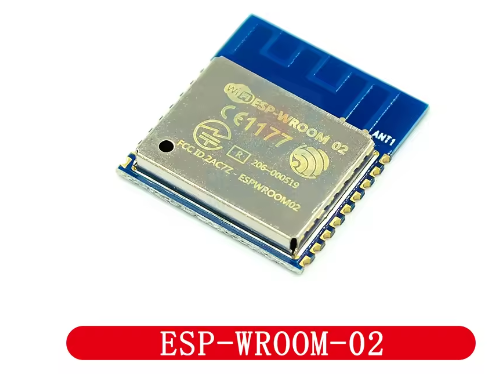
The ESP-WROOM-02 is a highly integrated, certified Wi-Fi module developed by Espressif Systems, the original creator of the ESP8266 ecosystem. This module represents the official, production-ready implementation of the ESP8266EX chip, offering reliable RF performance, comprehensive certifications, and a compact form factor that is ideal for both prototyping and mass production.
At its heart lies the ESP8266EX chip—a 32-bit Tensilica L106 RISC processor running at up to 160 MHz, with 2MB (16Mbit) of SPI flash memory integrated into the module. This provides ample storage for firmware, web interfaces, and OTA (Over-The-Air) updates. The module supports 802.11 b/g/n Wi-Fi protocols at 2.4 GHz, with a built-in PCB antenna that delivers up to +19.5 dBm output power and excellent receiver sensitivity down to -98 dBm.
Unlike many third-party ESP8266 modules, the ESP-WROOM-02 is designed and manufactured by Espressif, ensuring full compliance with RF certifications including FCC, CE, and Wi-Fi Alliance, making it the ideal choice for commercial products requiring regulatory approval. It comes preloaded with AT command firmware, allowing you to add Wi-Fi connectivity to any microcontroller using simple serial commands, or you can reprogram it as a standalone IoT processor using the Arduino IDE, MicroPython, or ESP-IDF.
Whether you are building smart home devices, industrial sensors, wireless data loggers, or consumer electronics, the ESP-WROOM-02 delivers the reliability, performance, and certification readiness your project demands.
Key Features
-
Official Espressif Module: Designed and manufactured by Espressif Systems, the creators of the ESP8266, ensuring the highest quality and reliable RF performance.
-
Integrated 32-bit Processor: Powered by the Tensilica L106 32-bit RISC processor running at up to 160 MHz, capable of running application code independently without an external microcontroller.
-
2MB Flash Memory: Equipped with 2 MB (16 Mbit) of SPI flash memory, providing sufficient storage for firmware, web interfaces, and OTA (Over-The-Air) firmware updates.
-
Complete Wi-Fi Solution: Supports 802.11 b/g/n protocols at 2.4 GHz with integrated PCB antenna (2 dBi gain). Delivers up to +19.5 dBm output power with receiver sensitivity down to -98 dBm.
-
Preloaded AT Command Firmware: Ships with industrial-grade AT firmware that allows control via simple serial commands, enabling rapid integration with any microcontroller.
-
Multiple Operating Modes: Supports Station (STA), SoftAP (Access Point), and SoftAP + STA modes, enabling devices to connect to existing networks or create their own.
-
Rich Peripheral Interfaces: Provides UART, HSPI, I2C, I2S, IR Remote Control, PWM, and 10-bit ADC interfaces, allowing connection to a wide variety of sensors, actuators, and display devices.
-
Ultra-Low Power Consumption: Features multiple sleep modes with deep sleep current as low as 20 µA and standby power consumption less than 1.0 mW (DTIM3), making it ideal for battery-powered applications.
-
Global Regulatory Certifications: Certified with FCC, CE, Wi-Fi Alliance, RoHS, and REACH, simplifying the certification process for commercial products.
-
Wide Operating Temperature: Rated for operation from -40°C to +85°C, suitable for demanding industrial environments and outdoor installations.
-
Compact SMD Package: Measures just 18.0mm × 20.0mm × 2.8mm with 18 castellated pins, designed for automated surface-mount assembly.
-
Upgradable Firmware: Supports local serial flashing, OTA (Over-The-Air) updates, and host download for flexible firmware management.
Technical Specifications
Pinout & Interface Guide
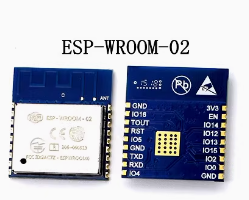
The ESP-WROOM-02 features 18 castellated pins for easy soldering to a PCB or connection via a development board.
Boot Mode Configuration
The module’s boot mode is determined by the state of GPIO0, GPIO2, and GPIO15:
Critical Notes:
-
GPIO15 must be pulled LOW during boot for both modes
-
GPIO2 must be pulled HIGH during boot
-
GPIO0 must be LOW to enter programming mode, HIGH for normal operation
Usage Guide
Power Supply Requirements
The ESP-WROOM-02 requires a stable 3.3V DC power supply capable of providing at least 500mA during peak operation. For reliable operation:
-
Use a low-dropout regulator (LDO) such as AMS1117-3.3 or LM1117-3.3
-
Add a 10µF to 100µF electrolytic capacitor and a 0.1µF ceramic capacitor close to the VCC pin for power decoupling
-
Do not apply 5V to any pin—this will permanently damage the module
Programming the ESP-WROOM-02
Method 1: Using a USB-to-TTL Adapter
This is the simplest method for programming the module:
Enter Programming Mode:
-
Connect GPIO0 (pin 10) to GND
-
Connect GPIO15 (pin 13) to GND
-
Connect GPIO2 (pin 12) to VCC (pull HIGH)
-
Connect EN (pin 17) to VCC (pull HIGH)
-
Apply power or pulse RST LOW
-
Upload firmware via Arduino IDE or esptool
-
After upload, disconnect GPIO0 from GND and reset
Setting Up Arduino IDE for ESP-WROOM-02
-
Install ESP8266 Board Package:
-
Open Arduino IDE → File → Preferences
-
Add to “Additional Boards Manager URLs”: https://arduino.esp8266.com/stable/package_esp8266com_index.json
-
Tools → Board → Boards Manager → Search “esp8266” → Install
-
Select Board:
-
Configure Flash Settings:
-
Flash Size: 2MB (16Mbit)
-
Upload Speed: 115200 (or 921600 for faster uploads)
-
CPU Frequency: 80 MHz (or 160 MHz for higher performance)
-
Flash Mode: DOUT (compatible)
Basic AT Command Example
With the default AT firmware, the ESP-WROOM-02 can be controlled via simple serial commands at 115200 baud:
AT                    // Check communication
AT+GMR                // Check firmware version
AT+CWMODE=1           // Set to Station mode
AT+CWJAP="SSID","PASSWORD"  // Connect to Wi-Fi
AT+CIFSR              // Get IP address
AT+CIPSTART="TCP","192.168.1.100",8080  // Open TCP connection
AT+CIPSEND=5          // Send data
> HELLO                // Data to send
Updating AT Firmware
If your module has an older firmware version, you can update it over Wi-Fi using the AT+CIUPDATE command:
// Check current version
AT+GMR

// Connect to Wi-Fi
AT+CWMODE=1
AT+CWJAP="SSID","PASSWORD"

// Start firmware update
AT+CIUPDATE
// Wait several minutes for completion
// Module will automatically restart

// Verify update
AT+GMR
Basic Arduino Example Code
#include <ESP8266WiFi.h>
const char* ssid = "your_SSID";
const char* password = "your_PASSWORD";
void setup() {
Serial.begin(115200);
Serial.println("\nESP-WROOM-02 Wi-Fi Test");
WiFi.begin(ssid, password);
Serial.print("Connecting to Wi-Fi");
while (WiFi.status() != WL_CONNECTED) {
delay(500);
Serial.print(".");
}
Serial.println("\nConnected successfully!");
Serial.print("IP Address: ");
Serial.println(WiFi.localIP());
}
void loop() {
}
Using WiFiEspAT Library
For easy integration with Arduino, the WiFiEspAT library allows you to control the module using Arduino-style Wi-Fi commands:
#include <WiFiEspAT.h>
#define RX_PIN 16
#define TX_PIN 17
#define AT_BAUD_RATE 115200
const char* ssid = "your_SSID";
const char* password = "your_PASSWORD";
void setup() {
Serial.begin(115200);
Serial1.setRX(RX_PIN);
Serial1.setTX(TX_PIN);
Serial1.begin(AT_BAUD_RATE);
WiFi.init(Serial1);
WiFi.begin(ssid, password);
while (WiFi.status() != WL_CONNECTED) {
delay(1000);
}
Serial.println("Connected to Wi-Fi");
Serial.print("IP: ");
Serial.println(WiFi.localIP());
}
Development Environments
-
Arduino IDE: User-friendly environment with extensive libraries
-
PlatformIO: Professional development environment with ESP8266 support
-
ESP-IDF: Official Espressif development framework for advanced users
-
MicroPython: Python-based development for rapid prototyping
-
NodeMCU (Lua): Lua-based firmware for quick project development
Q: What is the difference between ESP-WROOM-02 and third-party ESP8266 modules like ESP-01 or ESP-12?
The ESP-WROOM-02 is the official Espressif module, designed and manufactured by the creators of the ESP8266 chip. Key differences:
-
Quality assurance: Rigorous testing and certification by Espressif
-
Global certifications: FCC, CE, Wi-Fi Alliance, RoHS, REACH certified
-
Consistent performance: Optimized RF design for reliable wireless performance
-
Support: Official documentation and support from Espressif
Q: Can the ESP-WROOM-02 operate as a standalone microcontroller?
Yes. The ESP8266EX chip includes a 32-bit processor capable of running application code directly. You can program it with Arduino, MicroPython, or the ESP8266 SDK without requiring an external microcontroller
Q: How much flash memory does the ESP-WROOM-02 have?
The module is equipped with 2 MB (16 Mbit) of SPI flash memory. This is sufficient for most IoT applications, web interfaces, and OTA (Over-The-Air) updates.
Q: What is the maximum range of the Wi-Fi connection?
With its PCB antenna (2 dBi gain), the ESP-WROOM-02 achieves ranges of up to 100-200 meters in open space. In practical indoor applications with walls and obstacles, the range is typically 30-50 meters.
Q: Does the ESP-WROOM-02 support Bluetooth?
No. The ESP8266 series is Wi-Fi only. For Bluetooth capability, consider the ESP32 series modules like ESP32-WROOM-32.
Q: What voltage does the ESP-WROOM-02 require?
The module requires a stable 3.3V DC power supply with an operating range of 2.7V to 3.6V. Never apply 5V to the VCC pin or any GPIO pin—this will permanently damage the module.
Q: How much current does the ESP-WROOM-02 draw?
Current consumption varies by operating mode:
Q: Can I power the ESP-WROOM-02 with batteries?
Yes. The module’s low deep sleep current (20µA) makes it suitable for battery-powered applications. A single 18650 lithium-ion cell (3.7V) can be used with a 3.3V LDO regulator. With proper deep sleep management, battery life of months is achievable.
Q: Why does my ESP-WROOM-02 not boot?
Common boot issues include:
-
GPIO15 not pulled LOW during boot
-
GPIO0 pulled LOW (this enters programming mode)
-
GPIO2 not pulled HIGH during boot
-
EN/CH_PD not connected to VCC
-
Insufficient power supply (current sag during startup)
Q: How do I put the ESP-WROOM-02 into programming mode?
To enter programming (UART download) mode:
-
Pull GPIO0 LOW (connect to GND)
-
Pull GPIO15 LOW (connect to GND)
-
Pull GPIO2 HIGH (connect to VCC)
-
Pull EN HIGH (connect to VCC)
-
Apply power or pulse RST LOW
Q: Why can't I upload code to my ESP-WROOM-02?
Common upload issues:
-
GPIO0 not held LOW during power-on/reset
-
Incorrect serial connections (TX to RX, RX to TX)
-
Insufficient power supply (USB-to-TTL adapters may not provide enough current)
-
Wrong board selection in Arduino IDE (select “Generic ESP8266 Module”)
-
Missing pull-down on GPIO15
Q: What is the default baud rate for AT commands?
The default baud rate is 115200 bps. The bootloader outputs diagnostic information at 74880 baud during startup.
Q: How do I update the AT firmware?
You can update the AT firmware over Wi-Fi using the AT+CIUPDATE command:
-
Connect to a Wi-Fi network with AT+CWJAP
-
Send AT+CIUPDATE
-
Wait several minutes for the update to complete
-
The module will restart automatically
Q: Can I use the ESP-WROOM-02 with Arduino IDE?
Yes. Install the ESP8266 board package via Boards Manager, then select “Generic ESP8266 Module” as the board. Configure the flash size (2MB) and upload speed appropriately.
Q: What can I build with the ESP-WROOM-02?
Popular applications include:
-
Smart home devices: Lighting control, smart plugs, thermostats, window/door sensors
-
Environmental monitoring: Temperature, humidity, air quality stations
-
Industrial wireless sensors: Equipment monitoring, predictive maintenance
-
Weather stations: Remote data logging and monitoring
-
Wireless data acquisition: Replacing cables with wireless links
-
Consumer electronics: Adding Wi-Fi connectivity to existing products
Q: Is the ESP-WROOM-02 suitable for commercial products?
Yes. The ESP-WROOM-02 is certified with FCC, CE, Wi-Fi Alliance, RoHS, and REACH. This makes it ideal for commercial products requiring regulatory approval, significantly reducing certification costs and time.
Q: Is the ESP-WROOM-02 still recommended for new designs?
Important: Espressif has designated the ESP-WROOM-02 as “Not Recommended for New Designs” (NRND) as of 2025. For new projects, consider the successor models like ESP8684-WROOM-02C (ESP32-C3 based) which offer improved performance and Bluetooth capability.
Q: What firmware options are available?
Popular firmware choices include:
-
AT Command Firmware: Default firmware for co-processor mode
-
NodeMCU (Lua): Open-source Lua-based firmware for easy programming
-
MicroPython: Python-based development for rapid prototyping
-
Arduino/C++: Custom code via Arduino IDE
-
ESP-IDF: Official Espressif development framework