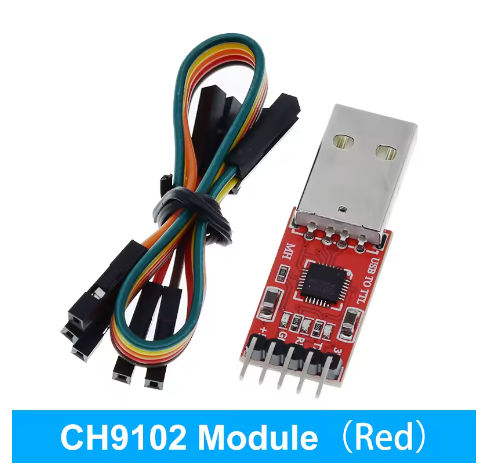
Product Overview
The CH9102 USB to TTL UART Serial Converter Module is a complete, high-performance programming and communication solution designed to bridge the gap between your computer’s USB port and microcontrollers or embedded systems. Based on the advanced CH9102 chip from Nanjing Qinheng (WCH), this module serves as a pin-to-pin compatible alternative to the popular CP2102, offering enhanced features and wider compatibility .
What sets this red version apart is its complete package – the module comes pre-soldered with header pins and includes a high-quality USB cable and retail packaging, making it a particularly convenient choice for users who want a hassle-free, “out of the box” experience. The module features the CH9102 chip, which supports an impressive maximum baud rate of up to 4Mbps – significantly faster than many competing solutions .
The CH9102 provides common MODEM signals to expand the UART interface of computers and is ideal for upgrading common serial devices or MCUs to USB bus connectivity . This module is specifically designed as an STC Microcontroller Programmer Downloader, making it widely used for flashing code onto STC series microcontrollers, as well as a universal serial adapter for Arduino Pro Mini, ESP8266, ESP32, STM32, and other UART devices .
Key Features
-
High-Performance CH9102 Chipset: Based on the advanced CH9102 USB 2.0 to UART bridge controller from Nanjing Qinheng (WCH), offering pin-to-pin compatibility with CP2102 and enhanced performance
-
Ultra-Fast 4Mbps Baud Rate: Supports baud rates up to 4 Mbps – significantly faster than CP2102 (1.5Mbps), enabling ultra-fast data transmission and firmware uploads
-
Wide Logic Level Compatibility: Serial port signals support 1.8V, 2.5V, 3.3V, and 5V logic levels, making it incredibly versatile for different target devices
-
Complete Kit with Cable & Accessories: Includes the red module, USB-A to USB cable, and often jumper wires – ready to use right out of the box
-
STC Microcontroller Programmer: Specifically designed to support the full range of STC single-chip microcomputers for program download and flashing
-
Dual Power Outputs (3.3V & 5V): Provides both 3.3V (up to 50mA) and 5V (up to 500mA) power outputs to supply your target device
-
Integrated Self-Recovery Fuse: Onboard resettable fuse protects your computer’s USB port and the module from short circuits and overcurrent conditions
-
Visual Status LEDs: Three onboard LEDs provide clear status indication: POWER (red), TXD (green), and RXD (blue/red) for real-time activity monitoring
-
Low Power Consumption: Operating current as low as 3mA with standby current of 90µA, making it suitable for battery-powered applications
-
Industrial Temperature Range: Rated for operation from -40°C to +85°C, suitable for demanding environments
Technical Specifications
Pinout & Interface Guide
The board features a 6-pin header (2.54mm pitch) with clearly labeled silkscreen markings:
Important Connection Note: TXD and RXD are labeled from the CH9102’s perspective:
LED Indicators
Usage Guide
Wiring Instructions
IMPORTANT: Always connect the ground (GND) between the CH9102 module and your target device first.
Standard Programming Connection (e.g., for Arduino Pro Mini, ESP32, STC Microcontroller)
Basic Serial Communication (No Auto-Reset)
Driver Installation
The CH9102 offers flexibility as it supports both built-in CDC drivers and manufacturer VCP drivers .
Driver Download Links:
Driver Installation Notes:
-
On Windows, download and install the VCP driver from WCH website (Nanjing Qinheng Microelectronics Co., Ltd.)
-
On macOS, the CH9102_VCP_SER_MacOS driver may trigger a system warning during installation, but the driver is actually installed successfully – you can safely ignore the warning
-
On macOS, after installation, you may see two ports – select the one named “wchmodem” for proper operation
-
On Linux, the CH9102 is supported by the built-in CDC-ACM driver and will appear as /dev/ttyACM0 or /dev/ttyUSB0
Identifying the COM Port
-
Windows: Open Device Manager. Look for “CH9102” or “USB Serial Port” under Ports (COM & LPT). Note the COM port number
-
macOS/Linux: Open a terminal and type ls /dev/tty.*. Look for a device named tty.wchmodem or ttyUSB0/ttyACM0
STC Microcontroller Programming
The CH9102 module is specifically designed for STC series microcontroller program download . Basic steps:
-
Connect CH9102 module to your computer via USB
-
Wire TXD→RXD, RXD→TXD, GND→GND, and power the target device
-
Use the STC-ISP programming software
-
Select the correct COM port and baud rate
-
Download your program to the STC microcontroller
Programming an Arduino Pro Mini
Connect the module as shown in the wiring diagram. In the Arduino IDE:
-
Select the correct COM port
-
Select the board (“Arduino Pro or Pro Mini”)
-
Click Upload – the DTR line will handle the reset automatically
Debugging ESP8266 / ESP32
For these 3.3V logic boards, use the 3V3 pin for power. Connect TX→RX, RX→TX, and GND→GND. Use a serial monitor to view debug output.
Self-Test / Loopback Test
To verify the module is functioning correctly, short the TXD and RXD pins together with a jumper wire. Any data you send will be received back, confirming the module is working properly.
Q: What is the difference between CH9102 and CP2102?
The CH9102 is a pin-to-pin compatible alternative to the CP2102 with several enhancements :
-
Higher baud rate: Supports up to 4Mbps vs 1.5Mbps
-
Wider logic levels: Supports 1.8V, 2.5V, 3.3V, and 5V levels
-
Driver flexibility: Supports both built-in CDC drivers AND manufacturer VCP drivers
-
Lower power: Operating current of 3mA vs higher on CP2102
Q: Can I use this as a drop-in replacement for CP2102 in my existing design?
es. The CH9102 is designed to be pin-to-pin compatible with CP2102, allowing for quick switching between different models without changing hardware design
Q: What microcontrollers can I program with this module?
This module is widely used for STC series microcontrollers, Arduino Pro Mini, ESP8266, ESP32, STM32 (“Blue Pill”), and any other UART-programmable device with compatible logic levels
Q: What does the DTR pin do?
The DTR (Data Terminal Ready) pin is used to automatically reset Arduino-compatible boards when uploading a new sketch. It pulls the reset line low, triggering the bootloader.
Q: Do I need an external power supply?
For low-power microcontrollers like Arduino Pro Mini, the module’s 5V output can provide sufficient power (up to 500mA). For higher current devices (motors, displays, etc.), use an external power supply.
Q: Do I need to install drivers for CH9102 on Windows?
Yes. While CH9102 can use built-in CDC drivers, for full functionality (GPIO, hardware flow control, DTR/RTS for download control), you should install the manufacturer’s VCP driver from the WCH website
Q: Why does the macOS driver installation show an error?
The CH9102_VCP_SER_MacOS v1.7 driver may trigger a system warning during installation, but the driver installs successfully. You can safely ignore the warning
Q: Which port should I select on macOS?
After installing the driver on macOS, you may see two ports. Select the one named “wchmodem” for proper operation
Q: Can I use this with Linux without installing drivers?
Yes. The CH9102 is supported by the built-in CDC-ACM driver on most modern Linux distributions. The device will appear as /dev/ttyACM0 or /dev/ttyUSB0.
Q: My computer doesn't recognize the device. What should I do?
Follow this checklist:
-
Driver issue: Download and install the latest CH9102 VCP drivers from WCH website
-
USB Cable: Ensure you are using a data cable, not a charge-only cable
-
Check Device Manager: Look for any unrecognized devices with a yellow warning icon
Q: Why can't I upload code to my board?
Common issues:
-
Wiring mismatch: Double-check that TXD → RX and RXD → TX are correctly connected
-
Power issues: Ensure the target board is properly powered
-
Wrong COM port: Verify the correct port is selected in your IDE
-
Auto-reset not working: For manual reset, press reset button immediately after upload starts
Q: What does the "Failed to write to target RAM" error mean?
This error may occur during upload. Try reinstalling the device driver . Also check your baud rate settings – lower baud rates may be more reliable for some target devices.
Q: Why can't I achieve 4Mbps communication?
The maximum 4Mbps baud rate requires proper driver installation (VCP driver) and appropriate cable quality. Your target device must also support this baud rate.
Q: What can I build with this CH9102 module?
Popular applications include:
-
STC Microcontroller Programming: Download firmware to STC series chips
-
Arduino Pro Mini Programming: Upload sketches without USB port
-
ESP8266/ESP32 Debugging: View serial debug output
-
GPS Module Interface: Connect GPS modules to computers
-
General Serial Communication: Any UART device to PC communication
-
Industrial Control: Interface embedded systems with PC software
Q: Is this module suitable for high-speed data logging?
Yes. With support for up to 4Mbps baud rate, the CH9102 is excellent for high-speed data logging and real-time sensor monitoring applications .
Q: Can I use this with 1.8V logic devices?
Yes. The CH9102’s serial port signals support 1.8V logic levels, making it suitable for modern low-voltage FPGAs and microcontrollers .
Q: What is the maximum cable length for reliable communication?
For high baud rates (above 115200), keep USB and serial cables short (under 1 meter). For lower baud rates, longer cables may work but are not recommended for noisy environments.