Product Overview
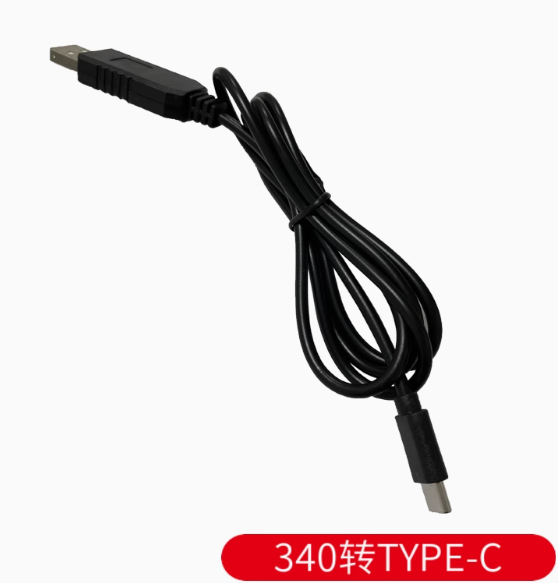
The CH340 USB to Type-C Serial Programming Cable Module is a modern, high-performance serial communication adapter that bridges the gap between your computer’s USB port and microcontrollers, routers, and embedded systems. This cable-style module features a USB Type-C interface, offering reversible plug orientation and compatibility with the latest computers and devices.
Built around the WCH (Nanjing Qinheng) CH340 chip, this module provides a reliable and cost-effective solution for programming, debugging, and serial communication. The CH340 is a full-speed USB device interface that simulates a standard UART serial port, making it fully compatible with existing serial applications without requiring software modifications.
Unlike traditional USB-to-TTL adapters that require separate cables, this all-in-one cable design integrates the conversion electronics directly into the cable assembly. The Type-C connector supports both data transmission and power delivery, allowing you to program and power target devices through a single connection. With support for baud rates up to 2Mbps and built-in clock generation (no external crystal required on many variants), the CH340 provides a stable, driver-friendly solution for embedded development.
Key Features
-
CH340 Chipset: Based on WCH CH340 USB-to-UART bridge controller, offering excellent stability and broad compatibility
-
USB Type-C Connector: Modern reversible connector for easy plug-in orientation; compatible with the latest laptops and devices
-
High-Speed Support: Baud rates from 50 bps up to 2 Mbps, suitable for fast firmware uploads and real-time debugging
-
Built-in Clock (Select Models): CH340C/N/K/E/X/B variants integrate an internal clock, eliminating the need for an external crystal oscillator
-
Wide Voltage Compatibility: Supports both 5V and 3.3V logic levels, making it compatible with a broad range of target devices
-
Full Modem Signal Support: Provides RTS, DTR, DCD, RI, DSR, and CTS signals for hardware flow control
-
Cross-Platform Support: Compatible with Windows (7, 8, 10, 11), macOS, and Linux
-
Plug-and-Play with Power: Type-C connection can provide both serial communication and device power through a single cable
-
Driver-Friendly: Uses widely-available CH340/CH341 drivers with simple installation process
Technical Specifications
Pinout & Connection Guide
The CH340 module typically provides the following signal pins (color-coding may vary by manufacturer):
Important:
-
The TXD pin of the module should connect to the RX pin of your target device
-
The RXD pin of the module should connect to the TX pin of your target device
-
Always establish a common ground by connecting the GND wire
Usage Guide
Driver Installation
The CH340 chip requires driver installation for proper operation. Download drivers from the official WCH (Nanjing Qinheng) website.
Windows Installation:
-
Download the “CH341SER.EXE” driver package (CH340 uses the same driver)
-
Run the installer as Administrator
-
Connect the Type-C cable to your computer
-
Check Device Manager → Ports (COM & LPT) for “USB-SERIAL CH340 (COMx)”
macOS Installation:
Linux:
Troubleshooting Driver Issues :
If you see a triangular exclamation mark next to USB-SERIAL CH340 (COMx) after connection, you need to update/install the CH340 driver
If no new device appears after connecting, try:
-
A different Type-C cable (ensure it’s a data cable, not charge-only)
-
A different USB port on your computer
-
Connecting to another computer to isolate the issue
Serial Communication Parameters
When configuring your terminal software (PuTTY, SecureCRT, Arduino Serial Monitor, etc.), use the following typical settings:
Loopback Test (Functional Test)
To verify the module is working correctly:
-
Connect the TXD and RXD pins together using a jumper wire
-
Open a serial terminal program on the module’s COM port
-
Set baud rate to 115200, 8 data bits, 1 stop bit, no parity
-
Type characters—they should be echoed back to the terminal
-
This confirms both transmit and receive paths are functional
Common Applications
STC Microcontroller “Cold Start” Programming
The CH340 is widely used for programming STC microcontrollers. Follow the “cold start” procedure:
-
Apply power to the target board (or ensure it is powered)
-
In STC-ISP software, select the correct COM port and baud rate (115200 typical)
-
Load your HEX file
-
Click Download/Program
-
Disconnect power from the target board (or disconnect VCC wire)
-
Reconnect power within about 2 seconds
-
Wait for “Operation Success” message
Type-C Data Cable Requirement
Important: To ensure proper device detection, always use a Type-C data cable (capable of data transmission). Some Type-C cables are charging-only and lack data lines, which will prevent the CH340 device from being recognized by your computer.
If your computer does not detect the module after connection, try a different Type-C cable that is known to support data transfer.
Power Supply Considerations
-
The Type-C connection provides 5V power (VBUS) that can supply your target device
-
The 5V output is typically limited to 500mA (standard USB 2.0 specification)
-
For power-hungry devices (motors, servos, high-power LEDs), use a separate external power supply
-
The V3 pin requires a 0.1uF decoupling capacitor when operating at 5V
Q: What is the difference between CH340 and CP2102/PL2303?
The CH340 is a popular, low-cost alternative to CP2102 and PL2303 chips. It offers excellent stability, wide driver support, and built-in clock options on many variants (no external crystal required). The CH340 is known for better driver compatibility on modern Windows systems compared to older PL2303 chips.
Q: Is the CH340 compatible with Windows 11?
Yes. The CH340 is compatible with Windows 11. Many users report that CH340-based modules work reliably on Windows 11 using the latest CH341SER drivers, unlike some older PL2303 solutions which lack Windows 11 support.
Q: What is the maximum baud rate supported?
The CH340 supports baud rates from 50 bps up to 2 Mbps, making it suitable for high-speed applications such as programming ESP32/ESP8266 and fast data logging.
Q: Which CH340 variants have built-in clocks?
CH340C, CH340N, CH340K, CH340E, CH340X, and CH340B have built-in clocks, eliminating the need for an external crystal oscillator and simplifying PCB design.
Q: Can this module power my target device?
Yes, with limits. The Type-C connection provides 5V power (via VBUS) that can supply low-power microcontrollers. However, for devices requiring more than 500mA, use a separate external power supply.
Q: My computer doesn't recognize the CH340 device. What should I do?
Follow this checklist:
-
Ensure CH340 drivers are properly installed (download from WCH website)
-
Try a different Type-C data cable (charge-only cables will not work)
-
Try a different USB port on your computer
-
Check Device Manager for yellow warning indicators
-
If the issue persists, try connecting to another computer to isolate the problem
Q: Why does the device show a yellow exclamation mark in Device Manager?
This indicates a driver issue. You need to update/install the CH340 driver:
-
Download the latest CH341SER driver from the WCH website
-
Uninstall the existing driver from Device Manager
-
Reinstall the driver
-
Restart your computer
Q: How do I perform a loopback test to verify the module is working?
Use the loopback test procedure described in the Usage Guide section. Connect TXD to RXD, open a serial terminal, and type characters—they should echo back. This confirms both transmit and receive paths are functioning.
Q: My programming attempts fail at high baud rates. What's wrong?
Try reducing the baud rate in your programming software. While the CH340 supports up to 2Mbps, some target devices may require lower baud rates for reliable communication, especially STC microcontrollers which often work best at 38400 or 115200 bps.
Q: What can I build with this CH340 Type-C module?
Popular applications include:
-
STC microcontroller programming and debugging
-
ESP8266/ESP32 development and firmware uploads
-
Raspberry Pi serial console access without a monitor
-
Router/switch configuration via console port
-
GPS module interfacing for PC-based navigation
-
Arduino programming (with manual reset, as DTR may not be available)
-
General serial communication between PC and embedded devices
Q: Is this module suitable for router console access?
Yes. The CH340 is commonly used for router console access. For connecting to RS232-level console ports (like those on many enterprise switches), an additional RS232 level shifter (e.g., MAX232) may be required, as the CH340 outputs TTL-level signals.
Q: Can I use this for Arduino programming?
Yes, with manual reset. This cable-style module may not include a DTR (Data Terminal Ready) line for automatic reset. You will need to manually reset your Arduino board when uploading sketches—press the reset button just as the upload begins.
Q: Is this module compatible with Raspberry Pi?
Yes. The CH340 is recognized on Raspberry Pi systems. Use it for serial console access or to interface with UART devices. Note that you should only connect TXD, RXD, and GND—do NOT connect the 5V line to the Pi’s GPIO.