Product Overview
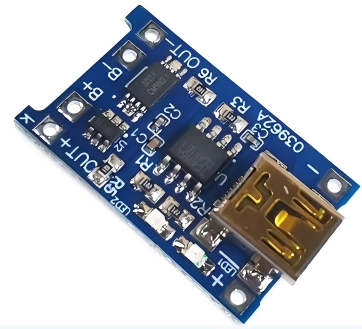
The TP4056 1A Lithium Battery Charger Module is a complete, low-cost charging solution designed for single-cell lithium-ion and lithium-polymer (LiPo) batteries. This compact module combines a TP4056 charger IC with a DW01 battery protection IC, offering both charging and protection functions in one tiny board.
Based on the industry-standard TP4056 chip from Top Power ASIC, this module implements a Constant Current / Constant Voltage (CC/CV) charging algorithm—the correct method for safely charging lithium batteries. It automatically delivers the maximum preset current (1A by default) until the battery reaches 4.2V, then switches to constant voltage mode, gradually reducing the current until the battery is fully charged.
The integrated DW01 protection circuit provides essential safeguards: overcharge protection, over-discharge protection (cutoff at approximately 2.5V), and overcurrent protection (3A typical). This makes the module ideal for charging 18650 cells, pouch batteries, and other 3.7V lithium batteries that lack their own protection circuit.
Whether you are building portable electronics, powering an Arduino project with battery backup, maintaining 18650 cells, or creating custom power banks, the TP4056 module offers a reliable, ready-to-use charging solution. The onboard Mini-USB connector allows direct connection to any standard USB charger or computer port, while alternative solder pads provide DIY wiring flexibility.
Key Features
-
Integrated Protection Circuit: Includes DW01 battery protection IC and FS8205 dual MOSFETs, providing overcharge, over-discharge (2.5V cutoff), overcurrent (3A), and short-circuit protection.
-
1A Maximum Charge Current: Default charge current of 1000mA (1A), fully adjustable by changing the programming resistor (RPROG) for lower current applications.
-
CC/CV Charging Algorithm: Implements proper Constant Current / Constant Voltage charging method essential for lithium battery safety and longevity.
-
Mini USB Input: Onboard Mini-USB connector for easy connection to any standard USB charger, power bank, or computer USB port.
-
Dual-Color Status Indicator: Red LED indicates charging in progress; Green LED indicates fully charged or no battery connected.
-
Automatic Power Path Management: Supports charging while simultaneously powering a load (output terminals remain active during charging).
-
Preset 4.2V Charge Voltage: ±1% accuracy ensures battery is charged to the correct full voltage without risk of overcharging.
-
Automatic Recharge: When a fully charged battery drops below 4.05V (approximately 80-90% capacity), a new charging cycle automatically begins.
-
Thermal Regulation: Automatically reduces charge current if internal die temperature exceeds safe limits, protecting the chip during high-current charging.
Technical Specifications
Pinout & Interface Guide
The TP4056 board is clearly labeled with connection points:
Input Side (Power Source)
Battery Connection (Charging Output)
Load Connection (Protected Output)
Status LEDs
Note: When no battery is connected, the red LED may flash while the green LED stays on.
Usage Guide
Basic Wiring Instructions
IMPORTANT: Always check battery polarity before connecting. This module has NO reverse polarity protection.
-
Connect Power Input: Plug a standard Mini-USB cable into the board’s USB port and connect it to a 5V USB charger (capable of at least 1A output). Alternatively, connect a 5V DC supply to the IN+ and IN- pads.
-
Connect Battery: Connect the positive terminal of your 3.7V Li-ion or LiPo battery to the B+ pad. Connect the negative terminal to the B- pad. The wires should be soldered securely.
-
Observe LEDs: When charging begins, the red LED (CHRG) will turn on. When the battery reaches 4.2V and charging completes, the green LED (STDBY) will turn on, and the red LED will turn off.
-
Connect Load (Optional): For devices requiring protection from battery over-discharge, connect your load to the OUT+ and OUT- terminals. The protection circuit will cut off output if the battery voltage drops below approximately 2.5V.
Setting the Charge Current
The default charge current on most modules is 1A (1000mA). This can be adjusted for smaller batteries by replacing the RPROG resistor (R3 on the module):
Important Usage Notes
-
Charge Time Calculation: For a fully discharged 2000mAh battery, charging at 1A will take approximately 2 to 2.5 hours.
-
Input Source Requirement: For reliable 1A charging, use a USB power supply rated for at least 1A. If the input voltage is too high (e.g., 5.2V), the current will be automatically reduced as a protection feature.
-
Loading While Charging: It is recommended to disconnect the load when charging, though the module does support simultaneous charging and discharging.
-
Current Recommendation: It is better if the charging current is about 37% of the battery capacity. For a 1000mAh battery, a charging current of 400mA is sufficient.
-
Battery Connection Sequence: The first time you connect a battery, there may be no voltage between the OUT+ and OUT- terminals. Applying 5V charging voltage will activate the protection circuit.
Q: What types of batteries can I charge with this module?
This module is designed specifically for single-cell (1S) 3.7V lithium-ion and lithium-polymer (LiPo) batteries. This includes common form factors like 18650, 14500, 16340, and pouch cells. It does NOT support 3.2V LiFePO4 batteries, multiple cells in series (2S, 3S, etc.), or NiMH/NiCd batteries.
Q: What is the difference between bare B+/B- terminals and OUT+/OUT- terminals?
The B+ / B- terminals connect directly to the battery and are always active during charging. The OUT+ / OUT- terminals pass through the DW01 protection circuit, which disconnects the load if the battery voltage drops too low (over-discharge protection at ~2.5V) or if current exceeds safe limits (~3A). For most applications, connecting your load to OUT+/OUT- is safer.
Q: Can I use this module while it is charging the battery?
Yes. You can power your device from the OUT+/OUT- terminals while the battery is charging. The protection circuit allows simultaneous charging and discharging. However, it is generally recommended to disconnect the load when charging for optimal battery health.
Q: Does this module have reverse polarity protection?
NO. This module does NOT have reverse polarity protection. Connecting the battery backward will likely destroy the TP4056 chip, damage the protection circuit, or cause the module to overheat. Always double-check polarity before connecting.
Q: Why is my battery not reaching 4.2V or charging very slowly?
Check the following:
-
Input power: Ensure your USB power supply can deliver at least 1A. A weak supply will reduce the charge current.
-
Input voltage: If the input voltage is too high (e.g., 5.2V), the current will be automatically reduced as a protection feature.
-
Battery health: Old or damaged batteries may not reach full voltage.
-
Connections: Poor solder joints can create resistance, reducing effective charge current.
Q: Can I charge multiple batteries in parallel with one module?
Yes, but with extreme caution. You can connect multiple identical 3.7V batteries in parallel (positive to positive, negative to negative) to charge them simultaneously. Critical safety requirements:
-
All batteries must be at the same voltage before connecting (within 0.2V).
-
All batteries should have the same capacity and chemistry.
-
Do not connect batteries with more than 0.2V difference in parallel as this can risk fire and explosions due to excessive charging current from one battery to another.
Q: How do I change the charging current from 1A to a lower value?
The charge current is set by the resistor (RPROG) connected to pin 2 of the TP4056 chip. Replace this resistor with a higher value to reduce current. Refer to the resistor table in the “Setting the Charge Current” section.
Q: Can I use a 12V power supply as input?
No. The maximum input voltage is 5.5V DC. Applying 12V will destroy the TP4056 chip. Use a 5V USB charger or a 5V regulator (e.g., LM7805) if you only have a higher voltage supply available.
Q: The module gets very hot during charging. Is this normal?
Some warmth is normal due to the linear charging method—excess voltage (5V input – 4.2V battery) is dissipated as heat. For 1A charging, power dissipation is approximately 0.8W, which will make the chip warm. The TP4056 has built-in thermal regulation that reduces current if the temperature exceeds safe limits.
Q: What happens when both red and green LEDs are on or flashing?
The red and green LEDs should never be on simultaneously during normal operation. If both are on or the red LED flashes, it may indicate:
-
No battery connected (green on, red flashing 1-4Hz)
-
Battery connection problem (poor solder joint)
-
Battery voltage is too low (below 2.9V, module may be in trickle charge mode)
Q: What can I build with the TP4056 charging module?
Popular applications include:
-
18650 battery chargers for DIY power banks
-
Arduino/ESP32 portable power supplies with battery backup
-
DIY Bluetooth speakers with rechargeable batteries
-
Smart home sensors running on battery power
-
Solar-powered lighting systems (with appropriate solar panel and regulation)