Product Overview
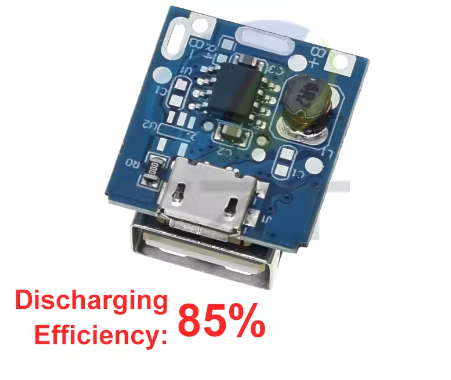
The 5V Boost Board Lithium Battery Charging Protection Board is a compact, highly integrated power management module designed for single-cell lithium batteries. Based on the 134N3P power management IC, this board combines battery charging, 5V boost output, and comprehensive protection circuits into a single, easy-to-use module—making it an all-in-one solution for DIY power banks, portable chargers, and other battery-powered projects .
This module is a major step up from simpler charger boards like the TP4056. While the TP4056 only handles charging, the 134N3P board intelligently manages the entire power flow: it charges your battery when you plug in a Micro USB power source and boosts the battery’s 3.7V to a stable 5V for powering USB devices when disconnected . It automatically switches between grid power and battery power without any manual intervention.
At its core, a built-in battery protection circuit safeguards against overcharging, over-discharging, short circuits, and overheating . Indicator LEDs provide visual feedback for charging and discharging status, and the module supports trickle charging for deeply depleted batteries, reviving cells that have dropped to dangerously low voltages .
This board is the perfect foundation for making portable power banks, replacing outdated charger circuits in small electronics, or building custom battery-powered Raspberry Pi and Arduino projects. Whether you are a hobbyist or looking for a convenient OEM solution for a product design, this module provides a reliable, integrated power management core .
Key Features
-
Integrated Charge & Boost Management: All-in-one IC (134N3P) handles both 1A charging (Micro USB input) and 1A 5V boost output (USB-A port) .
-
Comprehensive Protection Circuits: Includes overcharge, over-discharge (cutoff at 2.9V), overcurrent, output short circuit, and over-temperature protection to safeguard the battery and your devices .
-
Smart Charging Indicator: Visual status display with red LED indicating charging (flashing) and fully charged (solid), and a blue LED indicating discharging (flashing) .
-
Trickle Charge Support: Can safely recharge batteries that have been over-discharged to extremely low voltages (zero voltage charging support) .
-
Low Standby Current: Consumes an ultra-low 8µA typical quiescent current when idle, minimizing battery drain when not in use .
-
85% Conversion Efficiency: High-efficiency boost converter delivers an 85% efficiency rate (at 3.7V input, 5V/1A output) for effective power utilization .
-
Compatible Battery Types: Designed for single-cell 3.7V lithium batteries, including 18650, 14500, and LiPo pouch cells (must be connected in parallel for increased capacity; series connection is NOT supported) .
-
Compact Form Factor: Small PCB size (approx. 20mm x 18mm) allows for easy integration into portable devices and tight enclosures .
Technical Specifications
Pinout & Interface Guide
The 134N3P module is designed for simple, solder-free wiring. It has a USB-A port for powering devices and a Micro USB port for charging the battery. For connecting to the battery, it provides two solder pads:
Power and Output Ports:
-
Micro USB (Input): Connect a standard 5V USB charger (1A or higher recommended) to charge the battery.
-
USB-A (Output): Connect your USB-powered device (e.g., phone, Arduino, LED light) here to draw 5V power .
Usage Guide
Basic Wiring Instructions
IMPORTANT: This module has NO reverse polarity protection. Connecting the battery backward will instantly destroy the module. Always double-check polarity before soldering.
-
Prepare the Battery: Select a single 3.7V lithium battery (e.g., 18650). If you need more capacity, you can connect multiple batteries in parallel (B+ to B+, B- to B-). Do not connect them in series, as this will create a higher voltage (>3.7V) battery pack and damage the boost converter .
-
Connect Battery: Solder the positive wire of your battery to the B+ pad. Solder the negative wire to the B- pad.
-
First-Time Activation: After connecting the battery, do not use it immediately. Plug a Micro USB cable into the board and connect it to a charger. Let it charge until the battery is full. This “priming” step is important for the IC to initialize correctly and ensure that it starts and shuts down accurately .
-
Use Power Bank: Once activated, you can disconnect the charger. The blue LED should flash at intervals, and the USB-A output will now be active, allowing you to charge external devices.
Understanding the LEDs
The module uses a 3-pin LED indicator that is pre-soldered to the board. The state of these LEDs tells you what the module is doing:
Important Usage Notes
-
Output Current Limitation: The maximum output current is 1A . This module is designed for low-to-medium power devices. It is not suitable for running high-current loads like large DC motors, which can draw several amps and damage the module .
-
Parallel Batteries for Capacity: To increase the total runtime (mAh), you must connect batteries in parallel (positive to positive, negative to negative). Connecting them in series will increase voltage (e.g., 2S, 3S) and destroy the module .
-
Minimum Input Voltage: The minimum input voltage is 3.7V. While you can technically power it from a 3.7V source, it is strongly recommended to use a standard 5V USB charger for stable and reliable operation.
-
Battery Percentage Display Not Accurate: For modules that include a 4-LED battery indicator, the percentage shown may not be perfectly accurate, especially for old or new batteries . The common way to calibrate the reading is to fully charge the device, then use it until it automatically turns off, and then fully charge it again.
-
Reverse Polarity Warning: This is the single most common point of failure. Connecting the battery with reversed polarity will instantly and permanently damage the 134N3P IC .
Q: What is the difference between this 134N3P module and a TP4056 charger?
A TP4056 is only a charger. It can charge a battery from USB, but you need a separate boost converter to get 5V out of the battery. The 134N3P is a complete power management system that integrates both charging and 5V boosting functions in one module, plus automatic power path management .
Q: What types of batteries can I use?
This module is specifically designed for single-cell (1S) 3.7V lithium batteries. You can use an 18650 cell, a 14500 cell, or a LiPo pouch battery. The battery can be a lithium-ion (Li-ion) or a lithium-polymer (LiPo) type .
Q: Can I use this module to charge a battery and power a device at the same time?
Yes, but with a significant caveat. The module supports a “power path” and will power a load from the USB input if available. However, the total current output (charging the battery + powering the load) is limited by the input source. If the load draws too much current, the battery may not charge effectively. It is generally better to use the device on battery power or charge the battery separately .
Q: Does this module provide battery low voltage cutoff?
Yes. The protection circuit monitors the battery voltage continuously. If it drops to approximately 2.9V, the output (USB-A port) will be automatically switched off to prevent the battery from being over-discharged and permanently damaged .
Q: Is reverse polarity protection included?
NO. This is a critical safety warning. This module does NOT have reverse polarity protection. Connecting the battery backward will instantly and permanently destroy the 134N3P IC . Always double-check your connections.
Q: Why is my battery not getting fully charged to 4.2V?
The module is designed to charge to 4.2V with ±1% accuracy . If it seems to stop early, the battery might be old or damaged, or the connections may have high resistance. Try a different, known-good battery.
Q: My module doesn't work after I soldered it. What should I check?
Follow this checklist:
-
Check Polarity: Immediately check if the battery was connected backwards. If so, the IC is likely damaged.
-
Check Connections: Ensure the battery is properly soldered to the B+ and B- pads with no cold solder joints or shorts.
-
Prime the IC: Did you follow the “first-time activation” step? Connect it to a charger to “prime” the system .
Q: Can I use this module to charge my phone?
Yes, you can use it to make a DIY USB power bank to charge a phone. Be aware that the 1A output limit is relatively slow by modern standards (most phones today charge at 2A or higher). It will work, but charging will be slow.
Q: Why does the 4-LED battery indicator show the wrong battery level?
The battery indicator circuit measures voltage, which is an indirect method of estimating capacity and can be inaccurate with different batteries . Calibrate the reading by fully charging and discharging the battery a couple of times.
Q: What can I build with this 134N3P power module?
Popular applications include:
-
DIY Power Bank: Build your own compact portable charger using an 18650 battery.
-
Portable Arduino Project: Power your Arduino Uno or Nano from a single 18650 battery in a handheld project.
-
Rechargeable LED Light: Create a bright, portable work light that charges from USB.
-
Rechargeable Fan: Power a small 5V fan for a portable cooling solution.
-
Battery Upgrade for Electronics: Replace non-rechargeable batteries in small devices with a rechargeable Li-ion setup.
Q: Can I use a 12V power supply as an input?
No. The maximum input voltage is 5.5V DC. Applying 12V will destroy the 134N3P chip. You must use a standard 5V USB charger .
Q: Can I run a DC motor directly from this module's USB output?
Generally not recommended. DC motors have very high inrush currents when starting up. This surge will likely exceed the 1A output limit and trigger the short circuit or overload protection, causing the module to shut down . If you need to run a motor, it is better to power it directly from the battery (not through the USB port) and use a separate MOSFET or relay switch controlled by the battery’s voltage.
Q: What is the recommended way to connect multiple cells for higher capacity?
The cells must be connected in parallel. Solder the positive terminals of all batteries together and connect them to the B+ pad. Solder all the negative terminals together and connect them to the B- pad. The batteries should be at the same voltage before connecting them to prevent a large, damaging current flow between them.