Product Overview
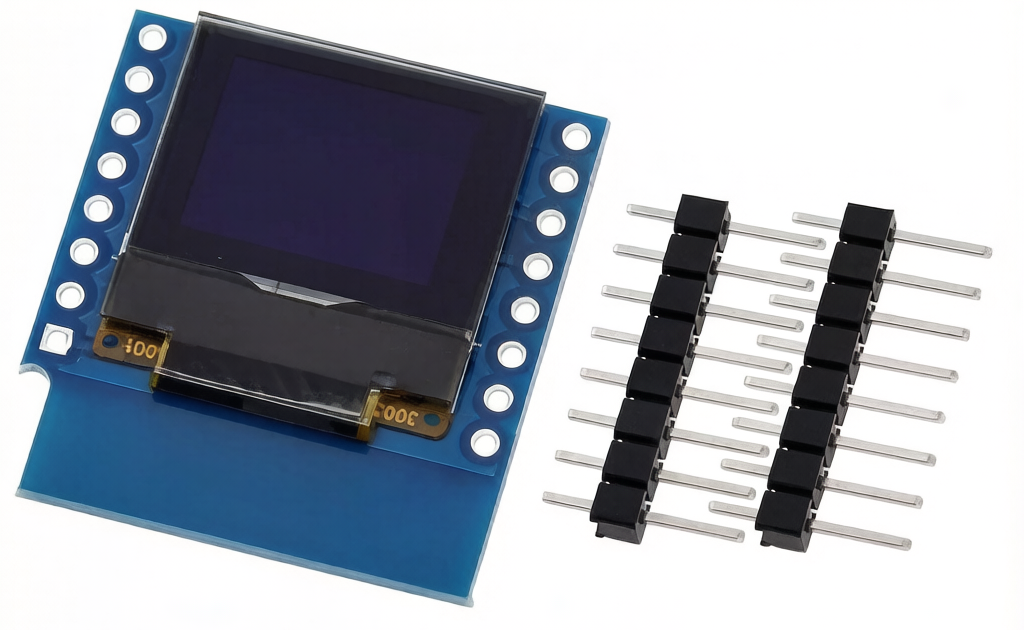
The 0.66-inch OLED Shield is a compact, high-contrast display module designed specifically for the Wemos D1 Mini series of ESP8266 development boards . This plug-and-play shield stacks directly onto your D1 Mini, providing a crisp 64×48 pixel monochrome display without the need for messy wiring or breadboards.
Powered by the SSD1306 driver IC and communicating via the I2C protocol (using just two pins: SDA and SCL), this display is the perfect companion for your IoT projects . Whether you’re building a smart sensor that displays temperature and humidity readings in real-time, a network monitor showing IP addresses and signal strength, or a mini interactive controller for your home automation system, this shield adds a professional visual interface to your ESP8266 projects .
OLED (Organic Light Emitting Diode) technology provides exceptional visibility in all lighting conditions. Each pixel emits its own light, delivering true blacks and high contrast without a power-hungry backlight, which is critical for battery-powered applications .
Key Features
-
True Plug-and-Play Shield: Designed specifically for the Wemos D1 Mini form factor, this board stacks directly onto your D1 Mini with no soldering required for basic use .
-
64×48 Pixel Resolution: Sharp enough for sensor data, status icons, simple graphics, and even small text-based menus.
-
I2C Interface: Uses only two data lines (SDA and SCL), saving precious GPIO pins for other sensors and actuators .
-
High Contrast OLED Display: Bright white pixels on a true black background for excellent readability in both bright sunlight and total darkness .
-
Ultra-Low Power Consumption: OLED technology consumes power only on pixels that are lit, making it ideal for battery-powered IoT sensors and portable projects .
-
Selectable I2C Address: The module supports two possible I2C addresses (0x3C or 0x3D), allowing you to avoid conflicts with other I2C devices on the same bus .
-
Driver IC: SSD1306: Fully compatible with popular libraries like the “ESP8266-OLED-Shield-Display” library, Adafruit_SSD1306, U8g2, and MicroPython .
Technical Specifications
Pinout & Hardware Interface
One of the biggest advantages of this shield is its “stackable” design. The board is equipped with female pin headers on the top and male pin headers on the bottom, allowing it to sit directly on top of the Wemos D1 Mini.
Compatibility:
Usage Guide
Installation
-
Prepare the Headers: If you have a brand new D1 Mini without headers installed, solder the included male pin headers onto the D1 Mini board.
-
Stack the Shield: Line up the pins on the bottom of the OLED shield with the headers on the D1 Mini. Press down firmly until it is seated.
-
Software Setup: You are now ready to upload code.
Example Code (Arduino IDE)
Library Installation:
You can use the popular SSD1306Wire.h library (from the “ESP8266 and ESP32 OLED Driver for SSD1306 displays” package). Install it via the Arduino Library Manager .
Basic Initialization Code:
#include <Wire.h>
#include <SSD1306Wire.h>
SSD1306Wire display(0x3c, D2, D1, GEOMETRY_64_48);
void setup() {
Serial.begin(115200);
display.init();
display.flipScreenVertically();
display.setFont(ArialMT_Plain_10);
display.setTextAlignment(TEXT_ALIGN_LEFT);
}
void loop() {
display.clear();
display.drawString(0, 0, "Hello Wemos!");
display.drawString(0, 20, "IP: 192.168.1.1");
display.drawString(0, 40, "Signal: Strong");
display.display();
delay(2000);
}
Important Usage Tips
-
Display Orientation: Many shields arrive in “landscape” mode. Use display.flipScreenVertically() or display.setRotation() to adjust the rotation in software to match your physical setup.
-
Geometry Definition: When using the SSD1306Wire library, you must specify GEOMETRY_64_48 in the constructor for the screen to function correctly .
Q: Does this product require soldering to work with a Wemos D1 Mini?
If your D1 Mini already has male pin headers soldered on, the shield simply stacks on top with no soldering required. However, you will need to solder the included pin headers to your D1 Mini if it does not have them yet** .
Q: What is the size of this display?
This is a 0.66-inch diagonal display with a resolution of 64×48 pixels. It is very small, roughly the size of a thumbnail .
Q: My screen is not showing anything, but the code compiled fine. What is wrong?
The most common issue is the I2C address. Most shields use 0x3C, but if yours has a jumper on the back, it might be 0x3D. Try changing the address in your code .
Q: Which pins on the D1 Mini does this shield use?
It uses the I2C bus: D1 (GPIO5) for SCL and D2 (GPIO4) for SDA. The other pins remain free for connecting sensors like DHT22 or PIR motion sensors .
Q: Can I use this shield with an ESP32 or standard Arduino Uno?
No, the physical pin layout is specific to the Wemos D1 Mini format. The Uno has a completely different pin spacing, and the shield will not plug in. However, you can use a standard 0.96″ OLED with the Uno.
Q: Does this shield have any buttons?
No, this is a display-only shield. Unlike some other D1 Mini OLED shields, this 0.66″ version contains only the screen. A separate button shield can be stacked on top or below it .
Q: Why did the compilation fail with an error about "Height incorrect"?
This is a geometry error in your library. Ensure you are using a library that supports the 64×48 resolution, such as the “ESP8266 and ESP32 OLED Driver for SSD1306 displays” library, and specify GEOMETRY_64_48 when initializing the object .
Q: Can I install this shield facing "backwards" on the D1?
Yes, you can. The shield has pin headers on both sides, allowing you to place it on the top or the bottom of the main board. Be mindful of the USB port if you place the D1 Mini underneath.
Q: What can I display on this small screen?
Despite its size, it is very functional. You can display system status (Wi-Fi connection, MQTT messages), sensor readings (Temperature/Humidity using a DHT22), timer countdowns, small icons, or even scrolling text.
Q: Is there a ready-made library for the ESP-01?
This shield is physically designed for the D1 Mini. For the ESP-01, you would need to buy a “Wemos D1 Mini” board or use a standard 0.96″ OLED with jumper wires.