Product Overview
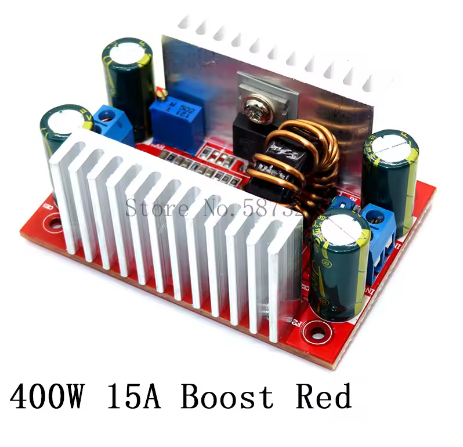
The 400W 15A High-Power DC-DC Boost Converter is a professional-grade step-up voltage regulator designed for demanding applications requiring efficient voltage elevation. This non-isolated boost module can increase a lower DC input voltage (8.5V-50V) to a higher, user-adjustable output voltage (10V-60V), delivering up to 400W of power and 15A of peak current .
This module stands out with its dual-mode constant voltage (CV) and constant current (CC) control, which is essential for applications like high-power LED driving and battery charging. The onboard multi-turn potentiometers allow independent adjustment of both output voltage and current limit, while the dual heatsinks ensure effective thermal management during high-power operation .
Whether you need to power a 36V LED array from a 12V battery, charge a 24V lithium battery pack, or create a variable bench power supply, this 400W boost converter provides the power, flexibility, and reliability required for professional and DIY projects .
Key Features
-
400W High Power Output: Delivers up to 400W of output power with 15A maximum input current, suitable for demanding applications like high-power LEDs, motor drives, and battery charging .
-
Wide Voltage Ranges: Accepts DC input from 8.5V to 50V and provides continuously adjustable output from 10V to 60V, covering 12V, 24V, 36V, and 48V systems .
-
Constant Voltage & Constant Current (CV/CC) Mode: Dual-mode regulation allows the module to function as a standard voltage regulator or as a current limiter—essential for LED driving and battery charging .
-
High Conversion Efficiency: Achieves up to 96% conversion efficiency (150kHz switching frequency), minimizing power loss and reducing heat generation .
-
Adjustable Output via Potentiometers: Two multi-turn potentiometers provide independent adjustment of output voltage (10-60V) and constant current limit (0.2-12A) .
-
Dual Heatsinks for Thermal Management: Pre-installed aluminum heatsinks on switching components enhance heat dissipation; active cooling recommended for loads exceeding 8A .
-
Overcurrent Protection: Built-in overcurrent protection automatically reduces output voltage when input current exceeds 15A, safeguarding the module and connected devices .
-
Screw Terminal Connections: Heavy-duty screw terminals ensure secure, low-resistance connections for high-current wiring .
-
Industrial Temperature Range: Rated for operation from -40°C to +85°C, suitable for demanding environments .
-
Compact, Non-Isolated Design: Measures 67mm × 48mm × 28mm, with four 2.5mm mounting holes for secure installation .
Technical Specifications
Pinout & Connection Guide
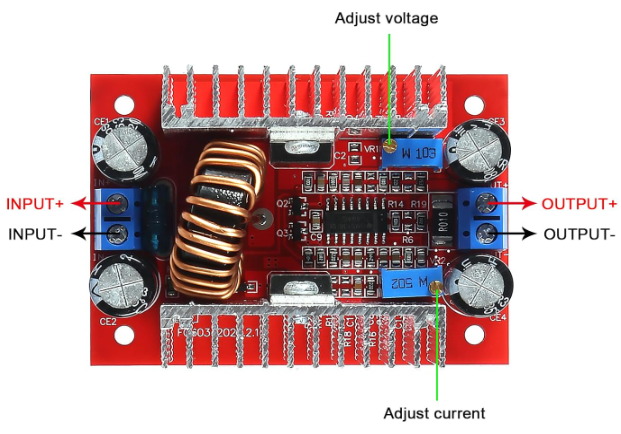
The module uses two sets of screw terminals for input and output, plus two multi-turn potentiometers for adjustment .
Input Terminals (Power Source)
Output Terminals (Load Connection)
Adjustment Controls
⚠️ Critical Safety Notes:
-
This module has NO input reverse polarity protection. Connecting the input backward will instantly destroy the module — add a series Schottky diode for protection.
-
The module does NOT have output short-circuit protection for current adjustment — never short the output to set current .
Usage Guide
Important Pre-Operation Steps
⚠️ Use a Multimeter: The factory default output is often set to a random voltage. Always measure the output with a multimeter before connecting your load and adjust to the exact voltage required.
Wiring Instructions
-
Set Initial Outputs: Before powering on, turn the voltage potentiometer counter-clockwise ~10-15 turns to set minimum voltage. Turn the current potentiometer clockwise ~30 turns to set minimum current .
-
Connect Input: Connect your DC power source (8.5V-50V) to the IN+ and IN- terminals. Ensure correct polarity.
-
Set Output Voltage (CV Mode): Place a multimeter on the output terminals. Apply input power. Slowly turn the voltage potentiometer clockwise until you reach your desired output voltage.
-
Set Current Limit (CC Mode – For LED/Battery): This requires a test load connected to the output:
-
Connect your test load (LED array or discharged battery) to OUT+ and OUT-
-
Slowly turn the current potentiometer counter-clockwise while monitoring the ammeter
-
Stop when you reach the desired current
-
Do NOT short the output to set current – this will not work and may damage the module
-
Connect Permanent Load: Turn off input power, connect your permanent load, and re-apply power.
Thermal Management & Power Derating
The maximum output power depends heavily on cooling :
Tip: If the module temperature exceeds 65°C, active cooling is mandatory to prevent overheating and ensure reliable operation .
Setting Up Constant Current (CC) Mode for LEDs
LEDs are current-controlled devices. Follow this procedure for proper CC operation :
-
Set voltage potentiometer to maximum, current potentiometer to minimum
-
Power on the module
-
Slowly increase current potentiometer until LEDs begin to glow
-
Connect ammeter in series with LED load
-
Increase current potentiometer until reaching desired current
-
Do NOT exceed LED’s rated current
Typical Applications
Q: What is the difference between Constant Voltage (CV) and Constant Current (CC) mode?
CV mode regulates voltage; the load determines how much current to draw. CC mode regulates current; the voltage drops as needed to maintain the set current limit. CC mode is essential for LED driving (prevents thermal runaway) and battery charging .
Q: Why can't I set the current limit by shorting the output?
The boost converter’s circuit structure cannot adjust current in a short-circuit condition . You must connect a test load (LEDs or discharged battery) when setting the constant current limit.
Q: How much cooling does this module need to run at 400W?
At 400W, the module generates significant heat. Natural cooling is only sufficient up to ~100W . To achieve 200W-400W, you must use active cooling, such as a 12V fan blowing directly on the heatsinks .
Q: Does this module have reverse polarity protection?
NO. This module does NOT have input reverse polarity protection . Connecting the input backward will instantly destroy the module. Add a high-current Schottky diode in series with the input for protection, or double-check polarity before applying power.
Q: What is the maximum output current I can draw?
The module is rated for 12A continuous output (15A peak) . However, achievable current depends on input/output voltage differential and cooling. The larger the voltage difference, the smaller the achievable output current. For 12V to 36V conversion, expect lower current capacity.
Q: Can I use this module to charge a lithium battery?
Yes, with correct settings. This module supports CC/CV charging. Set the output voltage to the battery’s float voltage (e.g., 4.2V per cell) and set the CC limit to the desired charge current. For lithium batteries, use a fully discharged battery when setting the current limit .
Q: Why does my output voltage drop when I connect a load?
This typically happens for one of two reasons:
-
The module is in CC mode: The load is trying to draw more than the set current limit
-
Input power drop: Your input source or wires cannot supply the required current. Use thicker wires and verify input voltage remains stable under load.
Q: What is the quiescent (no-load) current consumption?
The module draws approximately 10mA when powered with no load (measured at 12V input boosting to 20V) . This is normal for a switching regulator and will increase slightly with higher output voltage settings.
Q: Can I use this module for audio amplifier power supply?
Yes, but set it to CV mode only. For audio amplifiers, set the output voltage to the amplifier’s rated voltage and set the current limit to maximum. The amplifier needs a constant voltage supply, not constant current – current limiting would distort the audio output .
Q: Is the output isolated from the input?
No. This is a non-isolated BOOST converter . The input ground (IN-) and output ground (OUT-) are common. Do not use this module for applications requiring galvanic isolation between the source and the load.