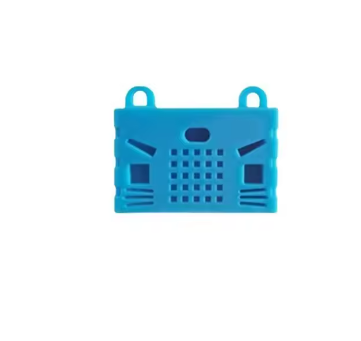
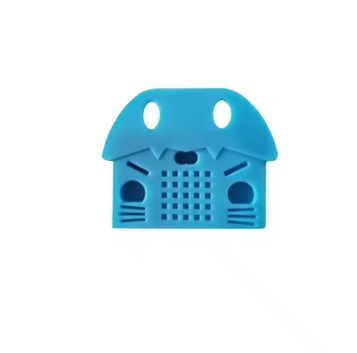
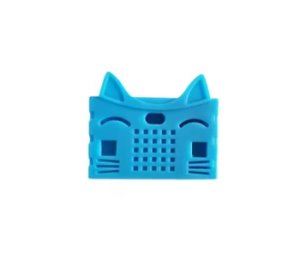
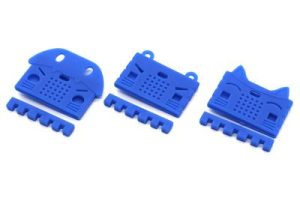
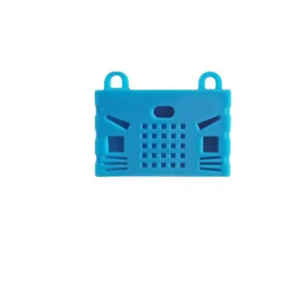
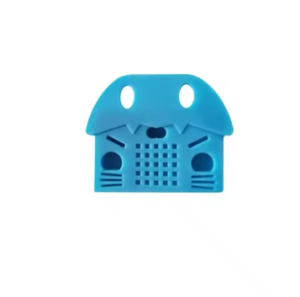
BBC micro:bit go NRF51822 development board Python connector silicone protective shell

SKU: FA1079-3
Microcontroller

Nordic nRF51822 (ARM Cortex-M0)

Clock Speed

16 MHz

Flash / RAM

256 KB / 16 KB

Display

5×5 LED matrix (25 LEDs)

Sensors

Accelerometer, magnetometer (compass), temperature

Inputs

2× programmable buttons (A and B)

Wireless

2.4GHz radio (Bluetooth Low Energy compatible)

Power

Micro USB or 2×AAA battery pack (battery not included)

The BBC micro:bit Go is a compact, feature-rich development board designed for coding education, STEM learning, and creative electronics projects. Based on the original Nordic nRF51822 microcontroller, this board packs a powerful ARM Cortex-M0 core, multiple onboard sensors, and a range of built-in features into a pocket-sized form factor that is easy for beginners to use and versatile enough for advanced projects .

The board is built around a Nordic nRF51822 SoC featuring a 16 MHz ARM Cortex-M0 core, paired with 256 KB Flash and 16 KB RAM . This provides reliable processing power for coding projects ranging from simple LED animations to sensor-driven applications. The board also includes a 2.4GHz radio for wireless communication, enabling peer-to-peer and mesh networking between multiple micro:bit boards .

The micro:bit is equipped with a comprehensive set of onboard sensors and input/output devices. It features a 5×5 LED matrix for displaying text, icons, and animations, two programmable buttons (A and B) for user input, and an accelerometer and magnetometer for motion and compass sensing . A temperature sensor allows you to measure ambient conditions, and the LED matrix itself can function as a light sensor for detecting brightness levels . Connectivity options include a Micro USB port for programming and power, a 20-pin edge connector for attaching accessories, and a battery jack for portable power using 2×AAA batteries .

The micro:bit platform is supported by a wide range of development environments. MakeCode offers block-based programming ideal for beginners, while Python (MicroPython) and JavaScript provide text-based options for more advanced users . The board appears as a USB drive when connected to a computer, allowing you to simply drag and drop compiled program files to flash your code .

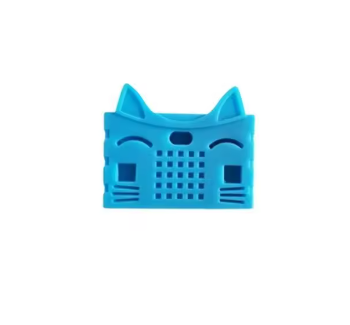
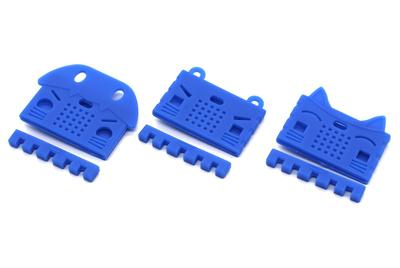
This set includes a silicone protective shell designed to fit the micro:bit board. The shell protects the board from bumps and scratches while keeping all buttons, pins, and connectors accessible. It is compatible with the micro:bit V1 and V2 form factors .

Whether you are a student, teacher, hobbyist, or business purchasing in bulk for education and training, the BBC micro:bit Go offers a reliable, engaging platform for learning and creating.


Features

  • Nordic nRF51822 ARM Cortex-M0 @ 16 MHz — Reliable processing for educational and creative projects .

  • 256 KB Flash / 16 KB RAM — Ample memory for coding, sensors, and wireless communication .

  • 5×5 LED matrix display — Show text, icons, animations, and sensor data visually .

  • Two programmable buttons (A and B) — For user input and interactive control .

  • Onboard sensors — Accelerometer, magnetometer (compass), and temperature sensor .

  • Wireless communication — 2.4GHz radio for peer-to-peer and mesh networking .

  • Multiple programming options — MakeCode (blocks), Python (MicroPython), and JavaScript .

  • 20-pin edge connector — For attaching accessories and expansion boards .

  • Silicone protective shell included — Protects the board while keeping all features accessible .

  • Battery jack for portable use — Runs on 2×AAA batteries for untethered projects .


Technical Specifications 

# Parameter Specification
1 Microcontroller Nordic nRF51822 (ARM Cortex-M0)
2 Clock Speed 16 MHz
3 Flash / RAM 256 KB / 16 KB
4 Display 5×5 LED matrix (25 LEDs)
5 Sensors Accelerometer, magnetometer (compass), temperature
6 Inputs 2× programmable buttons (A and B)
7 Wireless 2.4GHz radio (Bluetooth Low Energy compatible)
8 Power Micro USB or 2×AAA battery pack (battery not included)

Usage

Getting Started

  1. Power the board — Connect via Micro USB cable to a computer. Alternatively, attach a 2×AAA battery pack (not included) for portable use .

  2. Choose your programming environment — Visit the MakeCode editor for block-based coding, or use the Python editor for MicroPython programming .

  3. Write your code — Drag and drop blocks or write Python code to create your program.

  4. Download and flash — Connect the micro:bit to your computer via USB. The board appears as a USB drive. Drag the compiled .hex file onto the drive to program the board .

  5. Test and iterate — The program runs automatically once flashing is complete. Use the buttons, sensors, and LED matrix to interact with your code.

Programming Options

  • MakeCode (Blocks) — Visual, drag-and-drop programming ideal for beginners and classroom use .

  • Python (MicroPython) — Text-based programming for more advanced users and complex projects .

  • JavaScript — For developers who prefer a text-based language with web-based editing .

Typical Applications

  • STEM education and classroom learning — Teaching coding, electronics, and computational thinking.

  • Interactive art and design — LED animations, sensor-driven installations, and wearable projects.

  • Robotics and control — Motor control, sensor integration, and wireless communication.

  • Wireless projects — Peer-to-peer messaging, mesh networking, and remote sensing.

  • Science experiments — Using the accelerometer, magnetometer, and temperature sensor for data collection.

  • Data logging — Collecting sensor data for analysis and visualization.

  • Game development — Simple games using buttons, accelerometer, and LED matrix.

  • Teacher training and workshops — Bulk purchasing for schools, training centers, and educational programs.

Notes for Business Buyers

  • Silicone protective shell included — Protects the board during classroom use, transport, and storage .

  • Battery not included — Allows you to choose the power solution that best fits your needs.

  • Multiple programming environments — MakeCode, Python, and JavaScript support diverse teaching and learning styles .

  • Bulk purchasing available — Suitable for schools, training centers, and educational institutions.

  • Wide accessory ecosystem — Compatible with a broad range of expansion boards and accessories .

Q: What version of the micro:bit is this?

This is the original micro:bit based on the Nordic nRF51822 microcontroller, commonly referred to as the V1 or V1.5 board . It offers the same core features and programming support as the original platform.

Q: Does this set include a battery?

No. The battery is not included in this set. You can power the board via Micro USB or use a 2×AAA battery pack (sold separately) .

Q: What programming environments are supported?

The board supports MakeCode (block-based), Python (MicroPython), and JavaScript. These are accessible through web-based editors and are suitable for beginners and advanced users alike .

Q: How do I program the micro:bit?

Connect the board to your computer via Micro USB. It appears as a USB drive. Download your compiled program (.hex file) and drag it onto the drive. The board will restart and run your code automatically .

Q: What sensors are built into the board?

The board includes an accelerometer, magnetometer (compass), and temperature sensor. The LED matrix can also function as a light sensor .

Q: Can I use this board without a computer?

You need a computer or mobile device to write and download programs. Once programmed, the board can run independently on battery power .

Q: What is the 20-pin edge connector used for?

The edge connector allows you to attach expansion boards and accessories, such as motor drivers, sensors, and display modules .

Q: Is this board compatible with micro:bit accessories?

Yes. The board is designed to be compatible with the standard micro:bit accessory ecosystem, including expansion boards and sensors that use the edge connector .

Q: What age group is this board suitable for?

The micro:bit platform is designed for children aged 8 and up, but it is also widely used by teenagers, university students, and adult hobbyists for learning and prototyping.

Q: Can I purchase in bulk for a school or training program?

Yes. This set is suitable for both individual users and business purchasing, including classroom sets, training centers, and educational programs.