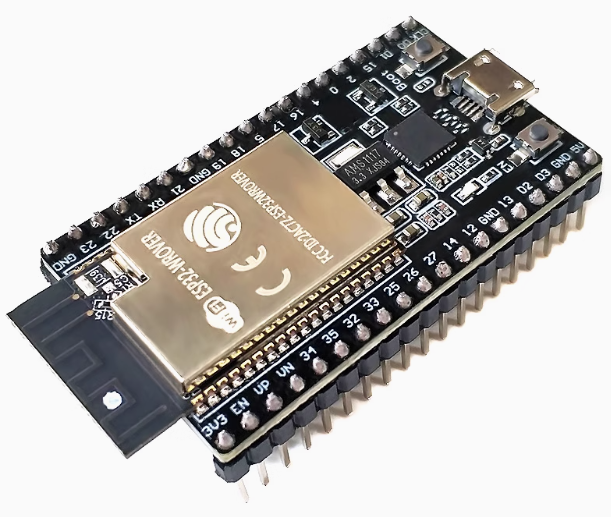
The ESP32-DevKitC Development Board with WROVER Module and CP2102 chip is a high-performance, advanced prototyping platform designed for complex Internet of Things (IoT), multimedia, and embedded applications requiring expanded memory capacity. This board integrates the powerful ESP32-D0WDQ6 chip with additional PSRAM (external RAM), making it ideal for graphics-intensive projects, large data buffering, and sophisticated application development.
Product Description
The ESP32-DevKitC with the WROVER module is an enhanced version of the standard DevKitC, specifically designed for applications that exceed the memory limitations of standard WROOM modules. It features the ESP32 System-on-Chip (SoC), which offers dual-core processing up to 240 MHz, along with integrated 2.4 GHz Wi-Fi (802.11 b/g/n) and dual-mode Bluetooth connectivity.
The key advantage of the WROVER variant is the inclusion of 4MB of integrated PSRAM (Pseudo-Static RAM) alongside the standard 520KB SRAM. This substantial memory boost allows developers to tackle larger, more memory-intensive projects, such as running complex display drivers, handling large data streams, or running multiple network protocols simultaneously without memory constraints.
The board utilizes the reliable Silicon Labs CP2102 USB-to-UART bridge chip, ensuring stable communication and easy programming via the universally compatible Micro USB interface. The design is breadboard-friendly, breaking out all essential GPIO pins for easy integration with sensors, actuators, and peripherals, serving both individual makers with ambitious projects and businesses developing professional, high-demand solutions.
Key Features
- Expanded Memory (PSRAM): Features 4MB of additional PSRAM (Pseudo-Static RAM) on the WROVER module, enabling larger application memory allocation.
- Powerful Dual-Core Processing: Utilizes the Tensilica LX6 32-bit dual-core microprocessor, adjustable up to 240 MHz.
- Integrated Connectivity: Built-in 2.4 GHz Wi-Fi and dual-mode Bluetooth (Classic and BLE) capabilities.
- Reliable USB Interface: Uses the robust CP2102 USB-to-TTL serial converter chip for stable data links and easy firmware uploads.
- Rich Peripheral Set: Exposes interfaces like UART, SPI, I²C, I²S, PWM, ADC, DAC, SD card interface, and capacitive touch sensors.
- Flexible Development: Compatible with multiple development environments, including the Arduino IDE and the robust Espressif IoT Development Framework (ESP-IDF).
- Security: Supports secure OTA (Over-The-Air) updates, WPA/WPA2/WPS security, and hardware encryption acceleration.
Technical Specifications (Parameters)
| Feature | Detail |
|---|---|
| Main Module | ESP32-WROVER (or WROVER-I, depending on antenna variant) |
| Microcontroller | ESP32-D0WDQ6 (Tensilica LX6 Dual-Core 32-bit) |
| Clock Frequency | 80 MHz to 240 MHz (adjustable) |
| SRAM | 520 KB (on-chip) |
| External RAM (PSRAM) | 4 MB |
| Flash Memory | Typically 4 MB or 8 MB QSPI flash (Check specific vendor details) |
| USB-to-UART Chip | Silicon Labs CP2102 |
| USB Interface | Micro USB |
| Antenna Type | Typically Onboard PCB Antenna (Check specific WROVER-I variant for U.FL) |
| Input Voltage (USB) | 5V DC (via USB) |
| Operating Voltage (Module) | 3.3V DC |
| Wireless Protocols | Wi-Fi 802.11 b/g/n, Bluetooth 4.2 BR/EDR & BLE |
| Interfaces | UART, SPI, I²C, I²S, PWM, ADC, DAC, GPIO, Hall sensor |