Pinout & Connection Guide
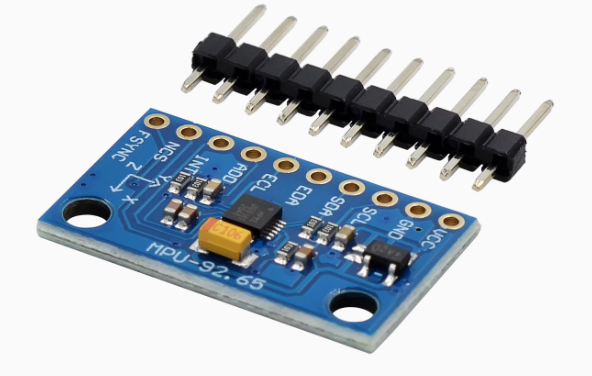
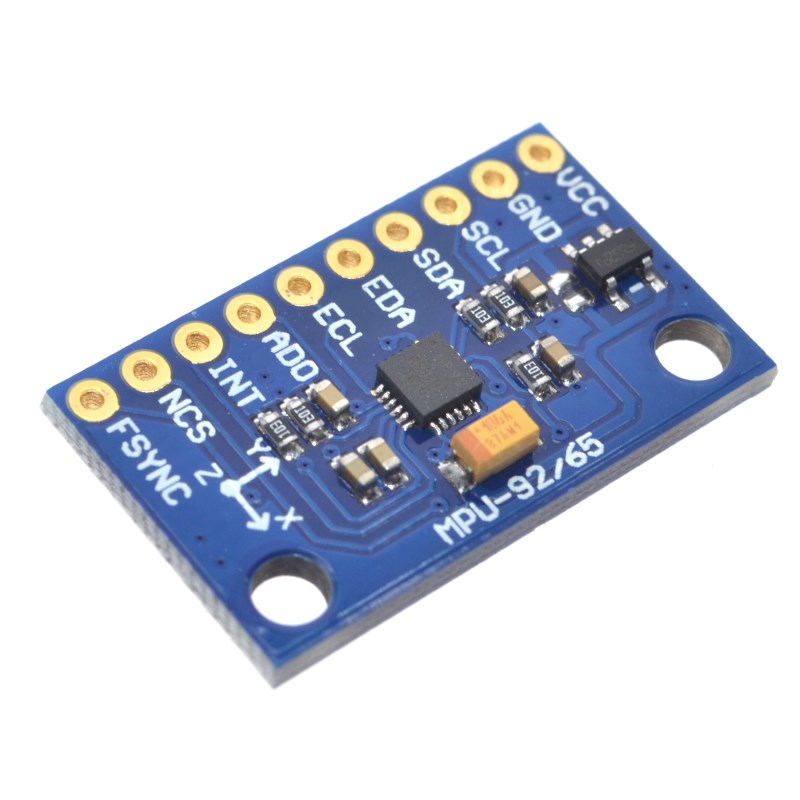
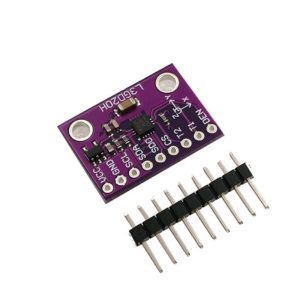
The GY-9250 module features a 10-pin configuration (2.54mm pitch). Pin labels may vary slightly between manufacturers; always verify the silkscreen on your specific board .
Pin Definitions
Interface Mode Selection
I2C Address Configuration
The I2C address is controlled by the AD0 pin :
Wiring Diagrams
I2C Mode (Recommended – Uses 2 pins):
SPI Mode (For higher data rates):
Note: The module is designed to be powered from 5V sources such as an Arduino. If you desire to power the module from 3.3V, you can bridge the solder jumper next to the voltage regulator to bypass the regulator .
Theory of Operation
How the MPU-9250 Works
The MPU-9250 integrates three MEMS (Micro-Electro-Mechanical Systems) sensors in a single package :
-
Gyroscope: Measures angular velocity (rate of rotation) around the X, Y, and Z axes using vibrating MEMS structures that respond to Coriolis forces.
-
Accelerometer: Measures linear acceleration (including gravity) using capacitive sensing elements that deflect under acceleration.
-
Magnetometer: Measures the Earth’s magnetic field using Hall-effect sensors with a magnetic concentrator, providing absolute heading reference .
The sensor outputs are digitized by 16-bit ADCs and can be read via I2C or SPI. The DMP (Digital Motion Processor) can perform sensor fusion to combine data from all three sensors, providing stable, drift-free 3D orientation (yaw, pitch, roll) without complex calculations on your main microcontroller .
Sensor Fusion Importance
Using a single sensor has limitations:
-
Gyroscope: Measures rate of rotation; integrating to get angle leads to drift over time.
-
Accelerometer: Cannot measure yaw (rotation around vertical axis) and is affected by linear acceleration.
-
Magnetometer: Provides absolute heading reference but is susceptible to magnetic interference.
Sensor fusion combines data from all three sensors to produce accurate, stable orientation. The DMP handles this fusion onboard, outputting quaternion or Euler angles directly.
Converting Raw Data to Physical Units
Gyroscope (Angular Velocity)
Raw gyroscope values must be divided by the sensitivity for the selected range:
Example: For ±2000°/s range, angular_rate (°/s) = raw_value / 16.4.
Accelerometer (Acceleration)
Raw accelerometer values must be divided by the sensitivity for the selected range:
Example: For ±2g range, acceleration (g) = raw_value / 16384.
Magnetometer (Magnetic Field)
Raw magnetometer values are converted to microtesla (µT) or Gauss:
Example: magnetic_field (µT) = raw_value × 0.6.
Usage Guide
Software Setup (Arduino IDE)
Step 1: Install Required Libraries
Several libraries support the MPU-9250. The most popular options include:
-
MPU9250 by hideakitai – Comprehensive, supports both I2C and SPI
-
MPU9250 by bolderflight – Well-documented, supports DMP features
-
mpu9250 by Electronic Cats – Simple and easy to use
Install via Arduino Library Manager:
-
Open Arduino IDE → Sketch → Include Library → Manage Libraries
-
Search for “MPU9250”
-
Install your preferred library
Step 2: I2C Address Verification
Before writing code, verify your sensor’s I2C address using this scanner:
#include <Wire.h>

void setup() {
  Wire.begin();
  Serial.begin(9600);
  Serial.println("I2C Scanner");
}

void loop() {
  byte error, address;
  int nDevices = 0;

  for(address = 1; address < 127; address++) {
    Wire.beginTransmission(address);
    error = Wire.endTransmission();

    if(error == 0) {
      Serial.print("I2C device found at address 0x");
      if(address < 16) Serial.print("0");
      Serial.println(address, HEX);
      nDevices++;
    }
  }

  if(nDevices == 0) Serial.println("No I2C devices found");
  delay(5000);
}
Expected output: Address 0x68 (or 0x69 if AD0 is pulled HIGH).
Step 3: Basic Test Sketch (Full 9-Axis Reading)
GY-9250 MPU-9250 Complete 9-Axis Read Example
Reads gyroscope, accelerometer, and magnetometer data
*/
#include <Wire.h>
#include <MPU9250.h>
MPU9250 mpu;
void setup() {
Serial.begin(115200);
Wire.begin();
delay(100);
if (!mpu.setup(0x68)) {
Serial.println("MPU-9250 sensor not found! Check wiring.");
while (1);
}
mpu.setGyroRange(2000);
mpu.setAccelRange(16);
Serial.println("GY-9250 MPU-9250 Ready (Full 9-Axis)");
Serial.println("---------------------------------------");
}
void loop() {
if (mpu.update()) {
float ax = mpu.getAccX();
float ay = mpu.getAccY();
float az = mpu.getAccZ();
float gx = mpu.getGyroX();
float gy = mpu.getGyroY();
float gz = mpu.getGyroZ();
float mx = mpu.getMagX();
float my = mpu.getMagY();
float mz = mpu.getMagZ();
float temp = mpu.getTemperature();
float heading = atan2(my, mx) * 180 / PI;
if (heading < 0) heading += 360;
float pitch = atan2(-ax, sqrt(ay * ay + az * az)) * 180 / PI;
float roll = atan2(ay, az) * 180 / PI;
Serial.print("Accel (g): ");
Serial.print(ax); Serial.print(", ");
Serial.print(ay); Serial.print(", ");
Serial.println(az);
Serial.print("Gyro (°/s): ");
Serial.print(gx); Serial.print(", ");
Serial.print(gy); Serial.print(", ");
Serial.println(gz);
Serial.print("Mag (µT): ");
Serial.print(mx); Serial.print(", ");
Serial.print(my); Serial.print(", ");
Serial.println(mz);
Serial.print("Heading: ");
Serial.print(heading);
Serial.print("°, Pitch: ");
Serial.print(pitch);
Serial.print("°, Roll: ");
Serial.println(roll);
Serial.print("Temperature: ");
Serial.print(temp);
Serial.println(" °C");
Serial.println("---------------------------------------");
}
delay(100);
}
Step 4: Using the Digital Motion Processor (DMP)
The DMP can perform sensor fusion to provide quaternion (3D orientation) output:
MPU-9250 DMP Example – Full 9-Axis Sensor Fusion
*/
#include <Wire.h>
#include <MPU9250_WE.h>
MPU9250_WE mpu = MPU9250_WE(&Wire);
void setup() {
Serial.begin(115200);
Wire.begin();
if (!mpu.init()) {
Serial.println("MPU9250 does not respond!");
while (1);
}
if (!mpu.enableDMP()) {
Serial.println("DMP could not be enabled!");
while (1);
}
Serial.println("DMP ready – Outputting orientation angles");
}
void loop() {
if (mpu.checkNewData()) {
xyzFloat angles = mpu.getAngles();
Serial.print("Yaw: ");
Serial.print(angles.x);
Serial.print("°, Pitch: ");
Serial.print(angles.y);
Serial.print("°, Roll: ");
Serial.println(angles.z);
}
delay(50);
}
Calibration for Accurate Orientation
For accurate heading and orientation, calibration is essential .
Gyroscope and Accelerometer Calibration
Place the sensor stationary on a level surface. The following calibration procedure is commonly used:
mpu.calibrateAccelGyro();
During calibration, the sensor should not be moved. This measures the zero-g offsets and bias errors .
Magnetometer Calibration
Magnetometer calibration compensates for hard-iron and soft-iron distortions caused by nearby magnetic materials (motors, wires, batteries). The typical procedure involves moving the sensor in a figure-eight pattern while the library collects min/max values:
Serial.println("Wave the device in a figure eight until it is finished");
mpu.calibrateMag();
After calibration, the calibration parameters can be saved and applied to future readings .
Calibration Parameters Output
After running calibration, you can retrieve the calibration parameters:
void print_calibration() {
  Serial.println("Accel bias [g]:");
  Serial.print(mpu.getAccBiasX() * 1000.f / (float)MPU9250::CALIB_ACCEL_SENSITIVITY);
  Serial.print(",");
  Serial.print(mpu.getAccBiasY() * 1000.f / (float)MPU9250::CALIB_ACCEL_SENSITIVITY);
  Serial.print(",");
  Serial.println(mpu.getAccBiasZ() * 1000.f / (float)MPU9250::CALIB_ACCEL_SENSITIVITY);

  Serial.println("Gyro bias [deg/s]:");
  Serial.print(mpu.getGyroBiasX() / (float)MPU9250::CALIB_GYRO_SENSITIVITY);
  Serial.print(",");
  Serial.print(mpu.getGyroBiasY() / (float)MPU9250::CALIB_GYRO_SENSITIVITY);
  Serial.print(",");
  Serial.println(mpu.getGyroBiasZ() / (float)MPU9250::CALIB_GYRO_SENSITIVITY);

  Serial.println("Mag bias [mG]:");
  Serial.print(mpu.getMagBiasX());
  Serial.print(",");
  Serial.print(mpu.getMagBiasY());
  Serial.print(",");
  Serial.println(mpu.getMagBiasZ());
}
Using the FIFO Buffer
The 512-byte FIFO buffer allows the sensor to store data samples, reducing host processor intervention. This is useful for low-power applications .
mpu.enableFIFO();
mpu.setFIFOEnabled(true);