Product Overview
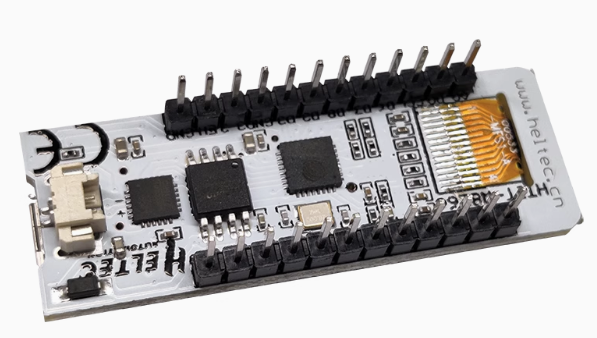
The NodeMCU ESP8266 with Integrated 0.91-inch OLED is a high-performance, Wi-Fi-enabled development board designed to simplify IoT prototyping by eliminating the need for external wiring. Unlike standard boards, this version features a built-in 128×32 blue OLED display directly on the PCB, allowing for real-time data visualization, status updates, and user interaction right out of the box.
Engineered with a breadboard-friendly “LoLin” footprint, it utilizes a high-efficiency non-module (on-board) chip design for a slimmer profile and better thermal management. This is the ultimate tool for developers who need to monitor sensor data, network signal strength, or system IP addresses without connecting a secondary monitor or computer.
Key Features
- Integrated Visual Interface: Features a high-contrast 0.91″ 128×32 OLED display connected via internal I2C (SDA/SCL), saving GPIO pins for other sensors.
- Compact “Non-Module” Design: The ESP8266 circuitry is integrated directly onto the PCB rather than using a pre-shielded module, offering a more streamlined and professional aesthetic.
- Dual-Core Functionality: Manage high-speed Wi-Fi communication while simultaneously running complex display logic.
- Modern Connectivity: Equipped with a USB-C interface (standard on this revision) for superior durability and higher power delivery compared to legacy Micro-USB.
- Ready for Deployment: Fully compatible with Arduino IDE, MicroPython, and NodeMCU (Lua), with extensive library support for the SSD1306 display driver.
- Breadboard Compatible: Pins are spaced perfectly for standard breadboards, making it ideal for rapid circuit testing and educational environments.