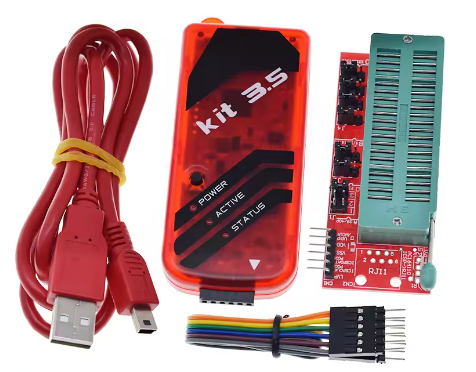
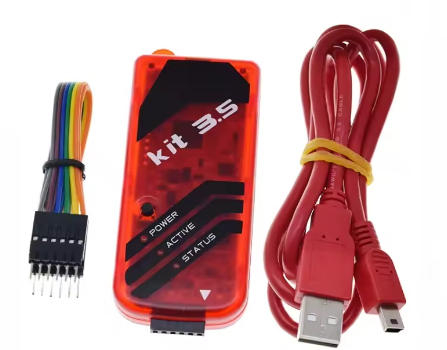
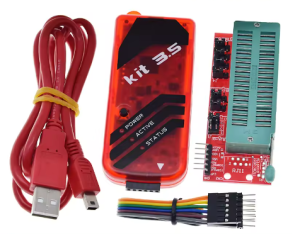
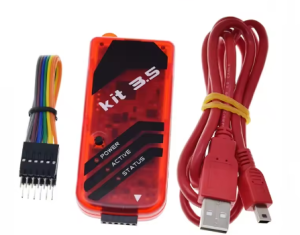
PIC KIT3.5 Offline Programmer & Debugger Offline/Programming/Emulator with ICD2

SKU: FA1059-3
PC Interface

USB 2.0 Full Speed (12 Mbps)

Connectivity

Standard 6-pin ICSP Header

Target Voltage (Vdd)

1.8 V – 5.5 V (±0.1V accuracy)

Programming Voltage (Vpp)

1.8 V – 14.0 V (Internal Boost)

Internal Memory

512 KB High-Speed Flash for Offline PTG

Status Indicators

Tri-color LED: Power (Green), Active (Blue), Status (Red/Yellow)

Device Support

All PIC/dsPIC families (8-bit, 16-bit, 32-bit)

Product Description
The PIC KIT3.5 represents the ultimate evolution of the classic PICkit series, specifically engineered to address the stability issues found in earlier versions. This ICD2 Enhanced Edition utilizes high-precision oscillators and reinforced power management circuits to provide the timing accuracy of a professional In-Circuit Debugger (ICD2) with the modern USB speed of the PICkit 3 series.
Designed for the 2026 embedded landscape, this tool supports the full range of Microchip’s PIC10, PIC12, PIC16, PIC18, PIC24, dsPIC, and PIC32 microcontrollers. Its defining feature is the Hardware Offline “Programmer-to-Go” capability, which allows production teams to load firmware onto the device’s internal memory and program target boards in the field or on a factory floor without a computer. This reduces the risk of source code exposure and simplifies the deployment process for business users.

Key Features
  • Enhanced ICD2 Emulation: Upgraded internal hardware provides more stable real-time debugging, fewer communication timeouts, and faster single-stepping compared to standard PICkit 3 clones.
  • True Offline Programming (PTG): Massive 512KB internal storage allows for reliable standalone programming. Simply press the physical button to flash the target board.
  • Self-Healing Firmware: Built-in “Anti-Brick” logic—if a firmware update is interrupted, the device can automatically recover its internal OS without needing an external programmer.
  • Wide Voltage Compatibility: Software-adjustable target voltage (1.8V to 5.5V) ensures safe operation for modern low-power IoT chips and legacy 5V systems.
  • Universal Toolchain Support: Seamlessly integrates with MPLAB X IDE and MPLAB IPE.
  • Industrial Protection: Features over-voltage, short-circuit, and ESD protection on the ICSP header to withstand rigorous industrial use.
Usage Instructions
  1. Software Setup: Install the latest MPLAB X IDE. The PIC KIT3.5 is recognized as a “PICkit 3” in the hardware tool selection menu.
  2. Hardware Connection: Connect the unit to your PC via USB. Connect the ICSP cable to the target board. Important: Align Pin 1 (triangle mark) with the MCLR pin on your target board.
  3. Real-Time Debugging: In MPLAB X, set breakpoints in your code and use the “Debug” button to step through instructions and inspect memory registers in real-time.
  4. Enabling Offline Mode (Programmer-to-Go):
    • Open MPLAB IPE.
    • Load your project HEX file.
    • Go to Settings > Programmer-to-Go.
    • Download the image to the device. You can now disconnect the USB and use a 5V power source (like a power bank) to program targets by pressing the button on the unit.
  5. Target Power: If your board is not self-powered, enable “Power Target Circuit from Tool” in the software settings (limited to 30mA).
Q: What makes the "3.5" version different from the standard PICkit 3?

The 3.5 edition is a hardware revision that uses higher-quality components. It fixes the common “Target Device ID (0x0)” errors caused by poor voltage regulation in older clones and features significantly more stable firmware for 2026 operating systems.

Q: Can this unit supply power to my development board?

Yes, it can provide up to 30mA at the selected voltage. This is perfect for the MCU itself, but if your board has motors, relays, or large displays, you must use an external power supply.

Q: Is this tool suitable for business procurement?

Absolutely. Business customers prefer the PIC KIT3.5 because the Programmer-to-Go feature allows factory operators to flash chips without access to the raw source code or a PC, protecting company intellectual property.

Q: Does it support the newer AVR or SAM microcontrollers?

No. This tool is a specialist for the PIC/dsPIC family. For 2026 projects requiring AVR or SAM support, we recommend the MPLAB PICkit 4 or PICkit 5.

Q: My Status LED is flashing Red. What should I do?

A red flashing LED usually indicates a voltage mismatch or a short circuit on the ICSP header. 1) Verify pin alignment. 2) Ensure the target voltage setting in MPLAB IPE matches your chip’s datasheet.