Product Overview
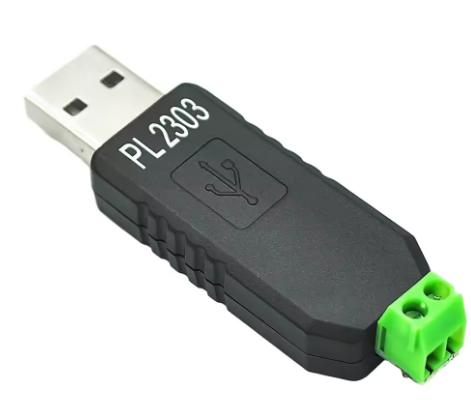
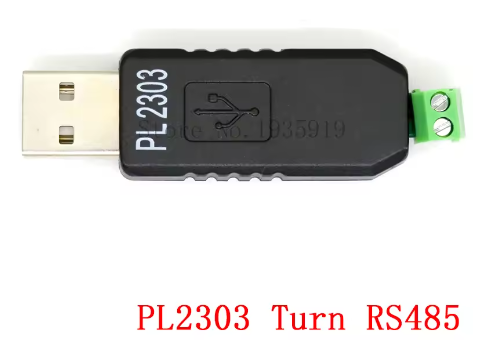
The PL2303 USB to RS485 Converter Adapter is a professional-grade communication tool designed to connect modern computers with RS485 industrial networks. Powered by the reliable Prolific PL2303 series chipset (available in HX, HXD, or GC variants), this converter provides a stable and efficient solution for interfacing with RS485 devices such as PLCs, Modbus meters, access control systems, and industrial automation equipment.
RS485 is the backbone of industrial communication, allowing long-distance transmission (up to 1200 meters) and supporting multi-drop networks with up to 32 devices on a single bus . This adapter uses differential signaling (A and B lines) to provide superior noise immunity, ensuring reliable data transfer even in electrically noisy factory environments.
The PL2303 chip is widely recognized for its excellent driver support across multiple operating systems, particularly for legacy versions like Windows XP and Windows 7 . While the HX/GC versions have certain driver restrictions on Windows 11, the HXD variant remains highly compatible with Windows 10 and 11 . This converter is self-powered via USB, requiring no external power supply for most applications .
Key Features
-
Prolific PL2303 Chipset: Available in HX, HXD, or GC variants, offering professional-grade stability and broad driver support
-
Long-Distance Transmission: RS485 differential signaling supports communication distances up to 1200 meters (4000 feet), ideal for industrial and field installations
-
Plug-and-Play Operation: Self-powered from USB bus; appears as a standard virtual COM port – no complex configuration required
-
Automatic Data Direction Control: Hardware handles RS485 half-duplex direction switching seamlessly; no software handshaking needed
-
Supports Legacy Windows: Full compatibility with Windows XP and Windows 7 using dedicated driver versions (V260 for HX chips)
-
High-Speed Communication: Baud rates from 75 bps up to 6 Mbps (chip capability), with practical rates up to 230 kbps over shorter distances
-
Multi-Device Support: Each converter can connect up to 32 RS485 devices in a multi-drop network (daisy-chain configuration)
-
Built-in Protection: Features self-recovery fuse, TVS diodes for surge protection, and 2.5kV isolation on industrial-grade models
-
Indicator LEDs: Status LEDs provide real-time visual feedback for power (PWR), transmit (TXD), and receive (RXD) activity
-
Cross-Platform Support: Compatible with Windows (XP through 11), Linux, macOS, and Android
Technical Specifications
Pinout & Connection Guide
RS485 Terminal Block
Important Wiring Rules for RS485
-
Connection: Connect A to A and B to B across all devices on the bus. This is a straight-through connection, not a crossover .
-
Ground: For distances over 100m or in electrically noisy environments, connect the GND terminals of all devices to provide a common reference voltage.
-
Termination: To prevent signal reflections, place a 120Ω resistor between A and B at the two farthest ends of the cable .
-
Cable Type: Use twisted-pair shielded cable (CAT5e or dedicated RS485 cable) for best noise immunity.
Wiring Examples
Connecting to a single RS485 device:
Converter Terminal      Device Terminal
    A       ───────────      A / D+
    B       ───────────      B / D-
    GND     ───────────      GND (if available)
Multi-drop network (daisy-chain):
-
Connect A to A across all devices
-
Connect B to B across all devices
-
Connect GND in a star or daisy-chain configuration
-
Place 120Ω termination resistors at the physical ends of the cable only
Usage Guide
Driver Installation
The PL2303 converter requires specific driver versions depending on the chip variant and operating system . Windows 10/11 often install drivers automatically, but manual installation may be needed.
⚠️ Important Compatibility Note: USB-Serial cables with PL2303 HX (non-HXD) chips are not supported on Windows 11 . The HXD and GC versions are required for Windows 10 and 11 compatibility .
Installation Steps (Windows 7/XP):
-
Download the correct driver: Based on your chip version and OS :
-
Disconnect the device: Unplug the converter from USB before installation .
-
Run the installer: Execute the downloaded driver installer as Administrator.
-
Connect the device: Plug the converter into a USB port. The driver will install automatically.
-
Verify installation: Open Device Manager → Ports (COM & LPT). You should see “Prolific USB-to-Serial Comm Port (COMx)” .
Troubleshooting Driver Issues:
-
If you see a yellow exclamation mark (Error Code 10), this indicates driver incompatibility, often due to counterfeit chips or improper driver versions .
-
Solution: Uninstall the existing driver (check “Delete driver software”), then install the correct version from the table above .
-
For Windows 11 with HXD chips, ensure you are using driver version V4.0.0 or later .
Changing COM Port Number
To change the assigned COM port (e.g., from COM10 to COM2 if your software only supports low port numbers):
-
Open Device Manager → Ports (COM & LPT)
-
Right-click “Prolific USB-to-Serial Comm Port” → Properties
-
Port Settings → Advanced
-
Select a new COM port number from the dropdown list
-
Restart your computer for the change to take effect
Testing the Converter
Once the driver is installed, you can test the converter using any serial terminal software (e.g., Putty, RealTerm, or Arduino Serial Monitor):
-
Loopback test: Connect the A and B terminals together using a short wire.
-
Open a serial terminal, select the converter’s COM port, and set the baud rate (e.g., 9600).
-
Type characters – they should be echoed back to the screen if the loopback is working .
Practical Communication Notes
-
Baud Rate vs. Distance: Maximum transmission distance decreases as baud rate increases :
-
0-10 meters: Up to 230 kbps
-
300 meters: Up to 115 kbps
-
1200 meters: Up to 57.6 kbps
-
5000 meters: 9600 bps
-
Anti-interference Performance: PL2303-based converters have been found to have poorer anti-interference performance compared to other chips like Silabs or CP2102 in industrial environments with significant noise .
-
Grounding: In noisy environments, ensure a common ground is established between all devices on the RS485 bus to maintain signal integrity .
Q: Does this converter support Windows XP and Windows 7?
Yes. The PL2303 chip has dedicated driver versions for legacy operating systems. For HX chips, use driver version V260 (PL23XX_Prolific_DriverInstaller_V260) , which fully supports Windows XP and Windows 7 .
Q: Why am I getting an Error Code 10 (yellow exclamation mark) in Device Manager?
This indicates a driver incompatibility. Common causes include counterfeit chips or using incorrect driver versions . Solution: Uninstall the existing driver, download the correct version from the table above (V260 for HX chips on Win7/XP, or V400 for HXD/GC chips), and reinstall .
Q: Is this converter compatible with Windows 11?
Yes, but only with HXD or GC chip versions. The older HX (non-HXD) chips are not supported on Windows 11 . Use driver version PL23XX_Prolific_DriverInstaller_V400 for compatible chips .
Q: Can I use this converter with a 3.3V logic microcontroller like ESP32?
This converter outputs RS485 differential signals (A/B lines), not TTL logic levels. To interface with an ESP32’s UART, you would need an additional RS485 transceiver (e.g., MAX485) to convert between TTL and RS485.
Q: What is the maximum number of devices I can connect?
RS485 standard supports up to 32 devices (unit loads) on a single segment . With modern 1/8-unit-load transceivers, you can theoretically connect up to 256 devices. For larger networks, use RS485 repeaters.
Q: How far can I extend the RS485 cable?
Up to 1200 meters (approximately 4000 feet) at lower baud rates (e.g., 57.6 kbps). At higher speeds, the maximum distance decreases .
Q: Do I need termination resistors?
Only if this converter is placed at the physical end of the RS485 cable line. If it is in the middle or connected to a short cable (under 10 meters), the termination can remain OFF .
Q: Why is my Modbus communication failing or producing CRC errors?
Common causes:
-
Wiring Polarity: Ensure A connects to A and B to B across all devices .
-
Baud Rate Mismatch: All devices must use identical settings (baud rate, data bits, parity, stop bits).
-
Termination: For long cables (>100m), you must have 120Ω termination resistors at both ends .
-
Ground Connection: Connect GND terminals to establish a common reference voltage .
Q: Can I use this converter for Modbus RTU communication?
Yes. This converter is ideal for Modbus RTU networks. It handles the physical layer (RS485), while Modbus protocol is handled by your software (e.g., Modbus poll software, libmodbus, pySerial). The converter automatically manages the half-duplex direction switching .
Q: What is the difference between PL2303-HX, HXD, and GC?
-
PL2303-HX: Older chip version, limited to Windows 7/XP; not supported on Windows 11
-
PL2303-HXD: Enhanced version with better Windows 10/11 support; uses driver V400
-
PL2303-GC: Latest version with full Windows 11 compatibility; also uses driver V400