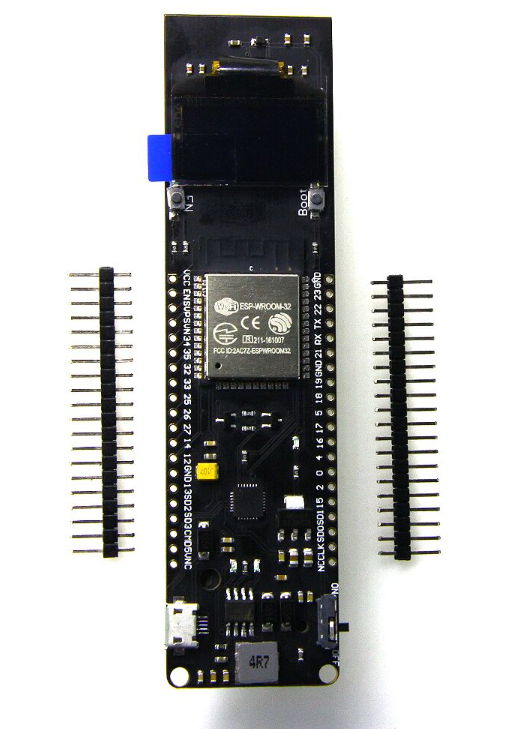
The Wemos ESP32 18650 Battery Module is a robust, self-contained IoT development platform designed for maximum portability and endurance. It integrates the powerful ESP32-WROOM-32 microcontroller, a built-in 18650 battery holder, and an onboard 0.96-inch OLED display, creating an “install and forget” solution for remote sensor applications.
Long Description
This module solves the common challenge of powering remote IoT projects. By integrating a standard 18650 Li-ion battery holder and a robust charging circuit (via Micro-USB), the Wemos board can operate autonomously for extended periods, making it ideal for solar-powered weather stations, remote agricultural sensors, or long-term data loggers. The onboard 0.96″ 128×64 pixel OLED screen provides immediate, clear local feedback on battery status, sensor readings, or connectivity strength, which is essential during field deployment.
For business purchasers, this provides a durable, reliable hardware foundation that streamlines the development of commercial off-grid solutions, minimizing maintenance costs. For individual makers, it offers an unparalleled balance of power, wireless connectivity (Wi-Fi and Bluetooth), and visual feedback, making sophisticated, battery-powered projects highly achievable.
Key Features
- Integrated Power Solution: Built-in 18650 battery holder and charging circuit with LED indicators (Red: Charging, Green: Charged).
- Onboard Visual Feedback: 0.96″ I2C OLED (SSD1306 driver) for immediate display of data.
- High-End Connectivity: Dual-mode Wi-Fi and Bluetooth 4.2 capability for versatile network integration.
- Solar Input Ready: Features a separate pin header for connecting a solar panel for continuous charging in remote areas.
- Robust & Efficient: Designed for low power consumption in deep sleep modes to maximize battery life.