Product Overview
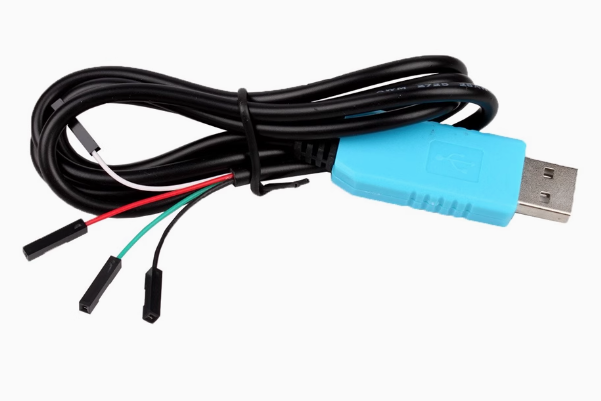
The PL2303GL Download Cable is a modern, highly compatible USB to TTL serial converter cable designed to bridge the gap between your computer’s USB port and embedded systems requiring serial communication . Based on the advanced PL2303GL chip from Prolific Technology, this cable provides a simple plug-and-play solution for programming, debugging, and communicating with microcontrollers, routers, and other UART-enabled devices .
What sets the PL2303GL apart is its enhanced operating system compatibility. The PL2303GL is designed to replace the discontinued PL2303TA chip and offers native support for Windows 11 and the latest operating systems, solving the driver compatibility issues that plagued older PL2303 variants . The chip is fully compliant with USB Specification v2.0 (Full-Speed) and features an on-chip USB 1.1 transceiver and 5V to 3.3V regulator .
Unlike traditional USB-to-TTL adapters that come as bare boards, this cable integrates the conversion electronics directly into the USB connector housing, with four color-coded flying leads at the end. This design makes it exceptionally easy to connect to your target device using jumper wires or direct soldering .
The PL2303GL is optimized for mobile and embedded solutions, providing a compact and easy-to-adapt solution for any connector and handheld device. With very low power consumption in operation or suspend mode, it can be powered directly from the connected device’s USB bus .
Key Features
-
Modern PL2303GL Chipset: Based on the advanced Prolific PL2303GL USB-to-UART bridge controller, offering full USB 2.0 compliance and enhanced driver compatibility .
-
Native Windows 11 Support: Designed to replace the discontinued PL2303TA with full support for Windows 11 and other modern operating systems .
-
Pre-stripped Color-coded Wires: Four clearly identified flying leads (Red, Black, White, Green) for easy connection—no soldering required for basic use .
-
5V Power Output (500mA): Red wire provides 5V at up to 500mA from the USB port, capable of powering low-energy target devices directly .
-
3.3V Logic Level Signaling: RX and TX pins operate at 3.3V levels, compatible with most modern microcontrollers and single-board computers .
-
On-chip 5V to 3.3V Regulator: Built-in voltage regulation eliminates the need for external level shifters in many applications .
-
High-Performance Data Buffers: 1024-byte bi-directional data buffers (768-byte receive / 256-byte transmit) for reliable high-speed communication .
-
Industrial Temperature Range: Rated for operation from -40°C to +85°C, suitable for demanding environments .
Technical Specifications
Pinout & Connection Guide
The cable features four color-coded wires at the output end :
Important Wiring Notes:
-
The White wire (RXD) should be connected to the TX pin of your target device
-
The Green wire (TXD) should be connected to the RX pin of your target device
-
Always establish a common ground by connecting the Black wire (GND) to your target’s ground
Usage Guide
Driver Installation
The PL2303GL supports modern operating systems with improved driver compatibility :
Windows 11:
-
Native driver included in Windows 11 version 24H2 and newer
-
For earlier Windows 11 versions, download the driver from Prolific USA website
Windows 10/8/7:
macOS:
Linux:
STC Microcontroller Programming
The PL2303GL is particularly well-suited for STC microcontroller programming . Connect as follows:
For STC Programming (Cold Start Required):
-
In STC-ISP software, select the correct COM port
-
Load your HEX file
-
Click “Download/Program”
-
Power off the target board (cold start)
-
Power on the target board within about 2 seconds
-
Wait for “Operation Success” message
Raspberry Pi Serial Console
To access Raspberry Pi’s serial debug console :
After connection, configure terminal software to 115200 baud, 8 data bits, 1 stop bit, no parity.
Router / Firmware Recovery
The cable is popular for accessing router console ports for firmware recovery or OpenWrt installation. The standard connection is:
-
GND to GND
-
Green (TX) to Target RX
-
White (RX) to Target TX
Warning: Do not connect the Red (5V) wire unless you are certain the device expects power from this port.
Loopback Test
To verify the cable is functioning correctly:
-
Connect the Green (TXD) and White (RXD) wires together
-
Open a serial terminal on the cable’s COM port
-
Type characters—they should be echoed back
-
This confirms both transmit and receive paths are working
Q: What is the difference between PL2303GL and PL2303TA?
The PL2303GL is the modern replacement for the discontinued PL2303TA . Key advantages include:
-
Better OS compatibility: Native support for Windows 11
-
Improved driver stability: Resolves driver signature issues affecting older PL2303 chips
-
On-chip 96MHz clock generator: Eliminates external crystal requirement
-
Same pin-compatible design: Easy drop-in replacement
Q: Does this cable support Windows 11?
Yes. The PL2303GL has native driver support in Windows 11 version 24H2 and newer, making it the ideal choice for modern systems .
Q: What baud rates does the PL2303GL support?
The flexible baud rate generator can be programmed to produce any rate between 1 bps and 115 kbps for standard operation, with support up to 6 Mbps in high-performance modes .
Q: Is this cable compatible with macOS?
Yes, but the driver is not included by default. You must download and install the driver from the Prolific USA website .
Q: Can this cable power my target device?
Yes, with caution. The red wire provides 5V at up to 500mA from the USB port . This is sufficient for low-power devices like microcontrollers but not for motors, servos, or devices drawing more than 500mA.
Q: Can I use this for Arduino reprogramming?
With limitations. The cable does not include a DTR (Data Terminal Ready) signal line, which is required for automatic reset of Arduino boards during sketch upload. It will work for serial communication and debugging, but for automatic sketch upload, you may need to manually reset the board.
Q: My computer doesn't recognize the device. What should I do?
Follow this checklist:
-
Ensure drivers are properly installed
-
Try a different USB port
-
Check Device Manager for yellow warning indicators
-
On Windows 10/11, older PL2303 chips may require driver signature adjustments—the PL2303GL is designed to avoid these issues
Q: How do I install the driver on Windows?
Download the driver from Prolific website, run the installer as Administrator, then connect the cable . The device should appear as “Prolific USB-to-Serial Comm Port” in Device Manager .
Q: Why are the TX/RX LEDs not blinking?
If the cable has status LEDs and they remain off, verify:
-
Drivers are properly installed
-
Correct COM port is selected in terminal software
-
Both ends of the communication link are correctly connected
Q: I'm getting garbage characters in my terminal. What's wrong?
Check the following:
-
Ensure baud rate matches your target device’s configuration
-
Verify data bits, stop bits, and parity settings (typically 8,1,N)
-
Check that TX and RX connections are not swapped
-
Try a lower baud rate to test basic communication
Q: What can I build with this PL2303GL download cable?
Popular applications include :
-
STC microcontroller programming and debugging
-
Raspberry Pi console access without a monitor
-
Router firmware recovery for OpenWrt, DD-WRT
-
Microcontroller programming: STM32, ESP8266, ESP32
-
GPS module interfacing for computer-based navigation
-
Industrial equipment communication via TTL serial ports
-
Router/switch console access for configuration
Q: What is the 4-pin connector version for?
The 4-pin version with color-coded wires provides maximum flexibility, allowing easy connection to a wide variety of target devices using standard jumper wires .
Q: Is there a way to add DTR to this cable for Arduino support?
Not directly. For Arduino programming requiring auto-reset, consider using an adapter specifically designed with a DTR signal line.
Q: Does this cable work with 5V logic devices (classic 5V Arduino Uno)?
The PL2303GL’s logic signals are 3.3V . While a 3.3V “HIGH” signal is often sufficient for a 5V target to recognize, the 5V target’s TX signal may exceed the 3.3V tolerance. For long-term reliability with 5V logic, a level shifter is recommended.