Product Overview
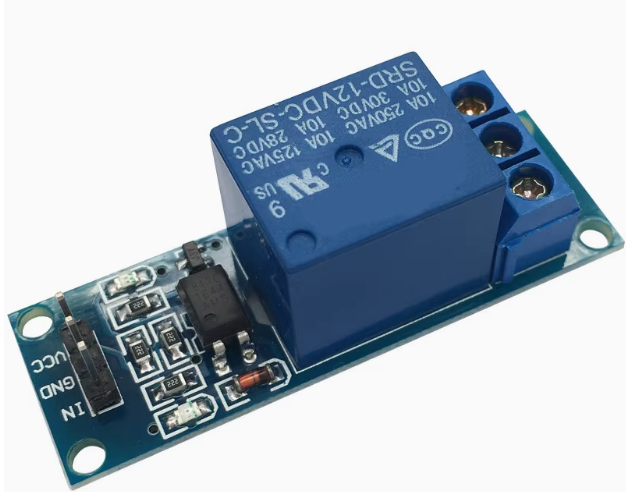
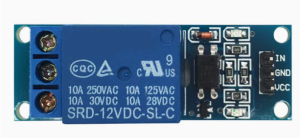
The 12V Single Channel Optocoupler Isolated Relay Module is a robust, high-performance control module designed for reliable switching of high-power AC or DC loads from a 12V control system. Whether you’re working with automotive electronics, industrial control panels, PLC systems, or 12V battery-powered applications, this module provides a safe and efficient interface between your 12V logic and the high-voltage load side .
At its core is a high-quality electromagnetic relay capable of switching loads up to 10A at 250V AC or 10A at 30V DC. The module features optocoupler isolation, which creates a complete electrical barrier between your control circuit and the potentially hazardous load side. This isolation protects your sensitive control electronics from dangerous voltage spikes, back-EMF from motors, and electrical noise common in industrial environments .
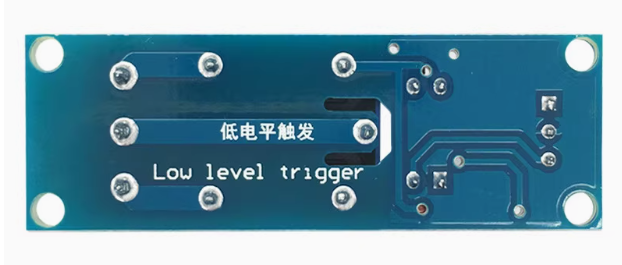
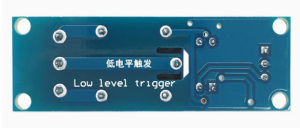
Designed with a low-level trigger, this module is activated when you apply a LOW signal (0V) to the input pin. This default behavior ensures that the relay remains off during power-up or if the control signal is lost, preventing accidental activation of connected devices . An onboard status LED provides clear visual confirmation of relay operation, and the module’s compact design allows for easy integration into control cabinets, breadboards, or custom enclosures.
Key Features
-
Optocoupler Isolation: Provides complete electrical isolation between the control side (12V logic) and the load side (up to 250V AC), protecting your controller from voltage spikes and electrical noise
-
High Load Capacity: SPDT relay contacts rated for 10A at 250V AC or 10A at 30V DC, suitable for controlling motors, solenoids, lighting, pumps, and industrial equipment
-
Low Level Trigger: The relay activates when the IN pin is pulled LOW (0V). This “active LOW” design enhances safety—the relay remains off during power-up or if the control signal is lost
-
12V DC Operation: Designed for 12V control systems, making it ideal for automotive applications, PLCs, industrial controllers, and battery-powered projects
-
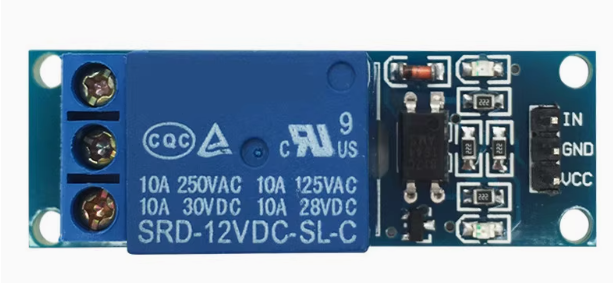
SPDT Contact Configuration: Provides Common (COM), Normally Open (NO), and Normally Closed (NC) terminals for maximum wiring flexibility
-
Clear Status Indicators: Onboard LEDs provide visual feedback: a power LED (green) lights when the module is powered, and a relay status LED (red) illuminates when the relay is activated
-
Easy 3-Pin Control Interface: Standard header with VCC (12V), GND, and IN (control signal) allows direct connection to microcontrollers, PLCs, or manual switches
-
Compact and Durable: Small form factor with mounting holes for secure installation. The isolation slot between control and load areas enhances safety
Technical Specifications
Pinout & Interface Guide
Input Side (Control Interface)
Output Side (Load Terminals)
Status LEDs
Usage Guide
Wiring Instructions
IMPORTANT: Always disconnect mains power before wiring high-voltage loads.
Basic Connection (Control Side)
Load Connection (AC Example)
-
Connect the Live (L) wire from your AC source to the COM terminal
-
Connect the load (lamp, fan, motor) to the NO terminal
-
Connect the load’s Neutral (N) wire directly to the AC source neutral
Load Connection (DC Example)
-
Connect the positive (+) supply to the COM terminal
-
Connect the load’s positive wire to the NO terminal
-
Connect the load’s negative wire directly to the power supply ground
Control Logic
Since this module is low-level triggered, the relay behavior is as follows:
Example Arduino Control (with 12V External Supply)
Note: Most Arduino boards operate at 5V, but the relay module requires 12V for the coil. Use an external 12V power supply for the relay, and connect the signal pin directly to the Arduino digital output (5V logic). The 5V HIGH signal (5V) is sufficient to turn the relay off because the trigger threshold is typically around 2-3V .
const int relayPin = 7;
void setup() {
pinMode(relayPin, OUTPUT);
digitalWrite(relayPin, HIGH);
}
void loop() {
digitalWrite(relayPin, LOW);
delay(5000);
digitalWrite(relayPin, HIGH);
delay(5000);
}
Example PLC / 24V System Interface
When using with a 24V PLC or industrial controller, the 12V relay module can be controlled via an open-collector output or relay contact. Ensure the control signal does not exceed the module’s input voltage limits.
Example MicroPython Code (ESP32 / Raspberry Pi Pico)
from machine import Pin
import time
relay = Pin(7, Pin.OUT)
relay.value(1)
while True:
relay.value(0)
time.sleep(5)
relay.value(1)
time.sleep(5)
Important Considerations
-
Power Supply: The module requires a stable 12V DC supply capable of providing at least 100mA (the relay coil draws approximately 30-40mA when active). For automotive applications, ensure the supply voltage stays within the module’s operating range (typically 10V–14V) .
-
Control Signal: The module is designed for 12V logic, but it can also be controlled by 5V microcontrollers (like Arduino). The 5V HIGH signal (5V) is sufficient to deactivate the relay, as the threshold is typically around 2-3V. For 3.3V controllers, ensure the HIGH signal (3.3V) reliably deactivates the relay—testing is recommended.
-
Inductive Loads: For motors, pumps, or solenoids, add a flyback diode across the load to protect the relay contacts from voltage spikes.
-
Default State: The low-level trigger design means the relay stays OFF when the IN pin is HIGH or unconfigured, preventing unwanted activation during power-up .
Q: What is the difference between low-level trigger and high-level trigger?
Low-level trigger means the relay activates when the IN pin is pulled LOW (0V). High-level trigger means the relay activates when the IN pin is HIGH (positive voltage). This module is low-level trigger, which is safer because the relay remains off during power-up or if the control signal is lost .
Q: What is the maximum load this relay can handle?
The contacts are rated for 10A at 250V AC or 10A at 30V DC. For inductive loads like motors, it is recommended to derate to 5A–7A to account for startup surges .
Q: Can I control this 12V relay module with a 5V Arduino?
Yes. The module uses optocoupler isolation, so the control side can accept lower voltage logic. A 5V Arduino output (HIGH = 5V) is sufficient to turn the relay off. When the Arduino pin is LOW (0V), the relay activates. No level shifter is required .
Q: Can I control this relay with a 3.3V microcontroller like ESP32?
Usually yes, but testing is recommended. The optocoupler typically activates when the input voltage is low. For deactivation (relay OFF), the input needs to be HIGH enough to prevent current flow. 3.3V may be sufficient, but if the threshold is higher, you may need a small NPN transistor buffer or level shifter .
Q: What is the purpose of the optocoupler?
The optocoupler provides electrical isolation between the control circuit and the high-voltage load. This protects your sensitive control electronics from voltage spikes, back-EMF, and electrical noise .
Q: What power supply do I need for this module?
The module requires a stable 12V DC power supply capable of providing at least 100mA. The relay coil draws approximately 30-40mA when active, plus a small quiescent current .
Q: Why does the relay click but my load doesn't turn on?
This indicates the relay is activating but the load circuit is incomplete. Check:
-
The load is correctly wired between COM and NO (or COM and NC)
-
The load’s neutral/ground is connected correctly
-
The load itself is functional
-
The load’s current does not exceed the relay’s 10A rating
Q: The relay clicks when I power on my controller. Why?
During power-up, microcontroller pins may briefly float or be in an undefined state. With a low-level trigger module, this should not activate the relay because the pin needs to be pulled LOW. Adding a 10kΩ pull-up resistor on the IN pin to 12V can ensure the relay remains OFF during startup
Q: Can I use this relay with a 24V automotive system?
Not directly. This module is designed for 12V operation. Using a 24V supply may damage the module. For 24V systems, consider our 24V relay modules.
Q: Can I use this relay for 220V AC applications?
Yes. The contacts are rated for 250V AC, which is suitable for 220V/240V systems. Ensure proper insulation and clearance between the control and load sides for safety .
Q: The module's status LED lights up but the relay doesn't click. What's wrong?
The LED indicates the control signal is reaching the optocoupler. If the relay doesn’t click, check:
-
The VCC power supply is stable at 12V
-
The power supply can provide enough current (at least 100mA)
-
The relay itself may be faulty (though rare)
Q: Can I use multiple relay modules with a single microcontroller?
Yes. Connect each module’s VCC and GND in parallel to the same 12V supply (ensure the supply can handle the total current), and connect each IN pin to a separate digital output pin on your controller.
Q: What can I build with this 12V relay module?
Popular applications include:
-
Automotive: 12V lighting, window controls, power locks, fan control
-
Industrial control: PLC outputs, motor control, conveyor systems
-
Home automation: Lighting control, appliance switching
-
Security systems: Alarm triggers, access control
-
HVAC systems: Fan control, thermostat switching
-
Solar power systems: Battery switching, panel control
Q: Can I use this relay with a 12V automotive battery?
Yes. The 12V coil voltage is perfectly suited for automotive applications. Ensure the module is protected from moisture and vibration when installed in vehicles .
Q: Is this module suitable for controlling a pump or motor?
Yes, with derating. For inductive loads like motors, it is recommended to operate at 50–70% of the rated contact current (5A–7A) to account for startup surges. Adding a flyback diode across the load is highly recommended to protect the relay contacts .
Q: Can I use this module without a microcontroller?
Yes. You can trigger the relay by manually connecting the IN pin to GND (to activate) or leaving it disconnected (to deactivate). This can be done with a simple push button or toggle switch connected between IN and GND .