Product Overview
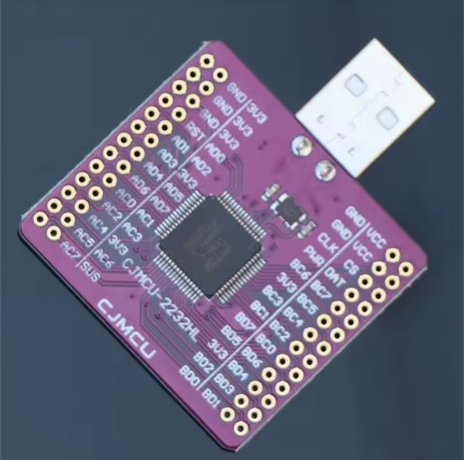
The CJMCU-2232 FT2232HL Module is a professional-grade, multi-protocol USB bridge based on FTDI’s 5th-generation FT2232HL chip . This powerful interface converter is designed to bridge USB 2.0 High-Speed (480Mbps) connectivity to a wide range of industry-standard serial and parallel interfaces, making it an indispensable tool for hardware developers, embedded engineers, and electronics enthusiasts .
Unlike simpler single-protocol adapters, the CJMCU-2232 leverages the FT2232HL’s dual Multi-Protocol Synchronous Serial Engine (MPSSE) to provide two independent, configurable channels . This allows you to combine functionalities – such as JTAG debugging on one channel and UART serial communication on the other – through a single USB connection. The entire USB protocol is handled on-chip, requiring no USB-specific firmware programming .
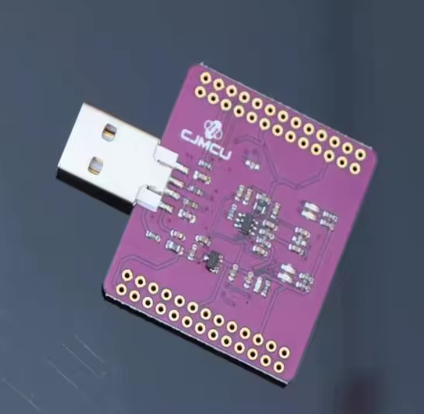
Whether you need a high-speed JTAG debugger for FPGA/ARM development, a logic analyzer, a multi-interface programmer, or simply a dual-port USB to RS232 converter, the CJMCU-2232 offers a compact, all-in-one hardware solution. The board breaks out almost all of the FT2232HL’s 64 pins to accessible headers, allowing you to customize its functionality for virtually any project .
Key Features
-
FTDI FT2232HL Chipset: 5th generation USB 2.0 High Speed (480Mb/s) to multipurpose UART/FIFO IC .
-
Dual Configurable Channels: Features two independent channels, each configurable as UART, FIFO, JTAG, SPI, I2C, or RS232 .
-
Multi-Protocol Synchronous Serial Engine (MPSSE): Simplifies the design of synchronous serial protocols (USB to JTAG, I2C, SPI, or bit-bang) .
-
High Data Transfer Rates: Supports up to 12Mbaud for UART and up to 40 Mbytes/sec for synchronous FIFO mode .
-
Breakout Design: Most FT2232HL pins are accessible via headers, providing excellent flexibility for custom interfacing and development .
-
Configurable EEPROM: Includes an onboard 93C46 EEPROM for customizing USB descriptors (VID, PID, serial number) and pin configuration .
-
3.3V I/O Logic: Native 3.3V logic levels, with 5V tolerant inputs for certain interfaces.
-
Onboard Oscillator: Uses a 12MHz crystal for accurate timing generation .
-
Cross-Platform Compatibility: Fully supported by FTDI’s VCP and D2XX drivers for Windows, Linux, and macOS .
Technical Specifications
Pinout & Interface Guide
The CJMCU-2232 module breaks out the FT2232HL’s 64-pin LQFP package to accessible pin headers and connectors . The two main ports are designated Channel A (ACBUS) and Channel B (BDBUS).
Power & USB Connector
Channel A (ACBUS)
Channel B (BDBUS)
Control & Status Pins
Usage Guide
Driver & Software Installation
To use the CJMCU-2232, you need to install FTDI’s Virtual COM Port (VCP) or D2XX drivers .
-
Download Driver: Visit the official FTDI Chip website (www.ftdichip.com) and download the latest drivers for your operating system (Windows, Linux, or macOS) .
-
Install: Run the installer or follow the OS-specific instructions.
-
Verify: Connect the module to your PC via USB. In Device Manager (Windows), you should see two new “USB Serial Ports” (COMx) appear.
Using as a Dual UART (Standard Mode)
In its default configuration, the FT2232HL enumerates as two standard COM ports.
-
Identify Ports: Note the COM port numbers assigned to Channel A and Channel B.
-
Connect: Wire the ADBUS and ACBUS pins of Channel A to your first target device, and BDBUS pins of Channel B to your second target device.
-
Communicate: Open two terminal applications (e.g., PuTTY or CoolTerm) and connect to each COM port independently.
Using as a JTAG Debugger (OpenOCD)
For FPGA or ARM development, the FT2232H is an industry-standard JTAG controller .
-
Configure Mode: Use the ftdi_eeprom tool or FT_Prog to program the onboard 93C46 EEPROM to configure the device for JTAG mode .
-
Connect: Wire the JTAG signals (TCK, TMS, TDI, TDO) from the ACBUS or BDBUS pins to your target device.
-
Software: Use OpenOCD (Open On-Chip Debugger) with a configuration file targeting the FT2232HL. Example command: `openocd -f interface/ftdi/…
Using with MPSSE (SPI/I2C)
The MPSSE engine allows bit-banging of synchronous serial protocols .
-
LibMPSSE: FTDI provides the LibMPSSE library, which simplifies communication with SPI and I2C devices through high-level API calls.
-
Python: The popular pyftdi library provides Python bindings for controlling the FT2232H’s GPIO, SPI, I2C, and JTAG functions.
-
Command Line: Tools like ftdi_gpio can be used to toggle pins for testing and basic control.
Configuring with FT_Prog
The onboard 93C46 EEPROM is programmable in-circuit over USB using FTDI’s MPROG or FT_Prog utility . This allows you to:
-
Set custom USB VID/PID for OEM products.
-
Define the startup configuration for each channel (UART, FIFO, MPSSE).
-
Configure I/O pin drive strengths and other chip settings.
-
Set USB descriptors (product string, serial number).
Q: What is the advantage of the FT2232H over a standard USB-to-UART adapter (e.g., CP2102)?
A standard adapter is limited to a single UART. The FT2232H offers two independent, configurable channels. Each channel can be a UART, SPI, I2C, or JTAG interface, and can even run different protocols simultaneously (e.g., JTAG on Channel A and UART on Channel B) .
Q: Can this module be used as a JTAG programmer for ARM or FPGA devices?
Yes, absolutely. The FT2232H is widely used as a JTAG controller in tools like OpenOCD, UrJTAG, and vendor-specific software for programming and debugging ARM Cortex processors and FPGAs .
Q: The FT2232HL seems similar to the older FT2232H. Is there a difference?
The “L” in FT2232HL designates the LQFP-64 package. The functional performance is identical. The “HL” is simply a package designator, and this module uses the 64-pin LQFP version .
Q: Does this module work with Mac or Linux?
Yes. FTDI provides cross-platform VCP drivers that are built into most modern Linux kernels and macOS. The device will typically appear as /dev/ttyUSB0 and /dev/ttyUSB1 (Linux) or /dev/cu.usbserial-* (macOS) .
Q: I connected the module, but the device is not recognized. What should I do?
Check the following:
-
Ensure you are using a data USB cable, not a charge-only cable.
-
Verify the FTDI drivers are properly installed. Reinstall them if necessary.
-
Check for driver conflicts in Device Manager (Windows).
-
Try a different USB port.
Q: What is the MPSSE and why is it important?
The MPSSE (Multi-Protocol Synchronous Serial Engine) is a dedicated hardware block within the FT2232H that can generate JTAG, SPI, I2C, and other bit-bang protocols without heavy CPU load . It allows the chip to act as a high-performance bus master.
Q: Can I use this module as a logic analyzer?
Yes, but with limited capabilities. With specialized software (like Sigrok with the fx2lafw firmware, though designed for FX2), the MPSSE can be used to sample digital signals. However, dedicated logic analyzers with more channels are generally better suited for complex debugging.
Q: What is the purpose of the onboard EEPROM?
The EEPROM stores the device’s USB configuration descriptors (VID, PID, serial number) and the power-on default configuration for the two ports . This allows you to customize how the device appears to the host computer.
Q: Can I power external circuits from this module?
Yes, but with caution. The USB port can supply up to 500mA. You can use the breakout pins to power small, low-current circuits directly from the 3.3V or 5V rail. For higher current loads, use an external power supply.
Q: What is the difference between the ACBUS and BDBUS pins?
These are the two independent I/O banks. ACBUS corresponds to Channel A, and BDBUS corresponds to Channel B. The function of these pins depends on how you configure the chip. In UART mode, they are TX/RX pins; in FIFO mode, they are data bus pins .