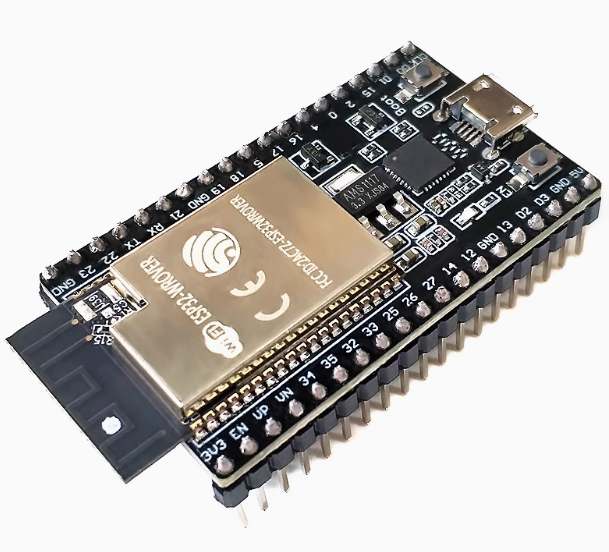
ESP32 DevKitC development board with WROVER-IB-N4R8 CP2102 Chip Type-C interface

SKU: FA1053-0-1-11
Module

ESP32-WROVER-IB (N4R8)

Antenna Type

IPEX / U.FL Connector (External Antenna Required)

Processor

Dual-core 32-bit LX6 (up to 240 MHz)

External Memory

4MB Flash / 8MB PSRAM

USB Interface

Type-C

USB-to-Seria

Silicon Labs CP2102

Wireless

Wi-Fi 802.11 b/g/n + BT 4.2 / BLE

Logic Voltage

3.3V

Input Voltage

5V via Type-C or 5V-12V via Vin Pin

Dimensions

54.4mm x 27.9mm (Standard DevKitC Form Factor)

This high-performance ESP32 DevKitC variant features the specialized WROVER-IB (N4R8) module. It is specifically designed for industrial and professional applications requiring external antenna connectivity and high memory capacity. Equipped with a modern Type-C interface and the stable CP2102 USB-to-UART bridge, it is a flagship choice for IoT development in 2025.

Product Description
The ESP32-DevKitC-WROVER-IB is a professional-grade evaluation board designed for scenarios where standard PCB antennas fail. The “IB” designation signifies that this module features an IPEX/U.FL connector, allowing users to attach an external high-gain antenna for significantly improved Wi-Fi and Bluetooth range—ideal for metal enclosures or long-distance outdoor deployments.
Under the hood, the N4R8 configuration provides a massive 8MB of PSRAM and 4MB of Flash. This ensures the board can handle memory-intensive tasks like SSL/TLS encryption for enterprise security, voice processing, and edge AI. The transition to Type-C ensures compatibility with modern workstations, while the CP2102 chip provides the industry’s most reliable driver support for seamless programming.
Key Features
  • External Antenna Support (IPEX): Features a dedicated U.FL/IPEX connector for external antennas, providing superior signal penetration and range compared to PCB antennas.
  • Maximized Memory (N4R8): Includes 8MB of PSRAM—essential for running high-resolution displays, cameras, or large data buffers in industrial gateways.
  • Industrial USB Stability: Built with the Silicon Labs CP2102 bridge, ensuring no port-dropping during long debugging sessions or high-speed data logging.
  • Future-Proof Type-C: Durable Type-C port for power and data, supporting modern charging cables and higher power stability.
  • Dual-Core Performance: 240MHz Xtensa® LX6 processor capable of independent task management (e.g., one core for Wi-Fi, one for sensor logic).
Usage Scenarios
  • Industrial IoT: Perfect for devices installed inside metal electrical cabinets where an external antenna must be routed outside for connectivity.
  • Edge AI & Vision: The 8MB PSRAM supports ESP-WHO facial recognition or large-scale data processing that standard 520KB RAM boards cannot handle.
  • Enterprise Gateways: Reliable 24/7 operation for bridging Bluetooth sensors to Wi-Fi/Cloud environments.
Q: Can I use this board without an external antenna?

No. The “IB” version does not have a PCB trace antenna. You must connect an IPEX-compatible antenna to the U.FL connector to achieve Wi-Fi or Bluetooth connectivity.

Q: How is the "WROVER-IB" different from the "WROVER-B"?

The “B” version has a built-in PCB antenna, while the “IB” version uses an IPEX connector for an external antenna. Both use the same ESP32 chip and memory layout.

Q: Do I need a special driver for the Type-C port?

The board uses the CP2102 chip. Drivers are standard for Windows 10/11 and macOS. If your PC doesn’t see the port, you can find the CP210x VCP Drivers here.

Q: How do I enable the 8MB PSRAM in my software?

In the Arduino IDE, go to Tools > PSRAM > Enabled. In ESP-IDF, enable it via menuconfig. Without this setting, the extra 8MB will remain inactive.

Q: Is this board suitable for business procurement?

Yes. This configuration (CP2102 + IPEX + N4R8) is the preferred choice for commercial prototyping because it uses the same certified module (ESP32-WROVER-IB) used in mass production, allowing for a 1:1 transition from prototype to final product.

Q: Can I power the board through the 3.3V pin?

It is recommended to power via the Type-C port (5V) or the Vin pin (5V-12V). If you use the 3.3V pin, you must provide a highly regulated 3.3V supply, as you are bypassing the onboard voltage regulator.