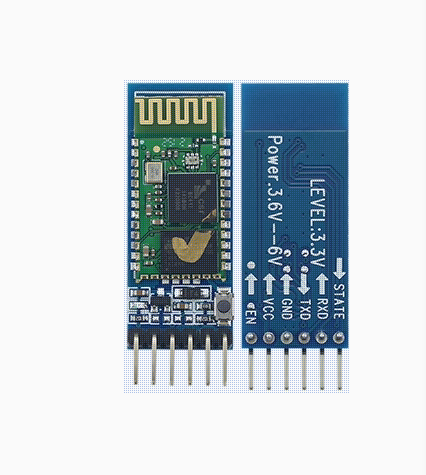
HC-05 6pin Bluetooth Module with Button (Compatible versions Type-C )

SKU: FA2039-1-1
Bluetooth Version

Bluetooth V2.0 + EDR

Operating Voltage

3.6V – 6.0V DC

Operating Current

Pairing: 30mA; Connected: 8mA – 10mA

Logic Level (I/O)

3.3V (VCC is 5V compatible; RX/TX use 3.3V logic)

Default Baud Rate

9600 (Data Mode) / 38400 (AT Command Mode)

Default Pairing PIN

1234 or 0000

Transmission Power

Class 2 (+4dBm)

Sensitivity

≤ -84dBm

Range

~10 Meters (30 feet)

Interface Pins

VCC, GND, TXD, RXD, STATE, EN (KEY)

Product Description
The HC-05 (Compatible Type-C) is a professional-grade Bluetooth 2.0+EDR (Enhanced Data Rate) wireless serial pass-through module. While standard Bluetooth modules are often restricted to “Slave” mode, the HC-05 is a Master/Slave dual-role module. This allows it to either act as a peripheral waiting for a connection or as a central controller that proactively searches for and connects to other Bluetooth devices.
The Type-C Compatible version is a refined hardware revision optimized for high-speed switching between data transmission and configuration. It features an integrated physical button that allows users to manually trigger AT Command Mode without complex software resets. Mounted on a 6-pin breakout board with a built-in power regulator and status LED, it provides a stable, long-range wireless bridge for Arduino, Raspberry Pi, and industrial PLC systems.
Key Features
  • Full Master/Slave Capability: Easily switch roles via AT commands to create peer-to-peer connections between two modules or connect to smartphones and PCs.
  • Hardware Configuration Button: A dedicated tactile switch simplifies the setup of device names, pairing codes (PINs), and baud rates by forcing the module into AT mode.
  • Transparent Serial Data: Once paired, the module acts as a “wireless serial cable,” transferring data exactly as it is received with no additional overhead.
  • Wide Voltage Input: The onboard LDO regulator supports a wide power range from 3.6V to 6.0V, making it compatible with both battery and USB power sources.
  • Enhanced Connectivity: Uses GFSK modulation with 2.4GHz ISM band technology, providing stable communication even in environments with multiple wireless signals.
  • Status Indicators: The onboard LED provides clear visual cues for pairing status (fast flash), configuration mode (slow flash), and established connection (double flash).
Usage Scenarios
  • Makers & DIY Users: Remote-controlled robotics, smartphone-integrated home automation, wireless sensor data logging, and wireless Arduino programming.
  • Business & Commercial: Wireless serial debugging for CNC and industrial machinery, cable-free point-of-sale (POS) systems, and long-range wireless diagnostic tools for automotive or HVAC systems.
Q: How do I enter AT Command Mode on the Type-C version?
Press and hold the onboard button while applying power to the module. If the LED begins to flash slowly (once every 2 seconds), you are successfully in Command Mode and can send settings via a serial monitor at 38400 baud.
Q: Can this module connect to an iPhone?

No. The HC-05 uses Bluetooth Classic (2.0). Apple iOS devices require “Bluetooth Low Energy” (BLE 4.0+) for serial data communication. This module is fully compatible with Android, Windows, macOS, and Linux.

Q: Can I change the Bluetooth name and pairing password?

Yes. Once in AT Command Mode, you can use AT+NAME=NewName and AT+PSWD="1234" to customize your device’s identity and security.

Q: Will the module lose my settings if I unplug it?

No. All configurations (Baud rate, Name, Role, etc.) are stored in the module’s non-volatile internal Flash memory and are preserved through power cycles.

Q: Do I need a level shifter for the RX pin?

While the module is powered by 5V, the logic level is 3.3V. For maximum reliability, we recommend using a simple voltage divider (e.g., a 1kΩ and 2kΩ resistor) on the HC-05’s RXD pin when connecting to a 5V Arduino.

Q: Can I connect two HC-05 modules to each other without a phone or PC?

Yes. Set one module as “Master” and the other as “Slave” using AT commands. As long as they have the same pairing PIN, they will automatically pair and establish a wireless serial link upon power-up.