Product Overview
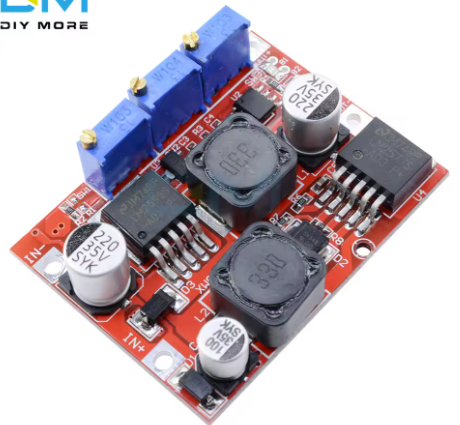
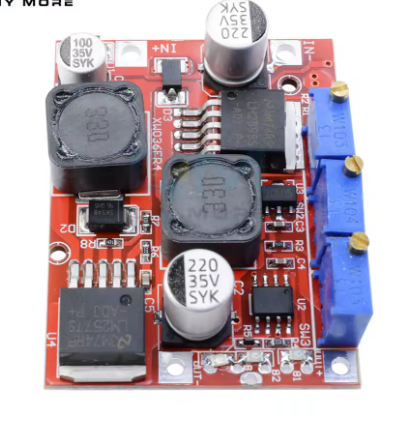
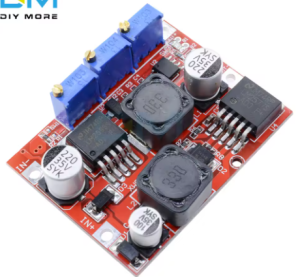
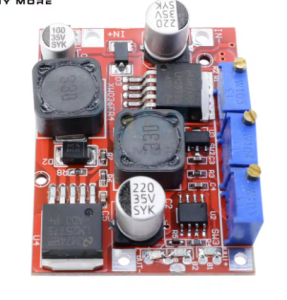
The LM2596 + LM2577C 15W Auto Step-Up/Down DC-DC Converter Module is a versatile, intelligent power management board that combines both step-up (boost) and step-down (buck) conversion capabilities in a single compact unit. Based on the high-performance XL6019 chip (a modern replacement for the LM2577/LM2596 combo), this module automatically adjusts to either increase or decrease the input voltage to maintain a stable, user-defined output .
What sets this module apart is its Constant Current / Constant Voltage (CC/CV) control with dedicated indicator LEDs. This feature makes it an exceptional choice for solar panel and wind turbine charging systems, where input voltage fluctuates significantly throughout the day . The module can charge various battery types—including 4V, 6V, 12V, 14V, and 24V lead-acid, lithium, nickel-cadmium, and nickel-metal hydride batteries—while protecting them from overcharging .
The module also functions as a high-power constant current LED driver, making it suitable for driving LED arrays without the need for external current-limiting resistors . With an output power rating of 15W (natural cooling) and conversion efficiency up to 80%, this module delivers reliable performance for DIY power supplies, battery chargers, and renewable energy systems .
Key Features
-
Automatic Buck-Boost Operation: Automatically steps up (boosts) or steps down (bucks) input voltage (4-35V) to maintain a stable output between 1.25-25V, regardless of input fluctuations .
-
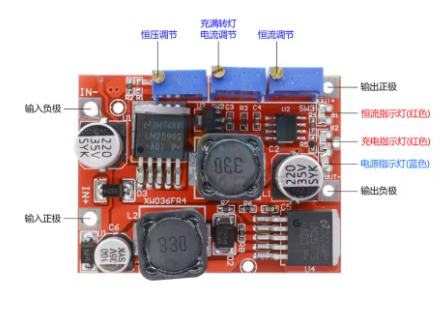
CC/CV (Constant Current/Constant Voltage) Control: Enables precise battery charging with adjustable constant current (0-2A) and constant voltage, protecting batteries from overcharging .
-
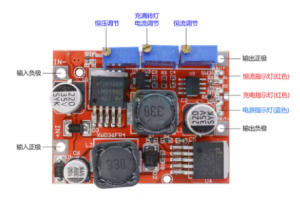
Dual-Color Charging Status Indicators: Red LED indicates charging in progress/constant current mode, Blue LED indicates charging complete (constant voltage mode) .
-
15W Output Power: Capable of delivering up to 15W of output power (natural cooling); add a heatsink for operation beyond 15W .
-
3A Maximum Output Current: Supports up to 3A output current (derate based on input-output voltage differential) .
-
Solar/Wind Energy Optimized: Specifically designed for renewable energy applications where input voltage varies; ensure input power is at least 1.1x output power for solar applications .
-
Adjustable Current Limit: Includes a dedicated potentiometer for setting the constant current limit (0-2A) .
-
Adjustable Transition Current: The “revolving light current” (transition point from CC to CV mode) can be set between 1%-100% of the constant current value (default 10%) .
-
Industrial Temperature Range: Operates reliably from -40°C to +85°C; above 40°C ambient, reduce power or add a heatsink .
-
Output Short Circuit Protection: Features constant current protection that activates during output short circuits .
Technical Specifications
Pinout & Interface Guide
Connection Terminals
User Controls (Potentiometers)
Status Indicators
Usage Guide
Wiring Instructions
IMPORTANT: Always disconnect the input power source before wiring. Do not reverse polarity—this module does not have built-in reverse polarity protection .
Basic Connection
-
Connect Input: Connect your DC power source (solar panel, battery, power supply) to IN+ and IN-
-
Connect Output: Connect your load (battery, LED, device) to OUT+ and OUT-
-
Adjust Settings: Follow the calibration procedure below before connecting sensitive loads
Calibration Procedure
For Battery Charging Applications
-
Determine Battery Parameters: Identify your battery’s float voltage (e.g., 12.6V for 3S Li-ion) and desired charge current (e.g., 1A)
-
Set Initial Output: Turn CV potentiometer counter-clockwise to lower output voltage to ~3V
-
Set Charge Current: Short the output terminals with a multimeter in 10A current mode. Adjust CC potentiometer clockwise until the meter reads your desired charge current
-
Set Float Voltage: Remove the short, connect a multimeter to output terminals. Adjust CV potentiometer clockwise until the voltage reaches your battery’s float voltage
-
Verify Charging: Connect your battery and monitor. Red LED indicates charging; Blue LED indicates fully charged
For LED Constant Current Driver Applications
-
Determine LED Requirements: Identify LED operating current and maximum forward voltage
-
Set Initial Output: Turn CV potentiometer counter-clockwise to lower output voltage to ~3V
-
Set LED Current: Short the output terminals with a multimeter in 10A current mode. Adjust CC potentiometer clockwise until current reaches desired LED operating current
-
Set Maximum Voltage: Remove the short, connect a multimeter. Adjust CV potentiometer clockwise until voltage reaches LED’s maximum forward voltage
-
Connect LED: Connect your LED array and verify operation
Solar Panel Usage Notes
When using solar panels as the power source, ensure:
-
Input power is at least 1.1 times the output power in all conditions
-
Solar panel ratings (open circuit voltage, short circuit current) may overstate actual power; test under real conditions
Important Considerations
-
Heat Management: For continuous operation above 15W, install a heatsink on the main switching IC
-
Reverse Polarity: This module has no reverse polarity protection; add a series diode at the input for protection
-
Minimum Load: Some configurations may require a minimum load for stable regulation
-
Input Power: When boosting voltage, input current exceeds output current; ensure your source can supply adequate current
Q: What is the difference between buck and boost conversion?
Buck conversion (step-down) reduces a higher input voltage to a lower output voltage (e.g., 24V to 12V). Boost conversion (step-up) increases a lower input voltage to a higher output voltage (e.g., 12V to 24V). This module automatically handles both .
Q: What is the advantage of this module over separate buck or boost converters?
This module provides both functions in one board, automatically adjusting to maintain a stable output regardless of input fluctuations. This is essential for solar/wind applications where input voltage varies significantly
Q: What is the maximum output current?
The module is rated for 3A maximum output current. However, output power is limited to 15W under natural cooling, so maximum current depends on output voltage (15W / output voltage = maximum current)
Q: Can I use this module with a 24V solar panel?
Yes. The module accepts 4-35V input, making it compatible with 12V, 24V, and 36V solar panels. Ensure input power exceeds output power by at least 1.1x
Q: The module gets hot. Is this normal?
Some heat is normal under load. The module is rated for 15W natural cooling. If operating above 15W or if the module is too hot to touch, add a heatsink to the main switching IC
Q: What is the efficiency of this converter?
Conversion efficiency is up to 80% . Higher output voltages generally yield higher efficiency
Q: Why is my output voltage not changing when I turn the potentiometer?
The potentiometer may require multiple rotations. Try turning it counter-clockwise 20 or more full rotations, then adjust clockwise while monitoring with a multimeter
Q: Can I use this module while charging a battery?
Yes. The module is designed for continuous operation. The CC/CV control ensures proper battery charging without overcharging
Q: The module has power but no output. What's wrong?
Follow this checklist:
-
Check that input voltage is between 4-35V
-
Verify polarity (IN+ to positive, IN- to negative)—the module has no reverse protection
-
Check that output is not shorted
-
Adjust CV potentiometer clockwise (may require multiple turns)
-
If charging a fully charged battery, the blue LED will be on but output current will be minimal
Q: How do I set the transition current (revolving light current)?
The transition current is factory-set to 10% of the constant current value. To adjust, locate the dedicated potentiometer and turn clockwise to increase the transition point (percentage of CC value)
Q: What do the indicator LEDs mean?
– Red CC LED ON: Module is in constant current mode
Q: Can I use this module without a heatsink for 15W operation?
Yes. The module is rated for 15W under natural cooling. At higher power levels or in high ambient temperatures (>40°C), add a heatsink
Q: What can I build with this module?
Popular applications include:
-
Solar battery chargers for 12V/24V lead-acid or lithium batteries
-
Wind turbine voltage regulators for battery charging systems
-
High-power LED drivers with constant current control
-
DIY variable bench power supplies (1.25-25V, 0-2A adjustable)
-
Car power voltage stabilizers for fluctuating vehicle electrical systems
Q: Is this module suitable for charging lithium batteries?
Yes. The CC/CV charging profile is ideal for lithium batteries. Set the float voltage to 4.2V per cell (e.g., 12.6V for 3S) and current to the recommended charge rate
Q: Can I use this module as a general-purpose power supply?
Yes. With adjustable output from 1.25V to 25V and constant current limiting, it serves as an excellent variable bench power supply for testing and powering electronics projects
Q: Can I run two modules in parallel for more current?
Not recommended. Running switching regulators in parallel without current-sharing circuitry can cause one module to supply most of the load, leading to overheating and failure. For higher current, use a single higher-rated converter.