Product Overview
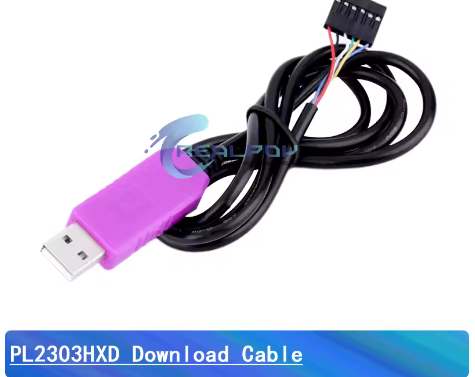
The PL2303HXD USB to TTL Serial Converter Module is a professional-grade 6-pin communication adapter designed to bridge the gap between your computer’s USB port and microcontrollers, routers, and embedded systems. This pink-colored module provides a reliable solution for programming, debugging, and serial communication with a wide range of devices including STC microcontrollers, STM32, ESP8266, ESP32, and routers.
At its core is the Prolific PL2303HXD chip, an enhanced version of the popular PL2303 series known for its stability and broad driver support. Unlike older versions (PL2303HX/HXA), the HXD variant features a built-in crystal oscillator eliminating external components, and supports higher baud rates up to 12Mbps. The chip fully complies with USB 2.0 specifications and integrates 5V to 3.3V voltage regulation.
This 6-pin version includes RTS and CTS hardware flow control pins in addition to the standard TXD, RXD, VCC, and GND. The extra flow control pins make this module ideal for applications requiring reliable data handshake, such as router configuration, GPS module interfacing, and industrial equipment communication. The module features a self-recovery fuse for overcurrent protection and indicator LEDs for power and data transmission status.
Key Features
-
Enhanced PL2303HXD Chipset: Built-in crystal oscillator for improved stability; supports higher baud rates than older HX/HXA versions
-
6-Pin Interface with Hardware Flow Control: Includes RTS and CTS pins for reliable data handshake – ideal for router configuration and industrial applications
-
High-Speed Support: Baud rates from 75 bps up to 12 Mbps, significantly faster than standard USB-to-TTL adapters
-
TTL Output Level: 3.3V logic with 5V tolerance on input pins – connects to both 3.3V and 5V target devices
-
5V Power Output: Red wire provides up to 500mA from USB port for powering low-energy target devices
-
Onboard Protection: Self-recovery fuse protects your computer’s USB port from accidental short circuits
-
Windows Compatibility: Drivers support Windows 7, 8, 10, and 11 (with appropriate driver versions)
-
Status LEDs: Visual indicators for power, TX (transmit), and RX (receive) activity for easy debugging
Technical Specifications
Pinout & Connection Guide
The 6-pin interface includes hardware flow control lines for reliable communication:
Important: Wire colors may vary by manufacturer. Always verify pin functions before connecting.
Basic Connection (for programming without flow control):
-
Green (TXD) → Target RXD (e.g., STC P3.0)
-
White (RXD) → Target TXD (e.g., STC P3.1)
-
Black (GND) → Target GND
-
Red (5V) → Target VCC (optional, for powering low-current devices)
Hardware Flow Control Connection (for routers, modems, high-reliability applications):
Usage Guide
Driver Installation
Important: PL2303HXD requires the correct driver version for your operating system.
Compatibility Summary:
Installation Steps:
-
Download the “PL23XX_Prolific_DriverInstaller_V400” from Prolific website
-
Before installing, unplug the module from USB
-
Run the installer as Administrator
-
After installation, plug in the module
-
Check Device Manager → Ports (COM & LPT) for “Prolific USB-to-Serial Comm Port”
If Driver is Not Working:
-
Older PL2303HX (not HXD) may not work with Windows 8/10
-
The HXD version is confirmed to work with Windows 7, 8, 10, and 11 with the correct driver
-
For Windows 10, use driver version V400 or later
Changing COM Port Number
-
Open Device Manager → Ports (COM & LPT)
-
Right-click “Prolific USB-to-Serial Comm Port” → Properties
-
Port Settings → Advanced
-
Select a new COM port number from the dropdown list
-
Click OK
STC Microcontroller Programming (“Cold Start” Required)
The PL2303HXD is widely used for STC microcontroller programming:
Recommended Baud Rate for STC Programming:
-
Many users report that 38400 bps works reliably for STC downloads
-
For higher baud rates (115200), ensure your target MCU’s oscillator is accurate
Connection Wiring:
“Cold Start” Programming Procedure:
-
Apply power to the target board (or ensure it is powered)
-
In STC-ISP software, select the correct COM port and baud rate
-
Load your HEX file
-
Click Download/Program
-
Disconnect power from the target board (or disconnect VCC wire)
-
Reconnect power within about 2 seconds
-
Wait for “Operation Success” message
Note: If the above fails, many users have success by keeping VCC connected and only toggling GND to perform the cold start.
Router / Switch Console Access
The 6-pin version with hardware flow control is ideal for router console access:
Warning: Do NOT connect the Red (5V) wire unless you are certain the device expects power from this port.
Loopback Test (Functional Test)
To verify the module is working correctly:
-
Connect Green (TXD) and White (RXD) pins together using a jumper wire
-
Connect Yellow (RTS) and Blue (CTS) pins together (if testing flow control)
-
Open a serial terminal program (e.g., PuTTY, Arduino Serial Monitor)
-
Select the module’s COM port and set baud rate (e.g., 115200)
-
Type characters – they should be echoed back
-
This confirms both transmit and receive paths are functional
Power Supply Considerations
-
The 5V pin can supply up to 500mA – sufficient for low-power microcontrollers
-
The 3.3V pin (if present) is primarily for reference; drawing significant current is not recommended
-
For power-hungry devices (motors, servos, high-power LEDs), use a separate external power supply
Q: What is the difference between PL2303HX and PL2303HXD?
The PL2303HXD is an enhanced version with built-in crystal oscillator, eliminating external components. It supports higher baud rates (up to 12Mbps vs ~1Mbps) and has better driver compatibility with Windows 10/11.
Q: Does this module support Windows 11?
Yes. With driver version PL23XX_Prolific_DriverInstaller_V400 or later, the PL2303HXD is fully compatible with Windows 11.
Q: What is the advantage of the 6-pin version over 4-pin?
The 6-pin version includes RTS and CTS hardware flow control pins, which are essential for reliable communication with routers, modems, and devices that require data handshake to prevent buffer overruns.
Q: Can I use this module for Arduino programming?
This module can be used for Arduino communication but lacks a DTR line for auto-reset. You will need to manually reset your Arduino board when uploading sketches.
Q: Will this module work with 5V logic devices?
Yes. The PL2303HXD’s inputs are 5V tolerant, and outputs are 3.3V TTL which is generally recognized as logic HIGH by 5V devices. For critical applications, a level shifter is recommended.
Q: My computer doesn't recognize the device. What should I do?
Follow this checklist:
-
Download the correct driver for your OS from Prolific website
-
Ensure you are using a data USB cable (not charge-only)
-
Try a different USB port
-
Check Device Manager for yellow warning icons
-
For Windows 8/10, the older PL2303HX (not HXD) may not work; HXD version is recommended
Q: Why does STC programming fail at higher baud rates?
This is a known characteristic of PL2303 chips with STC microcontrollers. Many users find 38400 bps (or lower) is the most reliable setting for STC downloads. Try reducing the baud rate in STC-ISP software.
Q: What is the "cold start" requirement for STC programming?
STC microcontrollers require a power cycle to enter programming mode. Power off the target board, click download in STC-ISP, then power on within 2 seconds.
Q: The connection drops after long periods of use. Why?
Older PL2303HX (non-HXD) versions were known to have this issue after 1-2 hours of continuous use. The PL2303HXD version has improved stability and does not typically exhibit this problem.
Q: What can I build with this PL2303HXD module?
Popular applications include:
-
STC microcontroller programming and debugging
-
Router/switch console access for OpenWrt, DD-WRT configuration
-
GPS module interfacing for navigation software
-
Raspberry Pi serial console (using only TXD/RXD/GND)
-
Microcontroller communication for STM32, ESP8266, ESP32
-
Industrial equipment serial port access
Q: Is this module compatible with Raspberry Pi?
Yes. The PL2303HXD is recognized on Raspberry Pi systems. Use it for serial console access or to interface with UART devices.
Q: Can this module power my target device?
Yes, with limits. The 5V output provides up to 500mA, sufficient for low-power microcontrollers. For projects with higher power requirements (motors, servos), use external power.
Q: How do hardware flow control (RTS/CTS) help?
RTS/CTS flow control ensures reliable data transfer by allowing the receiving device to signal when it’s ready for more data. This prevents data loss, especially at higher baud rates and with devices that have limited buffers.