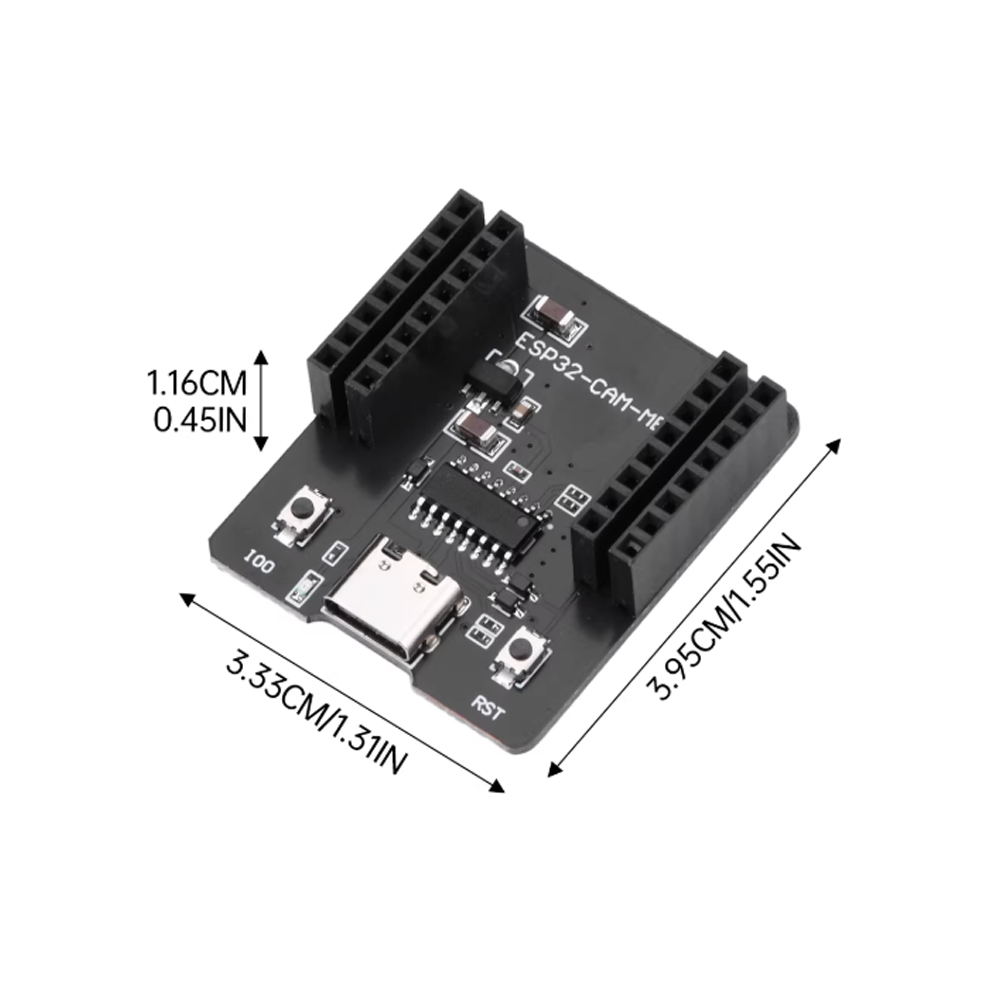
Type-C ESP32-CAM-MB Test Backboard Serial Port Burner Module CH340C

SKU: FA1053-2-6
USB Interface Chip

CH340C

USB Connector

Type-C

Compatibility

ESP32-CAM development board

Power Output

5V to ESP32-CAM

Programming Mode

Auto-download with built-in reset circuit

Connection Method

Direct plug-in to ESP32-CAM GPIO pins

Driver Requirement

CH340 driver (one-time installation)

Dimensions

Matches ESP32-CAM form factor for compact assembly

The Type-C ESP32-CAM-MB Test Backboard is a dedicated programming and testing adapter designed specifically for the ESP32-CAM development board. It provides a simple, reliable Type-C USB connection for uploading sketches, powering the camera board, and serial debugging — eliminating the need for external FTDI programmers, manual jumper wires, and precise button-pressing sequences that traditionally complicate ESP32-CAM development.

The ESP32-CAM is a powerful and affordable camera development platform, but it lacks a built-in USB-to-serial converter. Traditionally, users had to connect an external FTDI adapter with four jumper wires, manually bridge GPIO0 to GND for programming mode, and press the reset button at the right moment. The ESP32-CAM-MB backboard solves all of those problems. It features the CH340C USB-to-serial chip and a built-in auto-download circuit that handles the programming sequence automatically — just like a standard Arduino board.

The CH340C chip is a mature, widely supported USB-to-serial solution known for its stability and broad driver availability. It is an upgraded variant of the popular CH340G, offering improved performance and reliability. It requires only a one-time driver installation on most operating systems, after which it works seamlessly with the Arduino IDE, ESP-IDF, and other development environments. The Type-C connector offers reversible plug orientation, is increasingly standard across modern computers, and provides a secure, reliable connection.

The backboard plugs directly onto the ESP32-CAM‘s GPIO pins, aligning with the camera board’s header layout. This direct connection eliminates the need for jumper wires, reduces the risk of miswiring, and keeps the setup compact and portable. The board also includes a built-in reset circuit and auto-download functionality, so uploading a sketch is as simple as clicking “Upload” in the Arduino IDE.

The board is powered directly from the Type-C connection, supplying the ESP32-CAM with the stable 5V it requires. This integrated power and programming solution simplifies the development workflow and makes the ESP32-CAM accessible to beginners who may not be familiar with FTDI adapters and manual programming procedures.

Whether you are a beginner getting started with ESP32-CAM projects, a hobbyist building a home monitoring system, or a business purchasing in bulk for product development, this backboard provides a practical, cost-effective solution for programming and powering your ESP32-CAM. It is suitable for individual makers, students, and businesses alike.

Features

  • CH340C USB-to-serial chip — Upgraded variant with improved performance and broad driver availability

  • Type-C USB interface — Reversible connector, modern standard, secure connection

  • Direct plug-in design — Plugs directly onto ESP32-CAM GPIO pins, no jumper wires required

  • Auto-download functionality — Built-in reset circuit handles programming sequence automatically

  • Integrated power supply — Powers the ESP32-CAM with stable 5V via the Type-C connection

  • Serial debugging support — Enables serial monitor communication for troubleshooting

  • Compact and portable — Minimal footprint when attached to the ESP32-CAM

  • No external programmer required — Eliminates the need for FTDI adapters and manual wiring

  • Wide compatibility — Works with Arduino IDE, ESP-IDF, and other development environments

Technical Specifications 

# Parameter Specification
1 USB Interface Chip CH340C
2 USB Connector Type-C
3 Compatibility ESP32-CAM development board
4 Power Output 5V to ESP32-CAM
5 Programming Mode Auto-download with built-in reset circuit
6 Connection Method Direct plug-in to ESP32-CAM GPIO pins
7 Driver Requirement CH340 driver (one-time installation)
8 Dimensions Matches ESP32-CAM form factor for compact assembly

Usage

Getting Started

  1. Assemble the kit — Align the backboard with the ESP32-CAM‘s GPIO pins and press firmly to seat. The board plugs directly onto the camera board.

  2. Install the CH340 driver — On most systems, a one-time CH340 driver installation is required. After installation, the board is recognized as a serial port.

  3. Connect via Type-C — Use a Type-C USB cable to connect the backboard to your computer. The board is powered and ready for programming.

  4. Install board support — In Arduino IDE, install the ESP32 board package via Boards Manager. Select “AI Thinker ESP32-CAM” as the board type.

  5. Configure settings — Set PSRAM to “Enabled” and select the “Huge APP (3MB No OTA/1MB SPIFFS)” partition scheme.

  6. Upload your sketch — The auto-download circuit handles the programming sequence automatically. No manual button pressing is required.

  7. Run your program — After upload, press the reset button on the ESP32-CAM or power cycle to run your program.

  8. Serial debugging — Open the Serial Monitor to view debug output and troubleshoot your code.

Typical Applications

  • ESP32-CAM programming — Simplifies sketch uploading and power for camera projects

  • Smart doorbells — Quick iteration on video capture and motion detection projects

  • Wireless surveillance — Rapid prototyping of remote monitoring systems

  • Time-lapse photography — Easy programming for scheduled image capture

  • Educational projects — Accessible ESP32-CAM development for beginners

  • OEM product development — Convenient programming adapter for prototype and production testing

Notes for Business Buyers

  • Simplified programming — Auto-download circuit eliminates manual button pressing and jumper wire configuration.

  • CH340C reliability — Upgraded chip variant offers stable performance and broad driver availability.

  • Reduced setup time — Direct plug-in design speeds up development and testing workflows.

  • Suitable for bulk purchasing — Ideal for educational institutions, product development teams, and prototyping labs.

Q: What is the ESP32-CAM-MB Test Backboard used for?

It is a programming and testing adapter for the ESP32-CAM development board. It provides a Type-C USB connection with CH340C chip for uploading sketches, powering the camera board, and serial debugging without external FTDI programmers or jumper wires.

Q: Do I need an external programmer for the ESP32-CAM with this backboard?

No. This backboard replaces the need for an external FTDI programmer. Simply connect a Type-C cable and upload your sketch.

Q: Do I need to install a driver for the CH340C chip?

Yes. On most operating systems, a one-time CH340 driver installation is required before the board is recognized.

Q: How does the auto-download functionality work?

The board includes a built-in reset circuit that automatically controls the ESP32-CAM’s GPIO0 and reset pins during programming. This eliminates the need to manually bridge GPIO0 to GND or press buttons in sequence.

Q: What is the difference between CH340C and CH340G?

The CH340C is an upgraded variant of the CH340G, offering improved performance and reliability while maintaining the same driver compatibility. Both are widely supported USB-to-serial solutions.

Q: Is this backboard compatible with all ESP32-CAM versions?

Yes. It is designed to plug directly onto the standard ESP32-CAM GPIO header layout, including versions with OV2640, OV3660, and GC2640 cameras.

Q: Does this backboard provide power to the ESP32-CAM?

Yes. The Type-C connection supplies stable 5V power to the ESP32-CAM, powering both the camera board and the programming interface.

Q: Can I use this backboard for serial debugging?

Yes. Once the board is connected and the appropriate driver is installed, you can use the Arduino IDE Serial Monitor or other serial terminal software to view debug output and communicate with the ESP32-CAM.

Q: What development environments are supported?

It works with Arduino IDE, ESP-IDF, and other development environments that support the ESP32-CAM.

Q: Can I purchase in bulk for a school or company?

Yes. This backboard is suitable for both individual users and business purchasing, including classroom sets, prototyping labs, and product development teams.