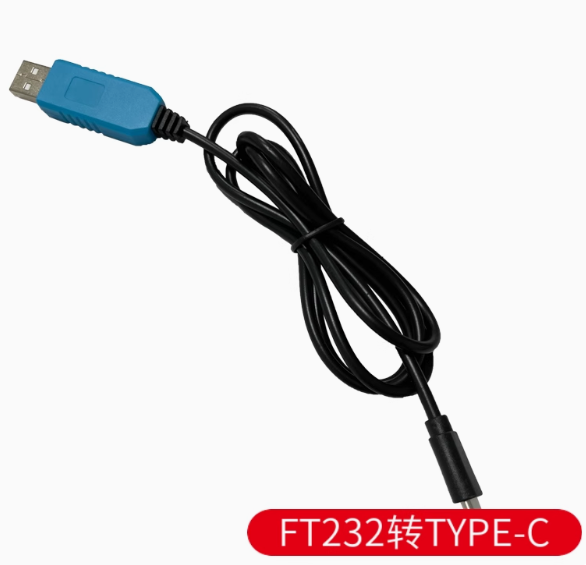
Product Overview
The FT232-Based Type-C Download Cable is a high-performance USB to TTL serial converter cable designed specifically for firmware flashing, programming, and debugging of embedded systems. Built around the industry-leading FTDI FT232 chipset (available in FT232RL, FT232RNL, or FT234XD variants), this cable creates a reliable bridge between your computer’s modern USB Type-C port and the UART interfaces of microcontrollers and development boards.
Unlike cheaper USB-to-TTL adapters that use generic chips, the FT232 series from FTDI (Future Technology Devices International) is widely regarded as the gold standard for serial communication. These chips are natively supported across all major operating systems—Windows, macOS, Linux, and even Android—ensuring true plug-and-play operation without driver compatibility headaches.
The cable features a USB Type-C connector for modern connectivity with reversible plug orientation, fully compatible with the latest laptops, tablets, and smartphones. The other end provides clearly labeled wire leads (typically 4 to 6 wires) for direct connection to your target device’s TXD, RXD, VCC, and GND pins, with optional RTS/CTS lines for hardware flow control.
Supporting data transfer rates up to 3 Mbps, this cable is ideal for rapid firmware flashing, real-time serial debugging, and high-speed data logging. The onboard voltage regulator provides selectable 3.3V or 5V TTL logic levels, making it compatible with a vast range of devices from 5V Arduino boards to 3.3V ESP32 modules. Whether you’re a professional embedded developer, a hobbyist working with ESP8266/ESP32, or a technician recovering bricked routers, this FT232-based Type-C cable is an indispensable tool for your workbench.
Key Features
-
FTDI FT232 Chipset: Based on authentic FT232 series IC (RL/RNL/XD variants), offering superior driver stability, broad OS compatibility, and reliable high-speed communication.
-
USB Type-C Interface: Modern reversible connector for easy plug-in orientation; compatible with the latest laptops, tablets, smartphones, and computers.
-
High-Speed Data Transfer: Supports baud rates from 300 bps up to 3 Mbps, enabling fast firmware flashing and real-time debugging.
-
Dual Voltage TTL Levels: Selectable 3.3V or 5V logic level output to match your target device’s requirements—safe for both 3.3V and 5V systems.
-
Built-in Signal LEDs: Power, TXD (transmit), and RXD (receive) indicators provide real-time visual feedback of communication status.
-
Full Handshake Support: Available RTS/CTS hardware flow control lines for reliable communication with devices requiring flow control.
-
Wiring Flexibility: Bare wire ends or color-coded pre-stripped leads allow direct connection to target devices without additional adapters.
-
Plug-and-Play Cross-Platform: Native driver support for Windows, macOS, Linux, and Android—no complex driver hunting required.
-
Industrial-Strength Protection: Select models feature self-recovery fuse, ESD protection diodes, and IO protection circuits for robust industrial use.
-
FTDIChip-ID™ Feature: Unique USB serial number per device allows for security and device identification in complex multi-cable setups.
Technical Specifications
Pinout & Connection Guide
The cable typically features 6 color-coded wires. Exact colors may vary by manufacturer; always verify with a multimeter if unsure.
*Colors may vary—verify with your specific cable labeling. Some 4-wire cables provide only TXD, RXD, VCC, and GND.*
Important Connection Rules:
-
TXD → Target RX (Transmit from cable goes to Receive on target)
-
RXD → Target TX (Receive on cable comes from Transmit on target)
-
Always connect GND to target ground
-
Select the correct VCC voltage (5V or 3.3V) before connecting to target device
Usage Guide
Driver Installation
FTDI Advantage: FT232 chips are natively supported across all major operating systems. Drivers are included in standard OS installations or available from FTDI’s official website.
Windows:
-
Most Windows 10/11 systems automatically detect and install drivers
-
If not, download the “CDM (Combined Driver Model)” from FTDI website
-
Verify installation in Device Manager → Ports (COM & LPT) → “USB Serial Port (COMx)”
macOS:
Linux:
Loopback Test (Verification)
To confirm the cable is working correctly:
-
Set voltage jumper to 3.3V
-
Connect TXD and RXD wires together using a jumper wire
-
Open serial terminal (PuTTY, Arduino Serial Monitor, Screen)
-
Select COM port, set baud rate to 115200, 8 data bits, 1 stop bit, no parity
-
Type characters—they should echo back, confirming both TX and RX paths work
Programming Microcontrollers
Arduino (Pro Mini, Nano, etc.):
-
Connect TXD → Target RX, RXD → Target TX, GND → GND
-
Select correct VCC voltage (5V for 5V boards, 3.3V for 3.3V boards)
-
For auto-reset, connect RTS or DTR line to target RESET pin (if available)
ESP8266 / ESP32:
-
Use 3.3V logic level (set cable output to 3.3V)
-
Connect TXD → ESP RX, RXD → ESP TX, GND → GND
-
Enter programming mode manually if auto-reset not supported
STM32 “Blue Pill”:
-
Connect TXD → PA10 (USART1_RX), RXD → PA9 (USART1_TX), GND → GND
-
Set BOOT0 jumper to “1” and press RESET to enter bootloader
Router / Switch Console Access
For recovering bricked routers or accessing console ports:
-
Connect TXD → Router RX, RXD → Router TX, GND → GND
-
Use terminal software at router’s specified baud rate (often 9600 or 115200)
-
Do NOT connect VCC line (routers are powered separately)
STC Microcontroller “Cold Start” Programming
When programming STC series microcontrollers:
-
Connect TXD → RXD (P3.0), RXD → TXD (P3.1), GND → GND, VCC → VCC
-
In STC-ISP software, select COM port and baud rate (try 115200 or 38400)
-
Load HEX file and click “Download/Program”
-
Power off target board (disconnect VCC or remove power)
-
Power on target board within 2 seconds (cold start)
-
Wait for “Operation Success” message
Q: Why choose an FT232-based cable over cheaper CH340 or PL2303 alternatives?
FTDI chips are widely regarded as the industry standard for USB-to-serial conversion. They offer superior driver stability across all operating systems, native support without complex driver hunting, and reliable performance at high baud rates. FTDI also provides ongoing driver updates and technical support, unlike many clone chips.
Q: What's the difference between FT232RL, FT232RNL, and FT234XD?
All are FTDI FT232 series chips with similar core functionality. The FT232RNL is a newer variant with enhanced features. The FT234XD is a compact version often used in smaller cable form factors. All provide the same excellent driver compatibility and reliable serial conversion.
Q: Does this cable support Windows 11?
Yes. FT232 chips have certified drivers for Windows 11, 10, 8, and 7. FTDI maintains current drivers for all modern Windows versions.
Q: What is the maximum cable length recommended?
Standard cable length is 1.0m to 1.8m. For longer runs, use active USB extension cables (5m max total recommended) to maintain signal integrity.
Q: Can this cable power my target device directly?
Yes, within USB limits. The VCC line can provide up to 500mA (standard USB 2.0 specification). This is sufficient for low-power microcontrollers (ESP8266 without Wi-Fi, Arduino Pro Mini, STM32 bare boards). For power-hungry devices (motors, servos, full ESP32 with Wi-Fi active), use a separate external power supply.
Q: My computer doesn't recognize the device. What should I do?
Follow this checklist:
-
Try a different USB Type-C data cable—some cables are charge-only
-
Try a different USB port on your computer
-
Check Device Manager for yellow exclamation marks
-
Download and install the latest FTDI drivers from ftdichip.com
-
Test on another computer to isolate the issue
Q: The TX/RX LEDs are not blinking. Is something wrong?
The LEDs blink only during active data communication. At low baud rates, they blink slowly; at high baud rates (>115200), they may appear constantly lit or dim. If no data is being transmitted, LEDs remain off. Perform a loopback test to verify functionality.
Q: I'm getting garbage characters in my terminal. What's wrong?
Common causes:
-
Baud rate mismatch—ensure terminal matches target device’s settings
-
Data format mismatch (8 data bits, 1 stop bit, no parity is typical)
-
TX and RX connections swapped—verify wiring
-
Voltage level mismatch—ensure cable output voltage matches target logic level
Q: What can I build with this FT232 Type-C cable?
Popular applications include:
-
Firmware flashing: ESP8266, ESP32, Arduino Pro Mini, STM32
-
Router recovery: OpenWrt, DD-WRT firmware installation
-
Serial console: Raspberry Pi debugging without monitor
-
STC microcontroller programming: 51-series development
-
GPS module interfacing: Reading GPS NMEA data on PC
-
Industrial equipment: Serial port access for PLCs and instruments
Q: Is this cable compatible with Raspberry Pi for console access?
Yes. Connect:
-
Cable GND → Raspberry Pi GND (Pin 6)
-
Cable TXD → Raspberry Pi RXD (Pin 10)
-
Cable RXD → Raspberry Pi TXD (Pin 8)
Do NOT connect the VCC line—power the Pi separately via USB-C or GPIO 5V.
Q: Can I use this for JTAG programming?
The FT232H variant (higher-end model) supports MPSSE mode for JTAG, SPI, and I2C interfaces. Standard FT232R/RNL cables are for UART serial communication only. For JTAG, look for FT232H-based cables or adapters.
Q: The device stops working after long periods of use. What's wrong?
FT232 chips are known for excellent long-term stability. If you experience issues:
-
Disconnect and reconnect the USB cable
-
Close other applications using the COM port
-
Update to the latest FTDI drivers
-
Check for overheating (rare for these cables)